Krixis Consulting
  • Services
    • Manufacturing Marketing Agency
      • Machine Shop SEO
      • Machine Shop Website Design
      • Machine Shop Lead Generation
  • RFQ Growth
  • Blog
  • Contact
  • Portal Sign In
  • Menu Menu
  • Link to X
  • Link to Facebook
  • Link to LinkedIn
  • Link to Pinterest
  • Link to Instagram
Machine Shop Marketing

Machine Shop RFQ Checklist: What Buyers Should Include

A machine shop RFQ checklist helps a buyer describe the work they want quoted and helps a shop identify what still needs clarification. Start with the part and revision, relevant files, material, quantities, requirements, timing and a responsible contact. Keep unknown information visible instead of asking an estimator to infer it.

For shop owners, the checklist is also useful website content. Share it beside your inquiry route so engineers and purchasing teams can prepare a clearer request. A useful brief does not replace technical review; it gives that review a dependable starting point.

This guide explains what an RFQ means in machining, what to include, how to distinguish a preliminary discussion from a quote-ready package, and how to hand the request to a named person. Use the free template to adapt these questions to your own shop’s supported work.

Cut-paper RFQ packet with abstract drawing sheets, a specification card and a folded delivery map
Keep the part definition, scope and response needs together in one identifiable request.
In this guide

  • What is a machine shop RFQ?
  • Build a machine shop RFQ checklist around nine questions
  • Decide whether the request is ready for quotation
  • A fictional example of a clearer machining request
  • Put the checklist beside your website’s RFQ route
  • Hand the request to a person and preserve the original
  • Review the checklist using actual inquiry questions

What is a machine shop RFQ?

A machine shop RFQ is a request for quotation: a buyer asks a supplier to review defined machining work and provide a quotation. The request brings the commercial question and technical references together. It should explain which items are being considered, what information controls the request, and what response the buyer needs.

An early feasibility conversation can be valuable before those details are settled. Label it accordingly. A request for a budgetary indication, a manufacturability discussion and a quotation against released requirements are different tasks. Ask which service the shop supports rather than treating every upload as a complete production RFQ.

Keep request receipt, technical clarification, quote issuance and order confirmation as separate workflow steps. Receiving a drawing does not establish that the shop has accepted its requirements. A website acknowledgment should confirm receipt and the next review step without inventing a price, delivery promise or approval.

There is no single file package that suits every supplier. For example, Protolabs documents the CAD formats supported by its own quoting platform. Check the receiving shop’s actual instructions before exporting files or assuming a platform-specific requirement applies everywhere.

Build a machine shop RFQ checklist around nine questions

Use these questions as a conversation structure. Some requests need additional documentation; others can begin with a smaller, clearly labeled preliminary brief. The aim is to identify the information relevant to the next decision, not to fill every box with a guess.

1. Which part, assembly and revision should be reviewed?

Give each requested item a clear identifier. State the drawing revision and identify the corresponding model where one is provided. For an assembly, explain which components or operations belong in the requested scope. A supplier should not need to decide which attachment is the latest one from a crowded email thread.

List conflicts as questions. If a model, drawing and written note disagree, ask the responsible technical contact to resolve the discrepancy and identify the governing information. Do not quietly edit a controlled document or tell the shop to choose whichever version seems easiest.

2. Which files can the shop use and receive?

Follow the shop’s accepted file-format and size instructions. Where drawings and models are needed, provide the agreed versions together and include a short file list. Explain whether a file is released, preliminary or awaiting approval. A screenshot may help explain a question, but it should not silently stand in for the agreed product definition.

Keep the brief separate from a permission to share technical files. Confirm the intended recipient and transfer method before sending confidential information. If the public website does not offer an appropriate route, begin with non-confidential context and request the shop’s approved next step.

Translucent sheets with registration marks held by a plum binder clip
Identify conflicting versions as questions for the responsible technical contact.

3. What material and supply responsibility apply?

State the specified material and condition using the information your authorized technical source provides. Identify whether the supplier should obtain stock or whether material will be supplied by the buyer. Include applicable material-document requirements rather than assuming the shop includes them in every quotation.

If the material is undecided, say so and ask whether the shop can support a preliminary discussion. Do not ask a marketing form, an AI summary or a buyer-facing checklist to select an alloy, approve a substitute or establish suitability for the application.

4. What quantity is actually being requested?

Separate the quantity to quote now from possible future demand. Identify prototype and production requests separately, and state any specific quantity breaks you need evaluated. A forecast should remain labeled as a forecast rather than appearing to be a committed purchase.

For a multi-part request, use one clear line per item with its quantity and revision. If the buyer wants both individual prices and an assembly or package total, ask for that structure explicitly. Avoid open-ended instructions such as “quote every possible quantity.”

Three separate groups of handmade clay counters on a sage surface
Distinguish the requested quantity from possible future demand.

5. Which technical requirements must the reviewer see?

Point the shop to the authorized dimensions, tolerances, threads, surface requirements and other relevant notes. Identify specific questions without rewriting engineering requirements in informal marketing language. If a function is important but its requirement is unresolved, route that question to the responsible technical owner.

Use a short scope summary to identify included operations, outside processes or assembly expectations. State whether finishing, heat treatment, marking, packaging or other work should be included, excluded or discussed. The shop should confirm its supported scope through its normal review.

6. What inspection records or supporting documents are needed?

State the records the buyer needs with the quotation or delivered work. Ask about the applicable inspection, material or traceability documentation and identify any requirement that needs clarification. Do not assume that a supplier’s general quality statement answers the requirements of a particular project.

The NIST MEP supplier-selection guide encourages buyers to understand supplier capabilities, quality documentation and communication systems. Use those conversations to check fit; a completed RFQ checklist does not establish a supplier’s certification or approval status.

7. Which dates mean what?

Separate the date a quotation is requested from the date parts are needed. Identify the delivery destination and any relevant project milestone. Ask the supplier to explain its proposed lead-time basis and what must happen before that clock begins.

If a date is a preference, a target or dependent on another decision, label it. “Required on site” and “ready to ship” are different expectations. Do not turn an unconfirmed project target into a published promise about machine availability or delivery.

8. How should the supplier present its response?

Specify the useful comparison fields: item and revision, quantities, included operations, stated exclusions, separate one-time charges where applicable, and the supplier’s assumptions. Ask for clarification when quotations use different scopes instead of comparing only the headline total.

Keep requested terms and accepted terms distinct in your records. The Thomas industrial RFQ tip sheets provide broader examples of structuring requests with contacts, quantities and response needs. This KriXis checklist is an independent planning resource, not the supplier’s quotation or order document.

9. Who can answer the next question?

Include a business contact and the technical contact responsible for resolving requirements. Identify who is coordinating the request and the preferred reply route. For a shop receiving the inquiry, assign an internal owner who can acknowledge it, collect questions and route the technical review.

Keep changes in the same identifiable request record. When someone supplies a missing detail, record its source and the version it updates. An estimator should not have to reconstruct the current brief from several forwarded messages.
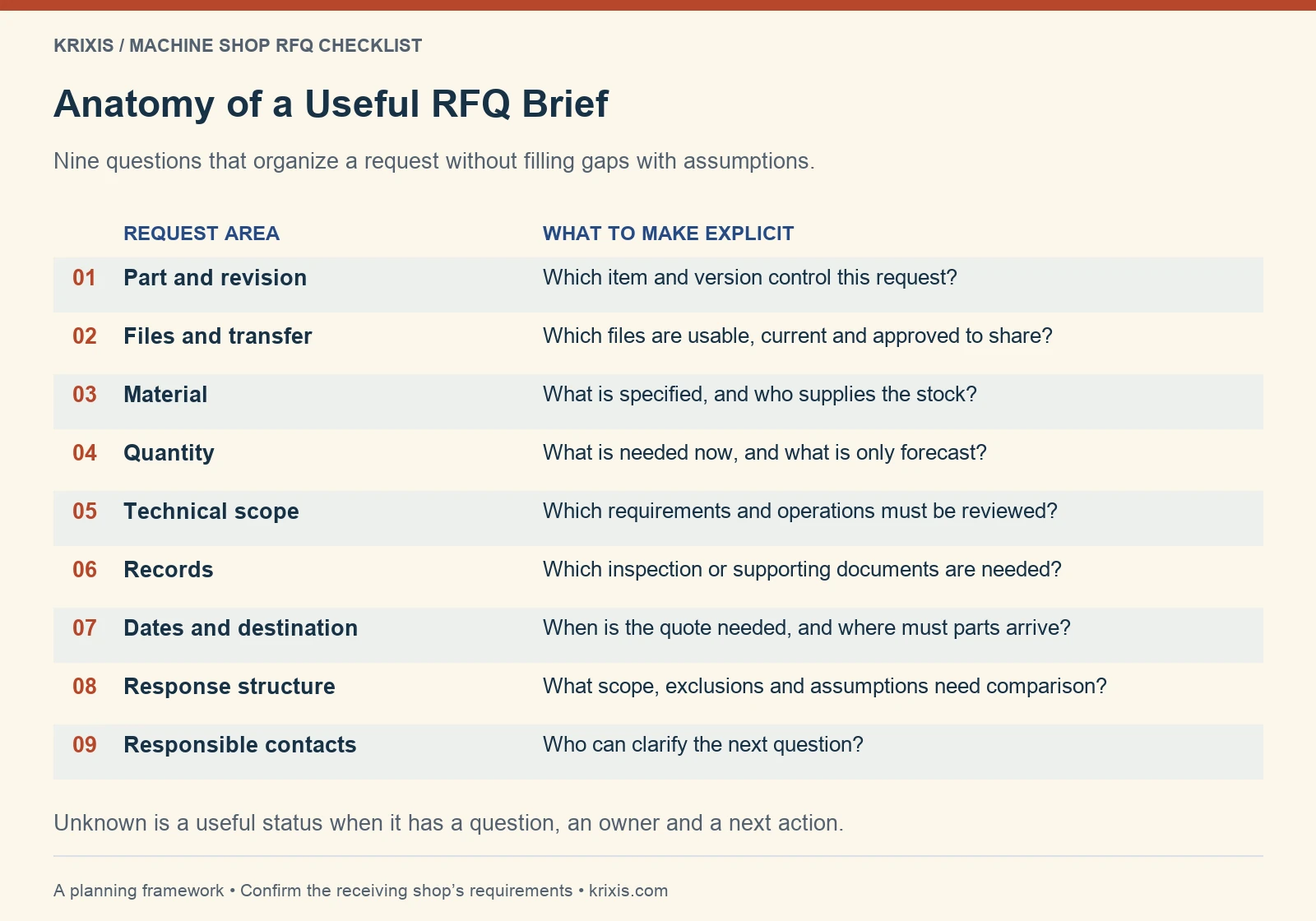
Machine shop RFQ checklist mapping nine request areas to the information each should clarify
Organize the current item and revision, usable files, material, quantity, technical scope, records, dates, response format and responsible contacts. Unknowns remain explicit questions.View full-size infographic

Give buyers a clear starting brief

Use the free checklist and editable brief to record current requirements, unknowns and responsible contacts.

Download the RFQ checklist and template

Decide whether the request is ready for quotation

Machining request references gathered beside a turned spacer
Keep item references and unresolved questions together before the shop reviews the request.

Ready is a decision about the next task, not a score for how many fields are populated. If an essential requirement conflicts, hold that point for clarification. If the buyer wants early input, agree that preliminary purpose and the information the shop needs to support it.

Use three working routes: proceed to the shop’s quotation review, ask a specific clarification, or arrange an agreed preliminary discussion. None of these routes should automatically approve manufacturability, commercial fit or delivery. Your shop’s lead-qualification process addresses acceptance for review; this checklist organizes the buyer’s request.

Avoid requiring sensitive or unnecessary details just to allow a first conversation. Explain what is needed now, what can follow through an approved route, and what remains unknown. The requester should be able to understand why a question matters.
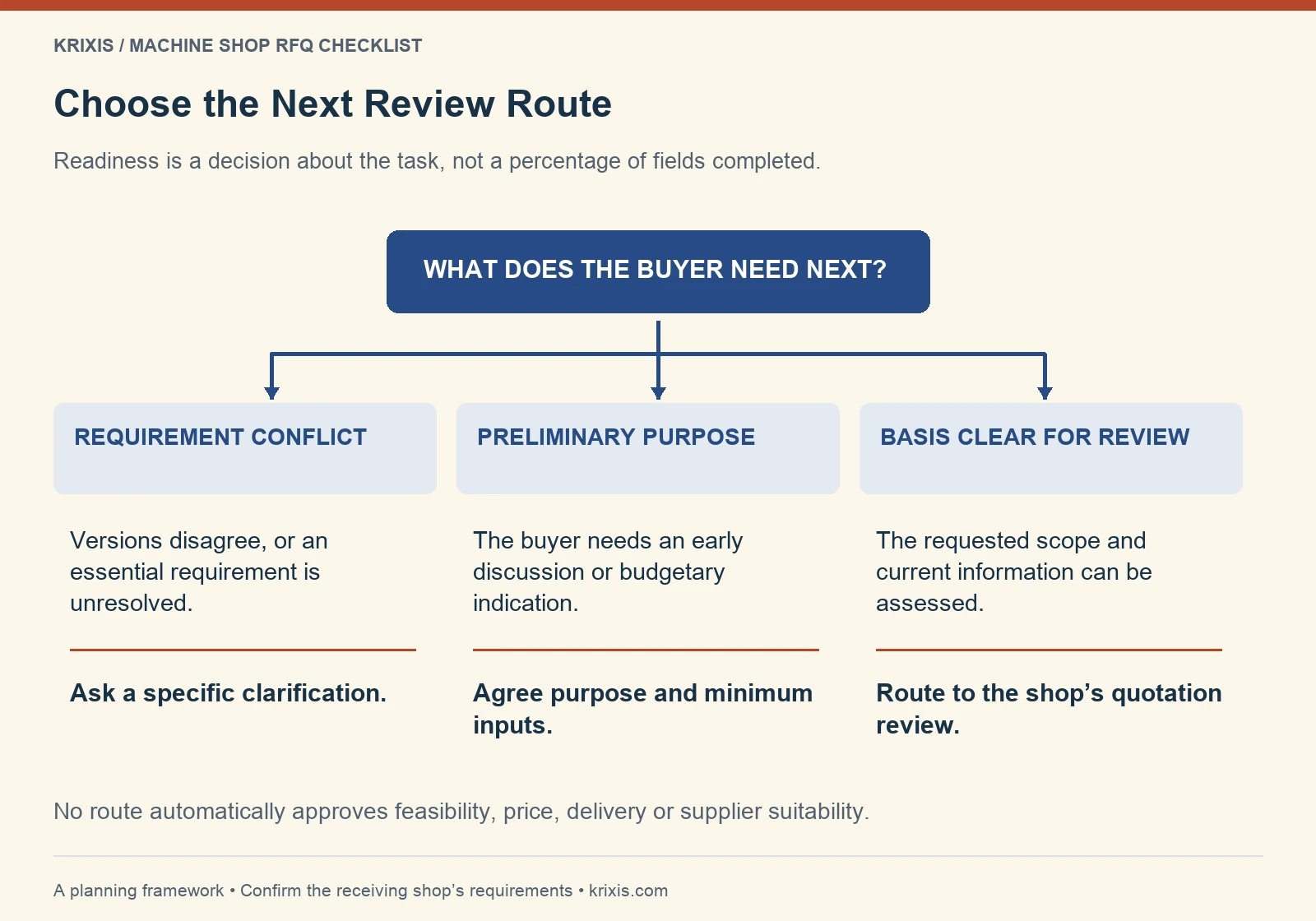
RFQ readiness decision tree separating requirement conflicts, preliminary discussions and quotation review
Choose a specific clarification, an agreed preliminary discussion or the shop’s quotation review. A completed brief does not automatically approve feasibility, price, delivery or supplier suitability.View full-size infographic

Find the missing handoff before adding fields

Discuss your public instructions and receiving handoff with KriXis. Agree the scope before work begins.

Discuss an RFQ readiness review

A fictional example of a clearer machining request

Consider this invented teaching example: a buyer writes, “Please quote the attached bracket. We may need more later.” One file is marked revision B, another revision C, and the email contains no present quantity or delivery destination. Those gaps call for questions, not an invented estimate.

A clearer working brief could say: “Item TRAIN-01, revision C, is the intended review basis. Confirm that the supplied drawing and model represent the same revision. Please quote an initial lot of 20. A possible later lot of 100 is a forecast only. The required delivery destination is stated in the brief; the delivery date remains to be confirmed.”

These names and quantities are fictional, not client evidence or a recommended purchasing pattern. The revised brief still does not settle material, inspection or other requirements. The next action is to identify the missing information and responsible contact, then agree whether the shop can begin the requested review.

The useful improvement is traceability: the reader knows which facts are confirmed, which are tentative and which questions block the next step. Do not describe the example as a completed quote or claim it produced a faster turnaround.

Put the checklist beside your website’s RFQ route

A shop can publish an accessible HTML explanation and offer a downloadable brief for people who prefer to prepare offline. Place a contextual link on relevant capability pages, near the inquiry action and in acknowledgment instructions where appropriate. Explain that the actual drawing-transfer route is separate.

Design the form around the first useful decision. Do not require someone to retype the entire worksheet into another long form. The RFQ form design guide covers labels, errors, file instructions and routing checks in more detail.

Give the public instructions an owner. Review accepted formats, contact routes and capability references when systems or supported work change. Remove an old template if it contradicts the live instructions, and make the current version easy to identify.
Create instructions your team can maintain

Use the free checklist and editable brief to record current requirements, unknowns and responsible contacts.

Get the editable planning worksheet

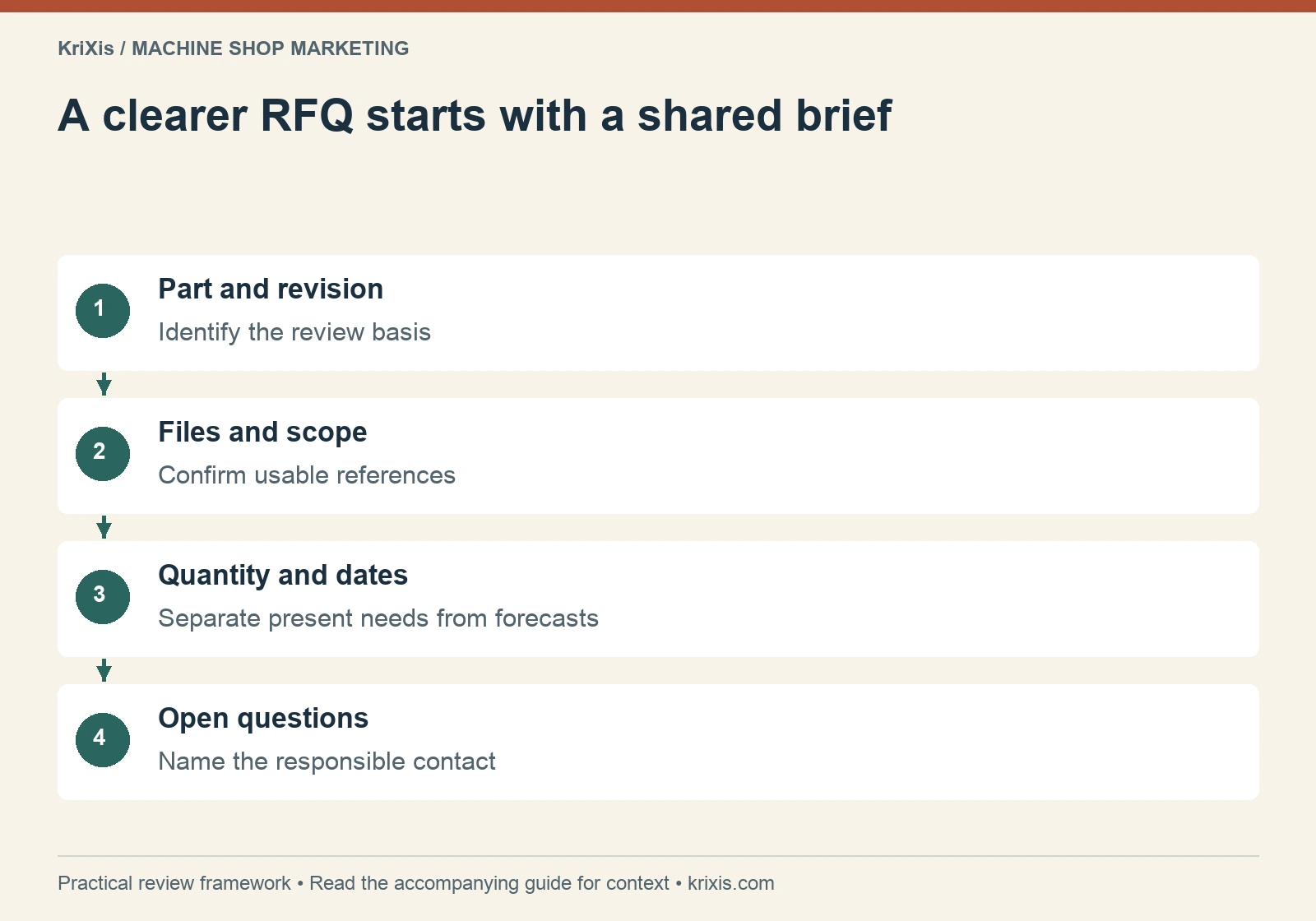
A clearer RFQ starts with a shared brief — part and revision, files and scope, quantity and dates, open questions
Use this sequence to organize the review described in the guide. View full-size infographic
Read this graphic as text
  • Part and revision: Identify the review basis
  • Files and scope: Confirm usable references
  • Quantity and dates: Separate present needs from forecasts
  • Open questions: Name the responsible contact

Hand the request to a person and preserve the original

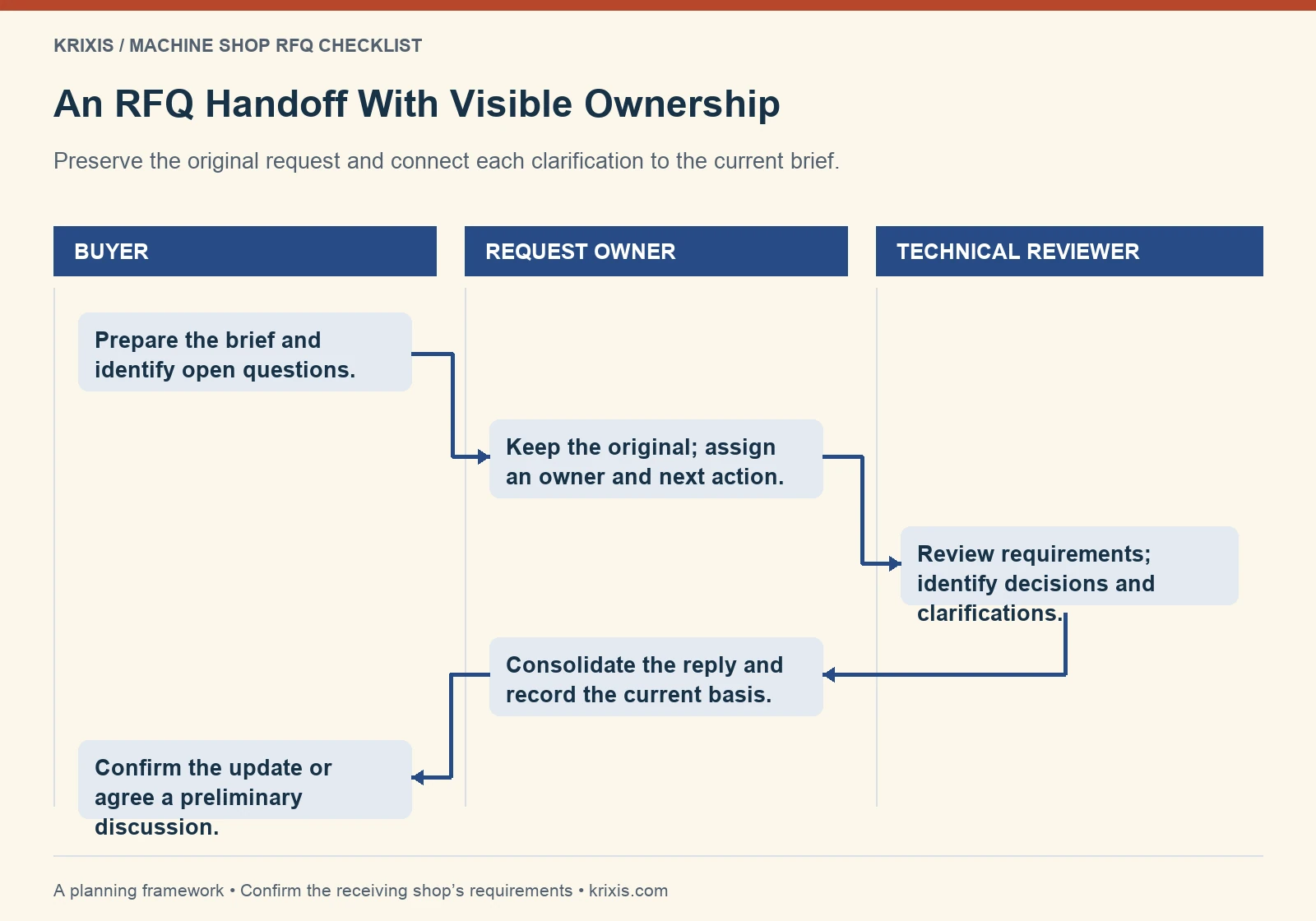
After receipt, keep the original request and identify the current brief, open questions, owner and next action in your CRM workflow. A confirmation screen should not be treated as proof that the inquiry reached estimating. Verify the intended route through an approved test process.

If a requirement changes during review, record the revision and ask whether a new quotation basis is needed. Keep the previous version identifiable. Once the shop has issued a reviewed quote, use the quote-follow-up guide to plan a relevant conversation around the buyer’s situation.

AI can help organize stated information or prepare a clarification draft when its use and inputs are approved. A reviewer must check the original request before a technical or commercial commitment is sent. A summary should preserve “unknown” instead of inventing a material, tolerance or delivery date.

Indigo and orange linocut of a rolled sheet and an envelope linked by a curved path
Keep the receiving owner and next action visible after a request is sent.
RFQ handoff swimlane showing buyer, request owner and technical reviewer responsibilities
The buyer prepares the brief, the request owner preserves it and assigns work, the technical reviewer identifies decisions, and the owner consolidates the reply. Changes return to the buyer for confirmation.View full-size infographic

Connect the checklist with a real receiving process

Discuss your public instructions and receiving handoff with KriXis. Agree the scope before work begins.

Review my RFQ content and handoff

Review the checklist using actual inquiry questions

Start with a small reviewed sample of requests and record the information repeatedly missing, the questions estimating asks and where responsibility becomes unclear. Choose one useful correction: a clearer instruction, a better example or an identified owner. Keep a dated version so the team knows what changed.

Measure missing-information categories and the completion of agreed actions separately from quote wins. More fields completed does not prove better-fit work, and a download is not a qualified RFQ. Search queries can reveal wording to explain, but they do not establish the searcher’s role or intent on their own.

For broader support, review KriXis RFQ Growth, the flagship direction connecting inquiries, follow-up and supported website work. Its service page describes the current foundation, rollout status and scope. Discuss your available systems and approval responsibilities before assuming a connection or automation is active.

Begin with one request and one next decision. A useful machine shop RFQ checklist makes the current requirements easier to understand, gives unknowns a clear owner and helps the buyer and shop agree what happens next.

Use the checklist on your next request

Use the free checklist and editable brief to record current requirements, unknowns and responsible contacts.

Open the free RFQ checklist kit

November 8, 2026/1 Comment/by Matthew Borza
https://www.krixis.com/wp-content/uploads/2026/11/machine-shop-rfq-checklist-hero.webp 960 1440 Matthew Borza https://krixis.com/wp-content/uploads/2015/12/KriXis-Full-Logo-Trans-300x79.png Matthew Borza2026-11-08 04:20:302026-11-08 07:22:23Machine Shop RFQ Checklist: What Buyers Should Include
Machine Shop Marketing

Machine Shop Quote Follow-Up: 5 Email Templates and a Clear Workflow


KriXis practical guide · About 12 minutes to read

Machine shop quote follow-up works best when the next message answers a specific question about an open opportunity. Confirm the right quote reached the right person, identify what the buyer needs to decide, and leave the record with a clear next action. Repeatedly sending “just checking in” can add activity without adding useful information.

The practical system is small: one current quote record, a responsible owner, the latest confirmed buyer information, an agreed next step and a review date. Templates help with wording. They become more useful when the shop chooses them from the actual situation rather than running every buyer through the same sequence.

This guide provides five original email drafts and a way to decide which one to use. It also explains where reviewed AI assistance may help, which decisions your estimator retains, and how to evaluate a managed follow-up workflow through KriXis RFQ Growth.

Three wire document trays holding plain quote folders with a copper clip
Keep one current working record for each open quote.
In this guide

  • Choose the buyer signal before choosing the message
  • Keep a compact quote register
  • Five RFQ follow-up email templates
  • Set timing from the opportunity
  • Use AI to prepare a draft, then verify it
  • Measure whether the process is becoming clearer
  • Connect website evidence with the open conversation
  • Put the workflow to work with KriXis RFQ Growth

Choose the buyer signal before choosing the message

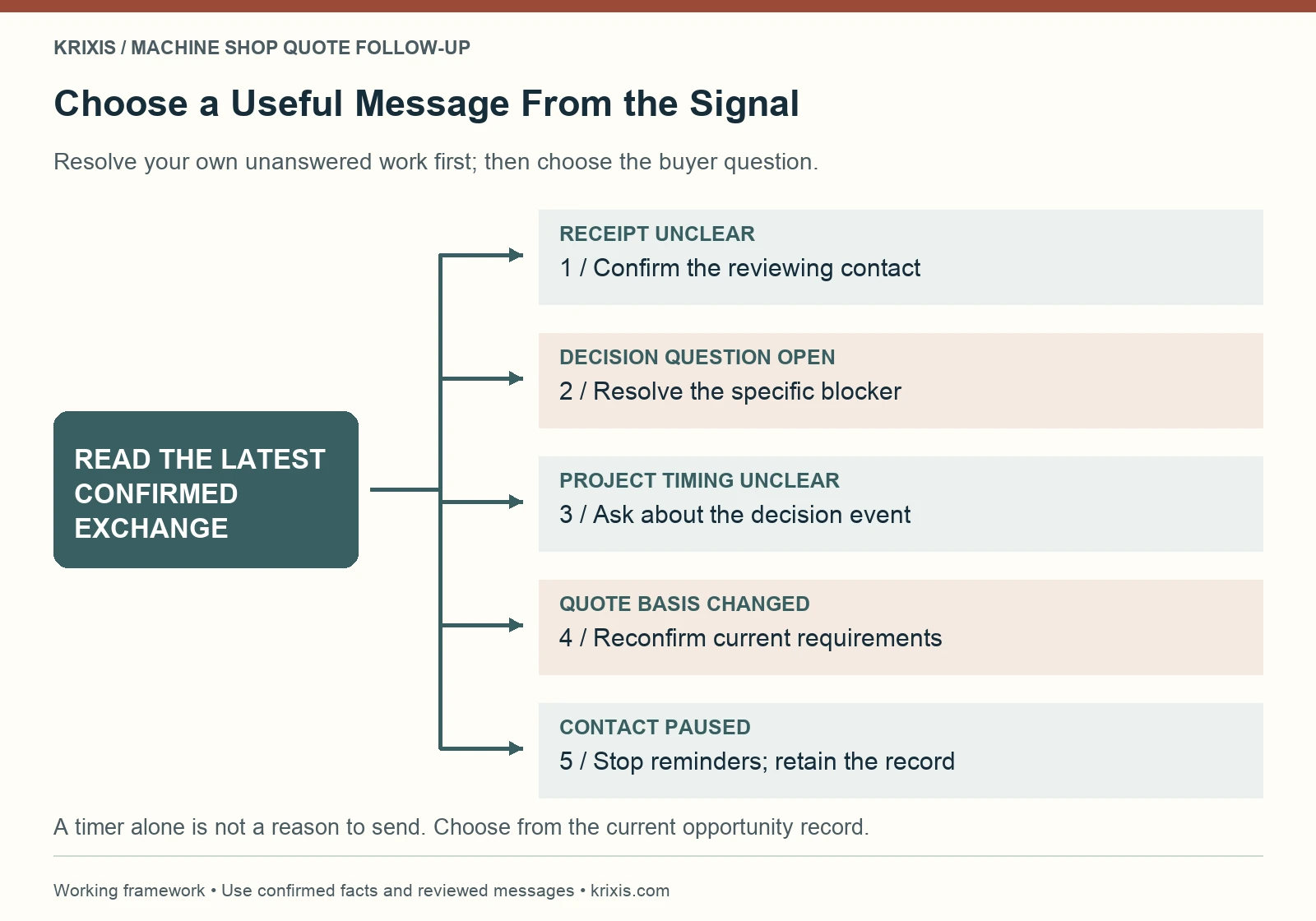
Start by reading the last meaningful exchange and the quote itself. An unanswered question from the buyer calls for your answer. An agreed project review date calls for a timely update. An uncertain delivery receipt calls for a different message from a confirmed design revision.

Use five working signals: receipt unconfirmed, a decision question open, the project schedule unclear, the quote basis changing, or contact paused. These describe what the next conversation should resolve. They do not imply that an opportunity is won or lost.

If more than one signal applies, choose the dependency that blocks progress. A buyer cannot meaningfully approve a quote based on an obsolete revision. A reminder to buy is premature while your estimator still owes an answer. Finish or assign the shop’s own action before asking the buyer for another one.

Keep confirmed facts separate from interpretations. “Buyer requested review after the design meeting” is evidence. “Buyer probably chose another supplier” is an assumption until you receive information supporting it. The distinction keeps the message appropriate and the pipeline record useful.

Decision tree matching five buyer signals to useful quote follow-up messages
Choose a message from the latest confirmed exchange: receipt, an open decision question, project timing, changed requirements or a pause. Resolve the shop’s own unanswered work before asking the buyer for another action.View full-size infographic

Keep a compact quote register

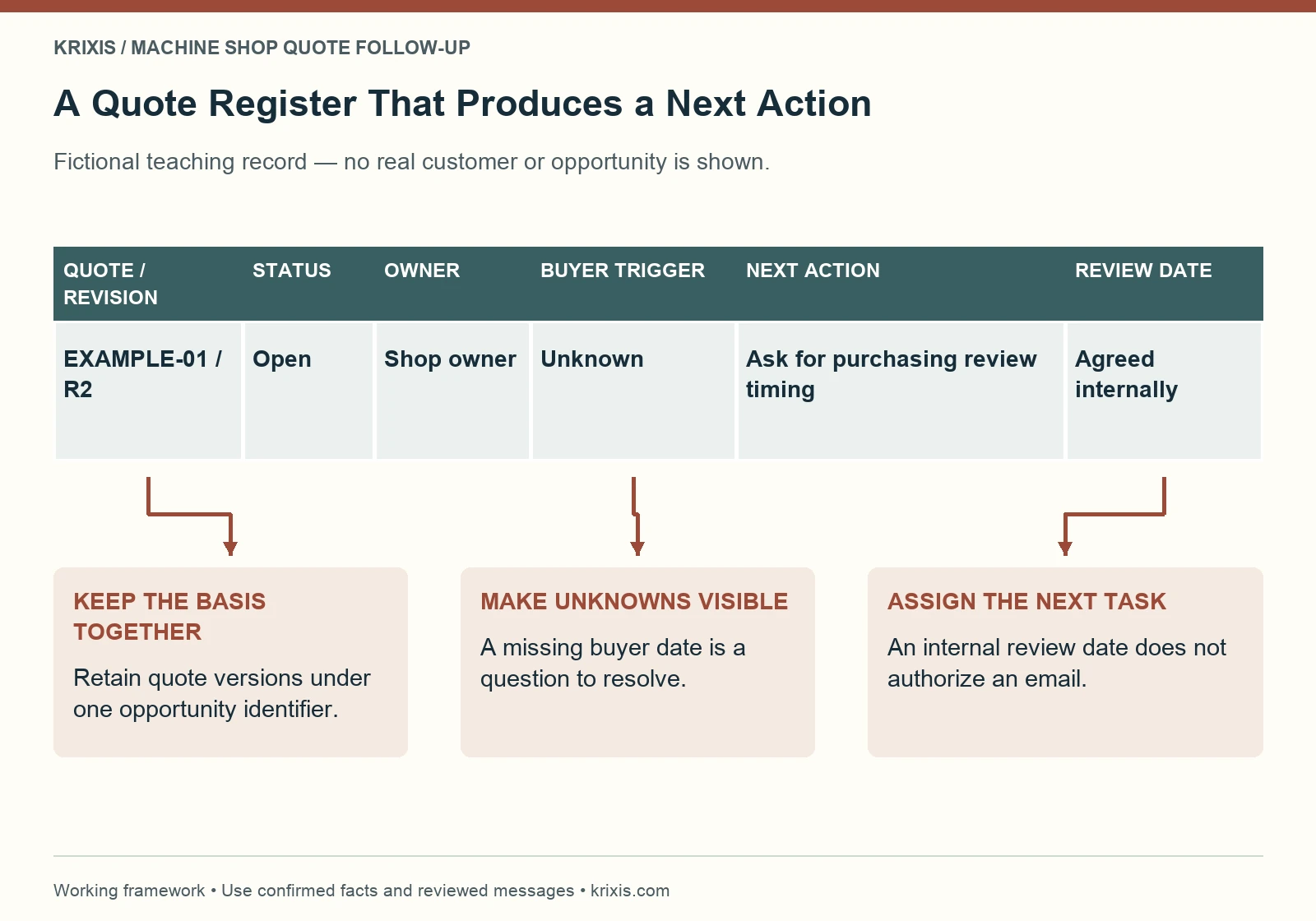
A quote register can begin in a spreadsheet or your existing machine shop CRM. Give each opportunity a stable identifier and retain its quote revisions under that record. A revised attachment should not silently become a second sales opportunity.

Record the current quote reference, relevant revision, sent date, owner, last confirmed buyer update, next action and next review date. Add the buyer’s expected decision event when known. Keep a link to the approved quotation and technical documents rather than scattering copies through unrelated tools.

Write actions as observable work. “Confirm whether the buyer’s purchasing review has moved” is more useful than “follow up.” If an estimator must first review a new drawing, assign that task to the estimator. Make it clear who can change the quote and who can send a customer message.

Quote tracking for machine shops should expose missing information. Use “decision date unknown” when that is the current evidence. An empty date, an overdue internal task and a buyer-requested pause are different conditions and should not produce the same reminder.

The RFQ qualification guide helps with work fit before estimating. This register follows what happens after the shop has issued a reviewed quote.

Fictional quote register with revision, status, owner, buyer trigger, next action and review date
This fictional record keeps an unknown buyer date visible and assigns a concrete next task. An internal review date is a planning field, not permission to send an email.View full-size infographic

Connect quote records with the next action

See how the flagship service direction connects inquiries, follow-up and supported website work.

See the KriXis RFQ Growth workflow

Five RFQ follow-up email templates

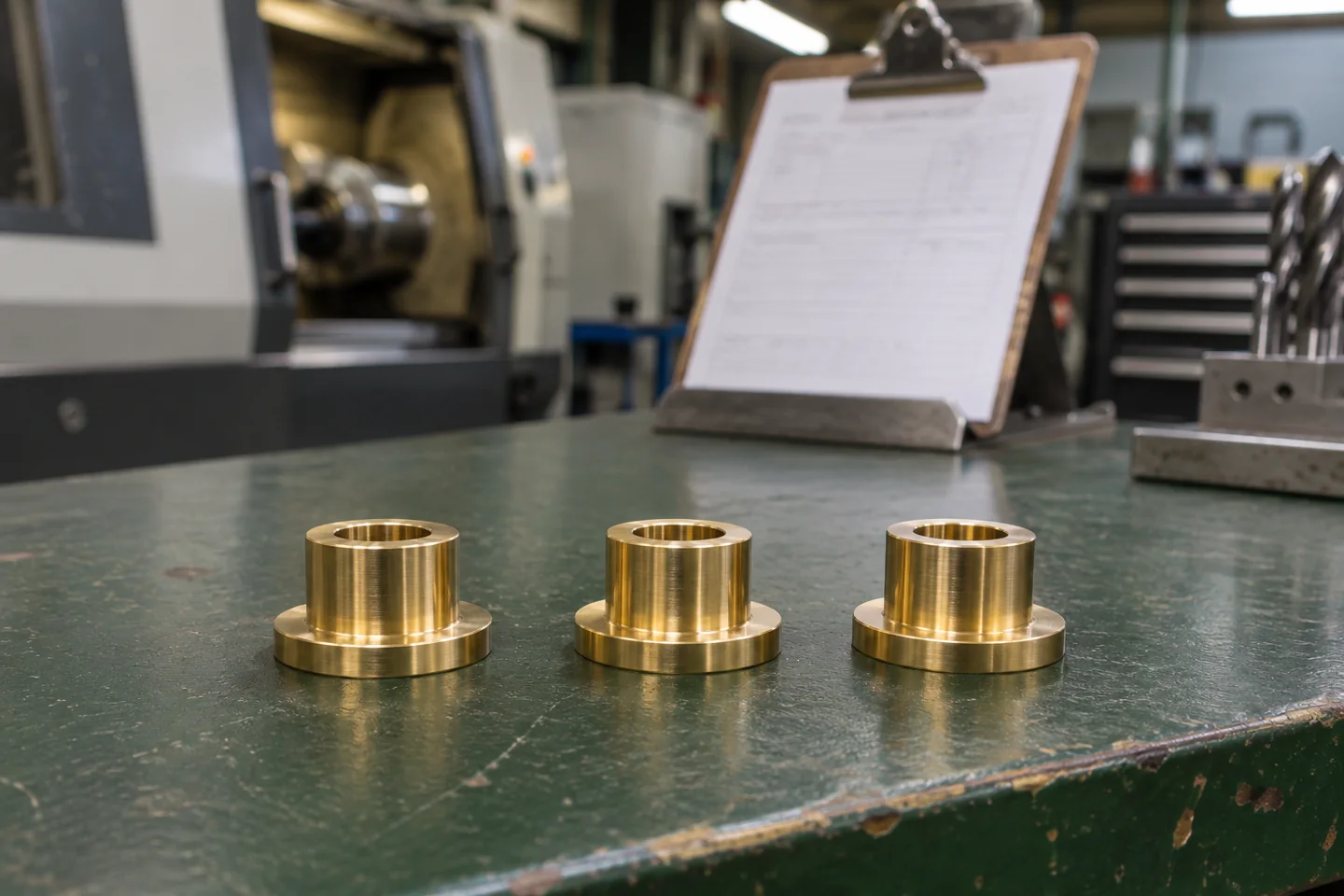
Turned brass spacers beside a paper job traveler
A useful follow-up connects the reviewed quote with a specific next decision.

These are original draft templates for a machine shop contacting a buyer after a quote. Replace every bracket with verified information, remove statements that do not apply, and review the message before sending. They do not change the quote’s terms or authorize a price, delivery date or technical commitment.

1. Confirm the quotation reached the right person

Use this when delivery or responsibility is uncertain. Check your records first so you do not ask the buyer to solve an internal routing problem.

Subject: Quote [reference] for [project] — receipt check

Hello [name],

We sent quote [reference and revision] for [project] on [date]. Could you confirm that it reached the person reviewing this purchase?

If a different colleague owns the review, please let me know the appropriate route. I can provide the current quotation again through our agreed sharing method.

Thank you,
[name and role]

After a reply, update the reviewing contact and the next action. A successful email send does not prove a buyer read the quote or accepted its contents.

2. Resolve a question that is holding up the decision

Use this after a specific question has been identified. If your team owes the answer, provide that reviewed answer or a realistic update instead of asking the buyer whether they are ready to order.

Subject: Quote [reference] — next step on [confirmed topic]

Hello [name],

Our last exchange identified [specific open question] as the next item to resolve for quote [reference and revision].

Would [a short review call / confirmation of the stated requirement] help move that item forward? [Responsible person] can review the point with you through [approved contact route].

Please let me know which next step would be useful. Any change to the quotation will go through our normal review before we issue it.

[name and role]

Do not insert an answer that the estimator has not approved. Record the actual issue and who now owns it; a sent message is only one part of that work.

3. Ask about the buyer’s decision event

Use this when the buyer’s project schedule is unclear or a previously stated review date has passed. The purpose is to learn when a useful conversation should occur.

Subject: [Project] — purchasing review timing

Hello [name],

I am updating our follow-up plan for quote [reference]. When we last spoke, the next project milestone was [confirmed event, if known].

Is that still the event that will determine your purchasing timing, or has the plan changed? If the project is waiting, please suggest a suitable point for us to reconnect.

I can pause reminders until that point so our contact follows your actual schedule.

[name and role]

Keep “waiting on the buyer’s project” separate from “waiting on our technical answer.” Knowing the difference prevents unnecessary messages and makes internal priorities clearer.

4. Reconfirm the quote basis before further discussion

Use this when the buyer mentions a changed quantity, drawing revision, delivery requirement or another condition that may affect the offer. Do not silently carry the original price and timing into a changed request.

Subject: Quote [reference] — confirm the current request

Hello [name],

Our current quotation refers to [verified revision / quantity / scope]. Your recent message mentioned [specific change].

Could you confirm which requirement now governs the request? We will route the confirmed information to [responsible reviewer] and let you know whether a revised quotation is needed.

Please continue to refer to the existing quotation’s stated scope and validity while we review the change. We will confirm any new commitments in a reviewed update.

[name and role]

Use the shop’s approved wording for quote validity. A reminder must not invent an expiry, imply reserved capacity or create artificial urgency. If the original offer has expired, ask the responsible person how to reopen the discussion.

5. Pause contact without inventing a lost-order reason

Use this when the buyer asks for a pause or your reviewed communication plan calls for stopping reminders after unanswered attempts. An internal pause does not prove a competitor won the work.

Subject: [Project] — pausing follow-up for now

Hello [name],

I will pause further reminders about quote [reference] for now. If the project moves forward or you need a clarification, please reply in this thread or contact [approved route].

When the discussion resumes, we will confirm the current requirements and review the quotation’s status before making any new commitment.

Thank you for considering [shop name].

[name and role]

Record whether the pause was requested by the buyer or set internally. Retain the latest evidence and the re-entry condition. Do not mark the quote as lost solely because a reminder sequence ended.

Charcoal drawing of a telephone handset beside an unnumbered calendar
Plan contact around the buyer’s actual decision event.

Build follow-up around the buyer’s situation

Review the operating rhythm and the decisions your shop retains.

Explore the RFQ Growth operating rhythm

Set timing from the opportunity

There is no single waiting period that fits every machining quote. A prototype review, a recurring production purchase and a project awaiting funding can have different decision events. Use the buyer’s stated timing, the quotation’s actual validity and the shop’s responsibilities to plan contact.

When sending the quote, ask for a useful next conversation rather than assuming one. If timing is unknown, assign a date to clarify it. That is an internal planning choice, not a claim that buyers require a particular number of messages before ordering.

Review due actions regularly. Prioritize answers your team owes, buyer-agreed conversations and records with unclear ownership. Move dates when evidence changes, and preserve the reason for moving them. Respect an explicit request to pause or stop contact.

The owner should be able to explain why a message is due and what new information it seeks. If the explanation is only that an automatic timer elapsed, review the record before sending.

Use AI to prepare a draft, then verify it

A reviewed assistant can help summarize the latest recorded exchange, identify missing fields and prepare a draft from an approved template. Its input should include the current quote reference, confirmed buyer information, allowed wording and a clearly defined task.

Require the reviewer to check the recipient, revision, quantities, dates, open question and next action against the original record. Missing information should remain an explicit question. Do not let a draft infer manufacturability, certification, price acceptance, available machine time or a delivery promise.

Define what happens when the source is incomplete, the draft conflicts with the record or a connection fails. Hold the message for review and assign a recovery action. A due date in a portal does not by itself prove that an email was created, sent or received.

The NIST AI Risk Management Framework Playbook offers an optional organizational reference for defining responsibilities and evaluating AI-related risks. The shop’s immediate operating requirement is concrete: identify the source, the reviewer and the approval step for each draft.

Our AI RFQ response guide explains the earlier intake handoff. Quote follow-up should use the same distinction between prepared administrative work and an approved customer commitment.

Navy and rust screenprint of a hand pausing a message card above a mail slot
Review the source and the customer commitment before a message is sent.
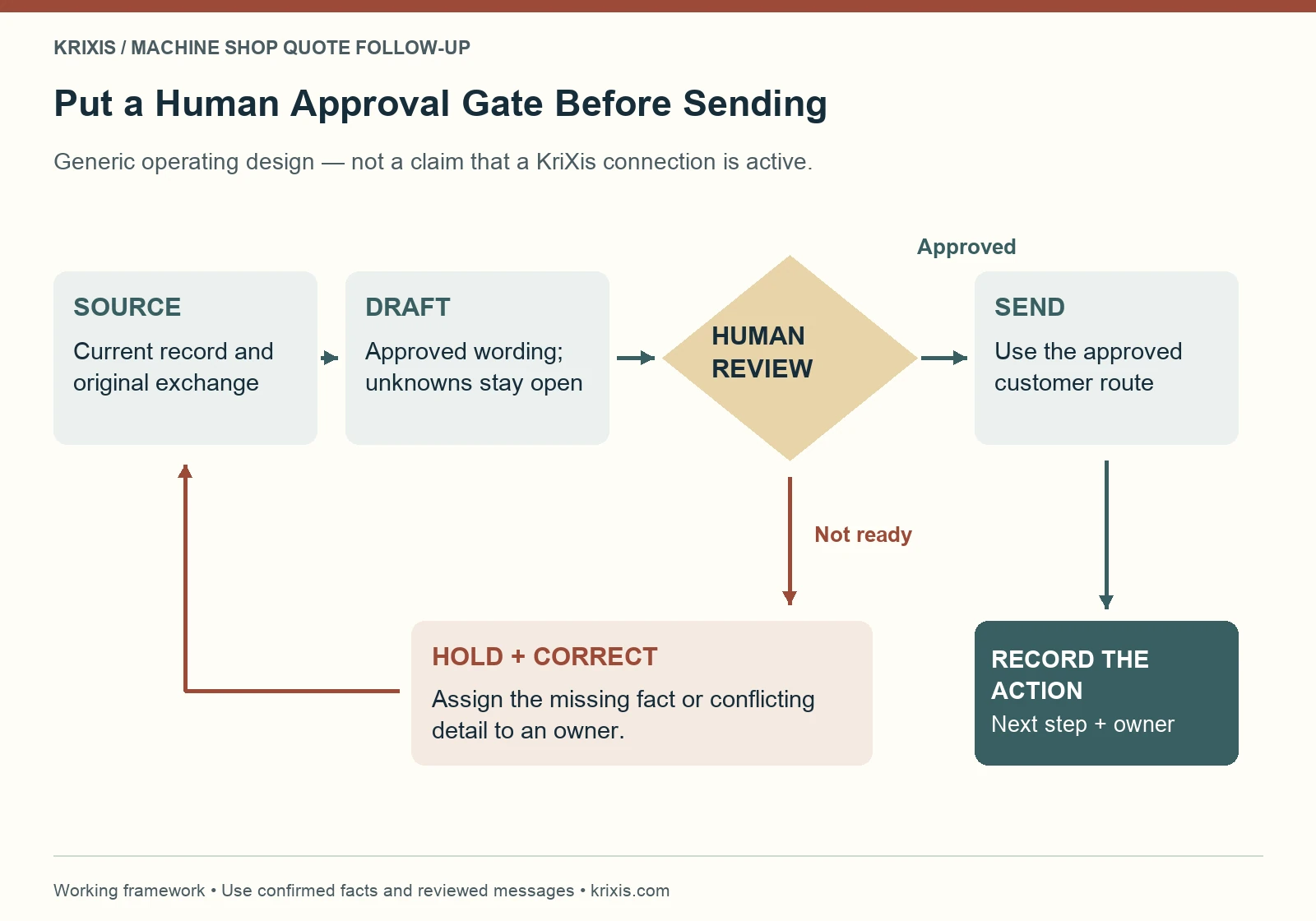
Source-to-draft workflow with a human review gate, correction route and action record
Use the current record to prepare a draft, check it through a human approval gate, hold incomplete messages, and record the approved action. This is a generic workflow design rather than a claim that a KriXis integration is active.View full-size infographic

Check which connections are available

See the available portal foundation and the connections still being built and tested.

Review the current RFQ Growth rollout

Measure whether the process is becoming clearer

Begin with operating questions your records can answer. How many open quotes have an owner and a specific next action? Which actions are overdue? Which buyer questions still need an answer from the shop? Which paused opportunities have a documented re-entry condition?

Keep contact attempts, buyer replies and confirmed outcomes separate. Several sent emails are not several buying decisions. A quote value is not an order value, and an order value is not collected revenue. Use your existing marketing measurement process to define those stages consistently.

If you compare outcomes over time, retain the review date and describe the population included. Open projects can mature later. Record an unknown reason as unknown rather than choosing “price” because it is convenient. The useful result is a better next decision, not a more flattering dashboard.

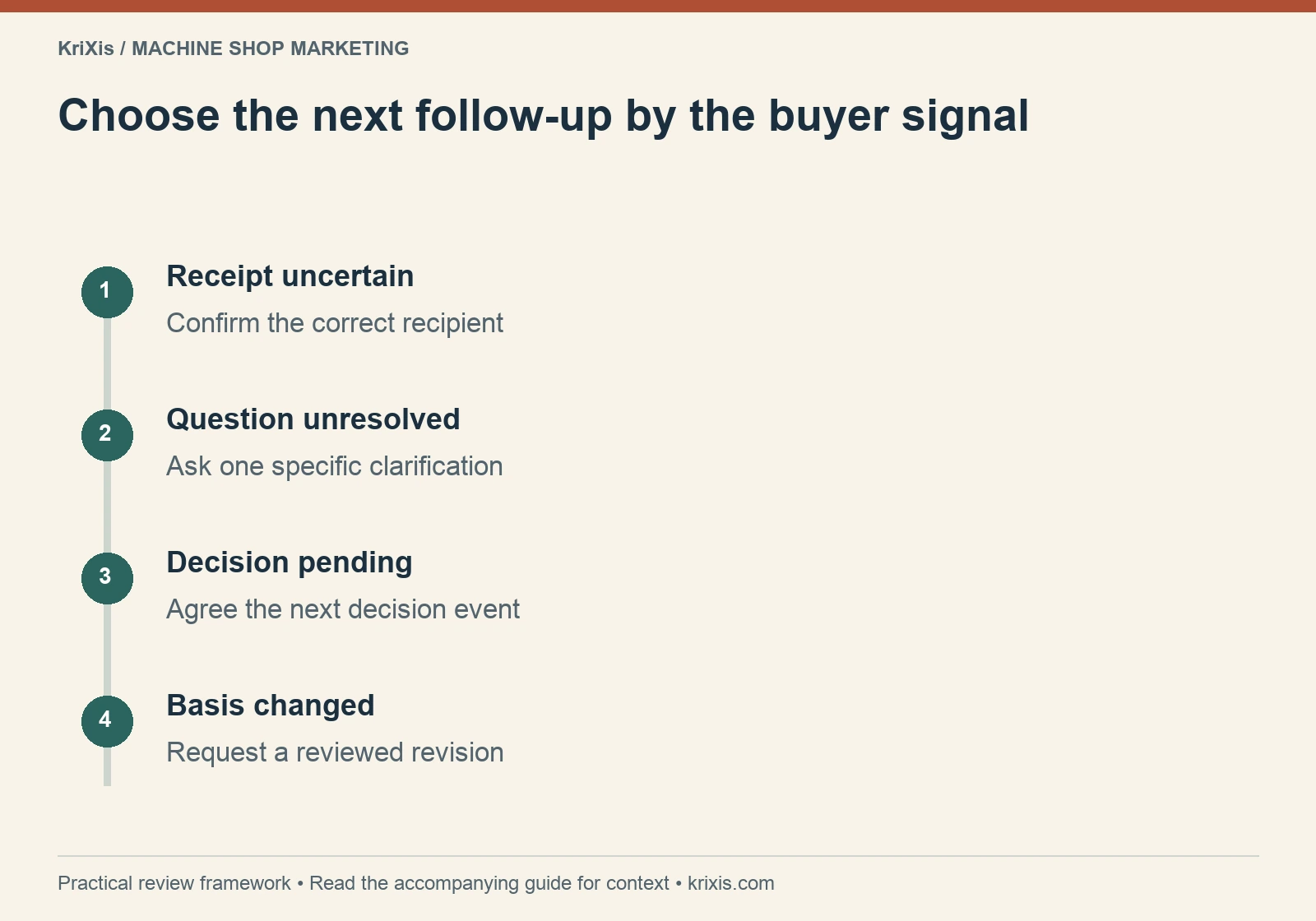
Choose the next follow-up by the buyer signal — receipt uncertain, question unresolved, decision pending, basis changed
Use this sequence to organize the review described in the guide. View full-size infographic
Read this graphic as text
  • Receipt uncertain: Confirm the correct recipient
  • Question unresolved: Ask one specific clarification
  • Decision pending: Agree the next decision event
  • Basis changed: Request a reviewed revision

Connect website evidence with the open conversation

Sometimes a buyer needs a clear explanation of a capability, a permissioned example or the route for asking a technical question. Link to the relevant capability page or case study when it answers the actual issue. Do not send a generic brochure link just to create another touchpoint.

If the same question repeatedly appears after quotes, review whether the website can explain that point more clearly. Keep technical claims with their responsible owner and preserve an approved inquiry route. Follow-up and website maintenance can then share a useful work item: answer a real buyer question with reviewed information.

Felt hands passing a blank envelope across a small gap
Assign the next action to a named person, including work waiting inside the shop.

Review the connected service scope

Review the planned service, standard setup and work that needs separate scoping.

See the KriXis RFQ Growth plan

Put the workflow to work with KriXis RFQ Growth

KriXis RFQ Growth is the flagship service direction connecting inquiries, follow-up and supported website work in one workspace. The public page describes a portal foundation for human-managed records, editable drafts, follow-up planning and reviewed reports, while the complete connected AI service is still in development.

Automatic inbox intake, connected AI assistance and other integrations need readiness and acceptance checks before a paid flagship rollout. The service page explains current availability and the separately scoped work. It does not offer autonomous engineering estimates, CAD analysis or unrestricted email management as the standard service.

Bring your public website, current inquiry workflow, typical workload and the person who can approve customer communications to a rollout consultation. Start with one recurring problem: an unowned quote, a missing review date or a repeated buyer question. KriXis can discuss the supported workflow and the connections still required before agreeing implementation scope.

A useful quote follow-up process leaves the team knowing what has been confirmed, what still needs a decision and what happens next. Choose one open record, select the appropriate message, review it and update the action that follows.

Start with one open quote and its next step

Bring your current workflow and an approval owner to a rollout consultation.

Plan my KriXis RFQ Growth setup

November 5, 2026/1 Comment/by Matthew Borza
https://www.krixis.com/wp-content/uploads/2026/11/machine-shop-quote-follow-up-hero.webp 960 1440 Matthew Borza https://krixis.com/wp-content/uploads/2015/12/KriXis-Full-Logo-Trans-300x79.png Matthew Borza2026-11-05 11:59:552026-11-08 07:23:28Machine Shop Quote Follow-Up: 5 Email Templates and a Clear Workflow
Machine Shop Marketing

Machine Shop Website Speed: A Practical Plan for Faster Buyer Pages


KriXis editorial guide · About 12 minutes to read

Machine shop website speed matters when an engineer is checking a capability, a sourcing buyer is opening a case study, or an estimator is trying to understand an inquiry. A page can look polished on the owner’s office connection and still feel slow, unresponsive or unstable on a phone.

The useful goal is a buyer route that loads, responds and stays usable. That includes the capability information, navigation, contact options and RFQ handoff. A higher test score is helpful evidence only when the actual experience and essential functions also work.

This guide shows how to choose representative pages, separate real-user evidence from diagnostic tests, prioritize a small change and verify the result. It does not assume your site has a particular performance problem or promise a ranking or lead increase.

Translucent browser panels moving through blue-green airflow
Prioritize the content and interactions that help a buyer complete a useful task.
In this guide

  • Start with the buyer task, not the home-page score
  • Understand the three Core Web Vitals
  • Keep field data separate from lab diagnostics
  • Find the bottleneck before choosing a tool
  • Deliver useful images at an appropriate size
  • Review scripts and embeds by the work they perform
  • Keep the RFQ route stable and responsive
  • Give the developer a bounded change request
  • Set a maintenance budget around the template
  • Verify the release before calling it an improvement
  • Monitor experience without promising a ranking lift

Start with the buyer task, not the home-page score

List the pages a serious buyer uses before contacting the shop. Include the home page, a high-priority capability page, an industry page, one image-heavy article and the RFQ or contact route. If the shop has downloadable documents, include the page that introduces them.

Write the task beside each URL: identify a process, check work fit, inspect approved evidence, find a contact or start an inquiry. A fast home page cannot represent a slow gallery template or an RFQ page that freezes after a file is selected.

Use your machine shop website navigation plan to identify the actual route between these pages. Check it on a phone and with a keyboard. Note the device, browser, connection and whether you were signed in. Logged-in administrator behavior may differ from a public visit.

Assign one person to keep the baseline and one to approve changes. Ask the estimator what must continue working. This turns “make the website faster” into a defined task with an owner, a few representative URLs and clear acceptance checks.

Understand the three Core Web Vitals

Google’s Core Web Vitals guidance identifies three aspects of experience: loading, responsiveness and visual stability. They help describe a problem; they do not replace evaluating the page’s usefulness.

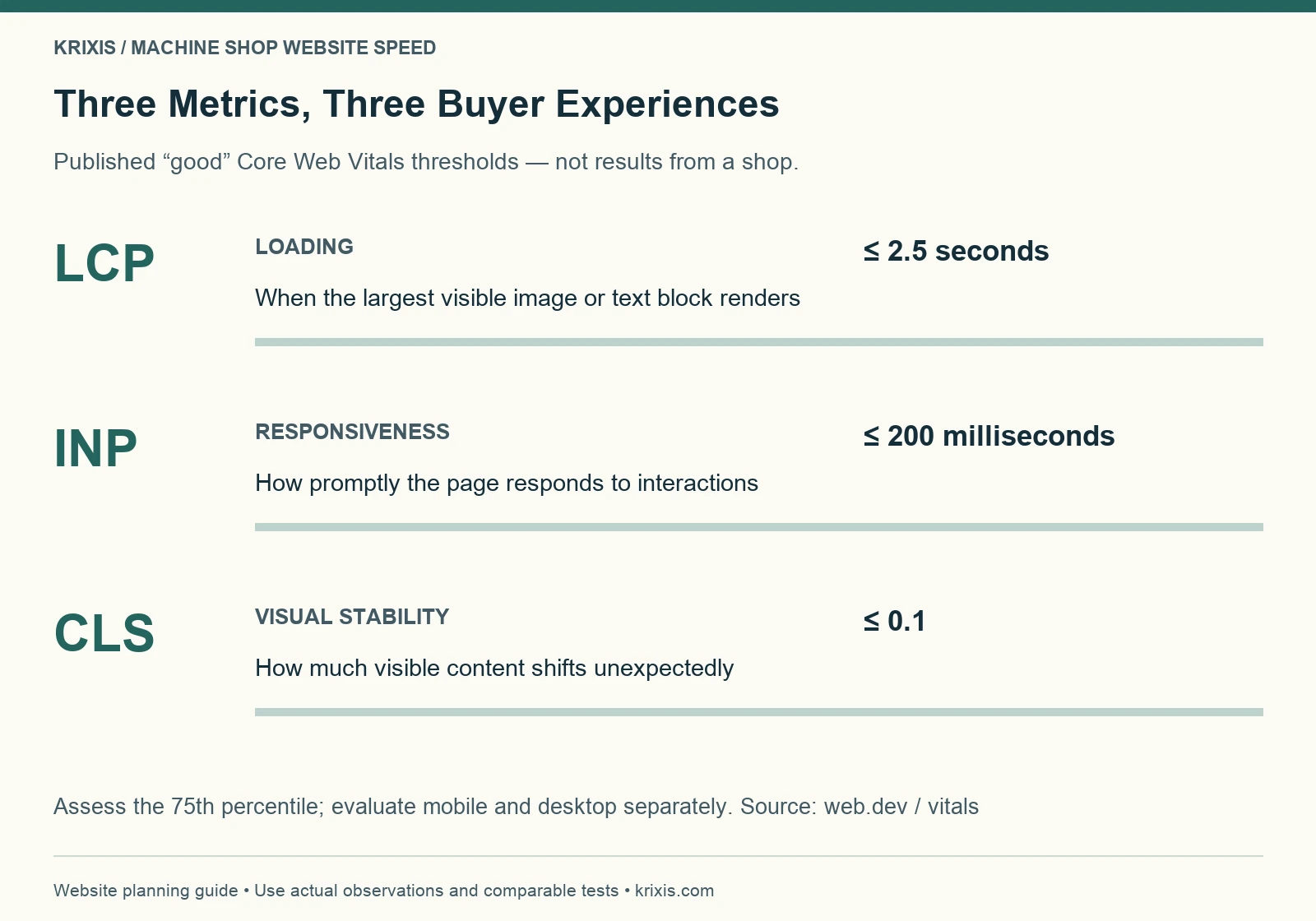
Largest Contentful Paint, or LCP, measures when the largest visible image or text block renders. Interaction to Next Paint, or INP, measures responsiveness across qualifying interactions. Cumulative Layout Shift, or CLS, measures unexpected movement of visible content.

The published “good” thresholds are LCP at 2.5 seconds or less, INP at 200 milliseconds or less, and CLS at 0.1 or less. Assessment uses the 75th percentile, with mobile and desktop evaluated separately. These are Google’s metric thresholds, not KriXis client results or a prediction of RFQ volume. See the Web Vitals definitions for their measurement context.

Translate each metric into a task. Does the capability photo appear late? Does the menu hesitate? Does a button move while the buyer tries to use it? This language makes the problem easier to reproduce and discuss with a developer.

LCP, INP and CLS definitions with published good thresholds
Good thresholds: LCP at 2.5 seconds or less, INP at 200 milliseconds or less, and CLS at 0.1 or less. Evaluate the 75th percentile and mobile and desktop separately. These are published metric thresholds, not shop results.View full-size infographic

Make the first test repeatable

Record the buyer task, baseline, dependencies and acceptance checks in one local worksheet.

Get the free website speed worksheet

Keep field data separate from lab diagnostics

PageSpeed Insights can show both real-user field data and a controlled Lighthouse test. Record which section you are reading. A single lab run is not a measurement of every visitor’s experience.

The field section uses a rolling collection period. When a page lacks sufficient data, the report may show origin-level data or no real-user data. Check whether the values describe the exact URL or the wider origin. “No data” does not mean a page is fast, broken or penalized.

Use lab diagnostics to investigate causes under stated conditions. Keep the same URL, device mode and test approach when comparing a change. Run a small repeatable set rather than selecting the best-looking result. Save the report date, conditions and screenshots so another person can interpret the comparison.

Avoid mixing a mobile before-test with a desktop after-test, or a cached repeat visit with a first visit without saying so. Separate measured observations from assumptions. The worksheet should say “menu delay reproduced on this device,” not “buyers are leaving,” unless you have evidence for that different claim.

Find the bottleneck before choosing a tool

Stationary end mill in a protective tool tray
A useful capability image should retain the detail buyers need without an unnecessarily large file.

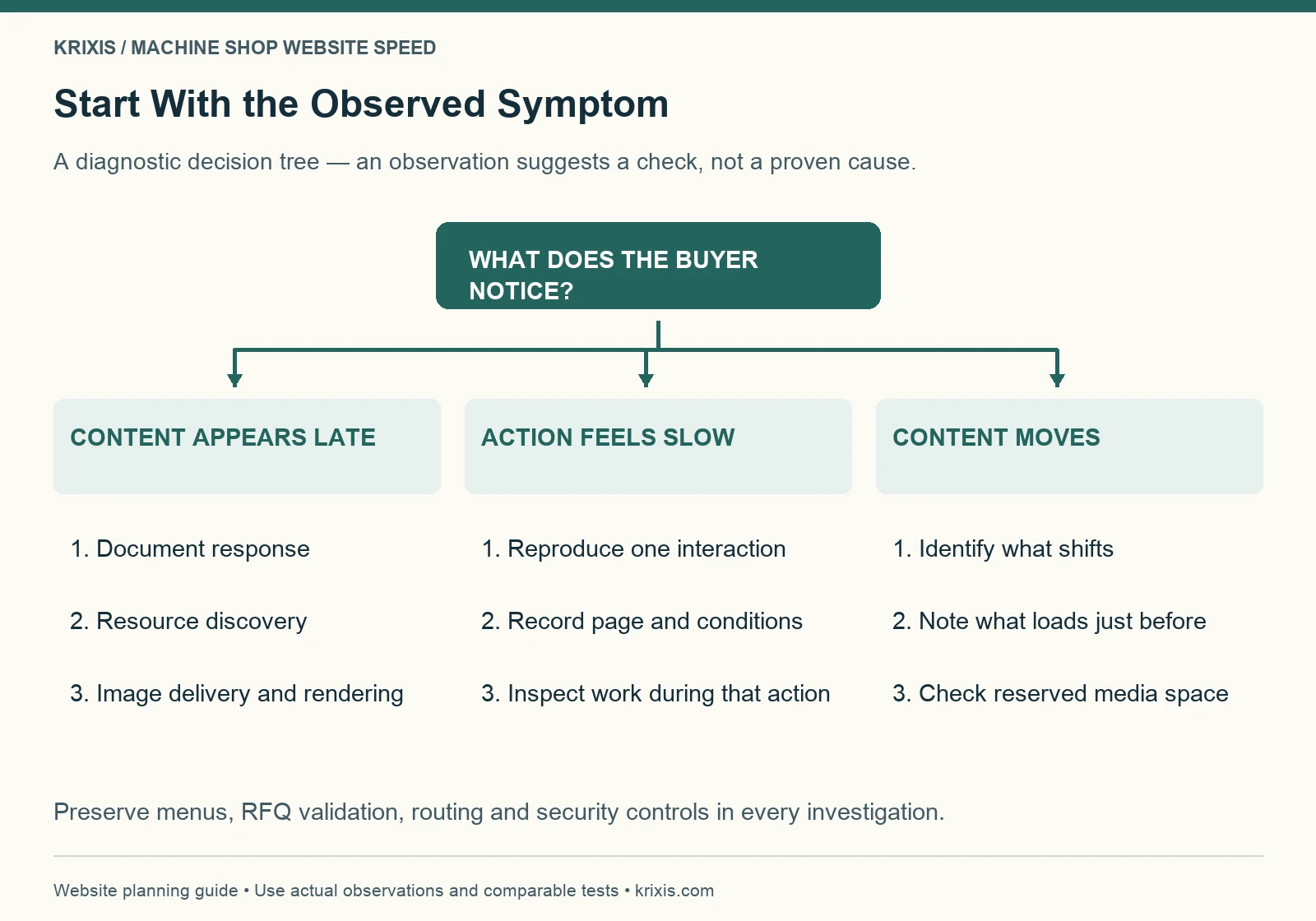
Start with the symptom and the affected template. A late main image, delayed server response, busy interaction and shifting page can require different investigations. Installing another optimization plugin before identifying the cause can make the setup harder to understand.

For a loading problem, ask when the document arrives, when the important resource is discovered and when it can render. Google’s LCP optimization guide explains why the full loading path matters. Compressing an image will not address every delay that occurs before or after its transfer.

For a slow interaction, reproduce the specific action: opening the mobile menu, expanding a capability section or submitting an invalid RFQ field. Record whether the delay occurs immediately, after a widget loads or only on a particular page. Give the developer an observable sequence, not a vague request to improve JavaScript.

For visual movement, note which element moves and what appears just before it. An image without reserved space, a font change or a late embed may be worth investigating. The observation guides the next check; it is not proof that one component caused the entire issue.

Decision tree from late content, slow actions or moving content to diagnostic checks
For late content, inspect response, discovery, delivery and rendering. For slow actions, reproduce the interaction. For moving content, identify what shifts and inspect reserved space. An observation suggests an investigation rather than proving a cause.View full-size infographic

Deliver useful images at an appropriate size

Machine shop websites need visual evidence. Removing every photograph to reduce page weight can make a capability page less useful. Start by deciding what each image helps the buyer understand, then deliver that image efficiently.

Keep a high-quality source separately from the publishing file. Export a sensible display size and compare the optimized result at the dimensions buyers will actually see. Check surface details, small text and diagram labels before approving compression. Do not use a tiny blurred thumbnail to represent an inspection record or a detailed process image.

WordPress supports responsive image markup through srcset and sizes. Themes and custom layouts still need checking: the presence of several files in the media library does not prove that a page selects an appropriate one. Ask the developer to inspect the delivered asset on mobile and desktop.

Identify the actual LCP element before changing loading priorities. Avoid lazy-loading an important above-the-fold image simply because other article images are lazy-loaded. Reserve image dimensions so the browser can allocate space. For a long gallery, prioritize the first useful view and load later media appropriately.

Use the machine shop website photography guide to decide which visuals deserve space. Clear evidence and efficient delivery should support each other.

Three proportional prints of the same milling detail arranged from small to large
Publish an appropriate display image while retaining a separate high-quality source.

Choose one page and one measurable problem

Share a public page and a non-confidential symptom to discuss the next useful investigation.

Discuss a website speed review

Review scripts and embeds by the work they perform

Inventory the components that load on the affected page: analytics, chat, maps, video players, sliders, form tools and theme features. Record the owner, purpose and pages where each is needed. Ask whether a full embed must load immediately or whether a useful preview and deliberate interaction would serve the task.

Change scope carefully. A form dependency might also control validation or routing. An analytics dependency may record the event you need to compare. Delaying or removing a script without checking its role can produce a cleaner test report and an incomplete business workflow.

Do not disable security checks or CAPTCHA to improve a speed score. If a required component is expensive, investigate its implementation and loading behavior with the responsible provider. Preserve the protection while finding an appropriate delivery approach.

Prefer one documented adjustment at a time when practical. If several components must change together, record the bundle and its reason. Retain a recoverable version and define what would trigger a rollback. A named owner should be able to explain both the intended benefit and the functions at risk.

Keep the RFQ route stable and responsive

A performance change is incomplete until the inquiry route works. Follow the same path a buyer would take from a capability page into the request process. Test on a phone, with the menu open, after validation errors and at the point where a visitor chooses an approved file-sharing method.

Verify labels, focus visibility, error messages and the submit state. Controls should remain understandable while work is in progress. Prevent ambiguous repeated submissions and explain what happens next. Do not treat a visible thank-you message as evidence that the estimator received the inquiry.

Use non-confidential test information and your approved test procedure. Check receipt and routing with the responsible person, then verify the fallback contact. Keep restricted drawings, personal records and customer information out of public speed tools and screenshots.

Our machine shop RFQ form design guide covers the handoff in more detail. The speed review adds regression checks around that established process; it does not replace them.

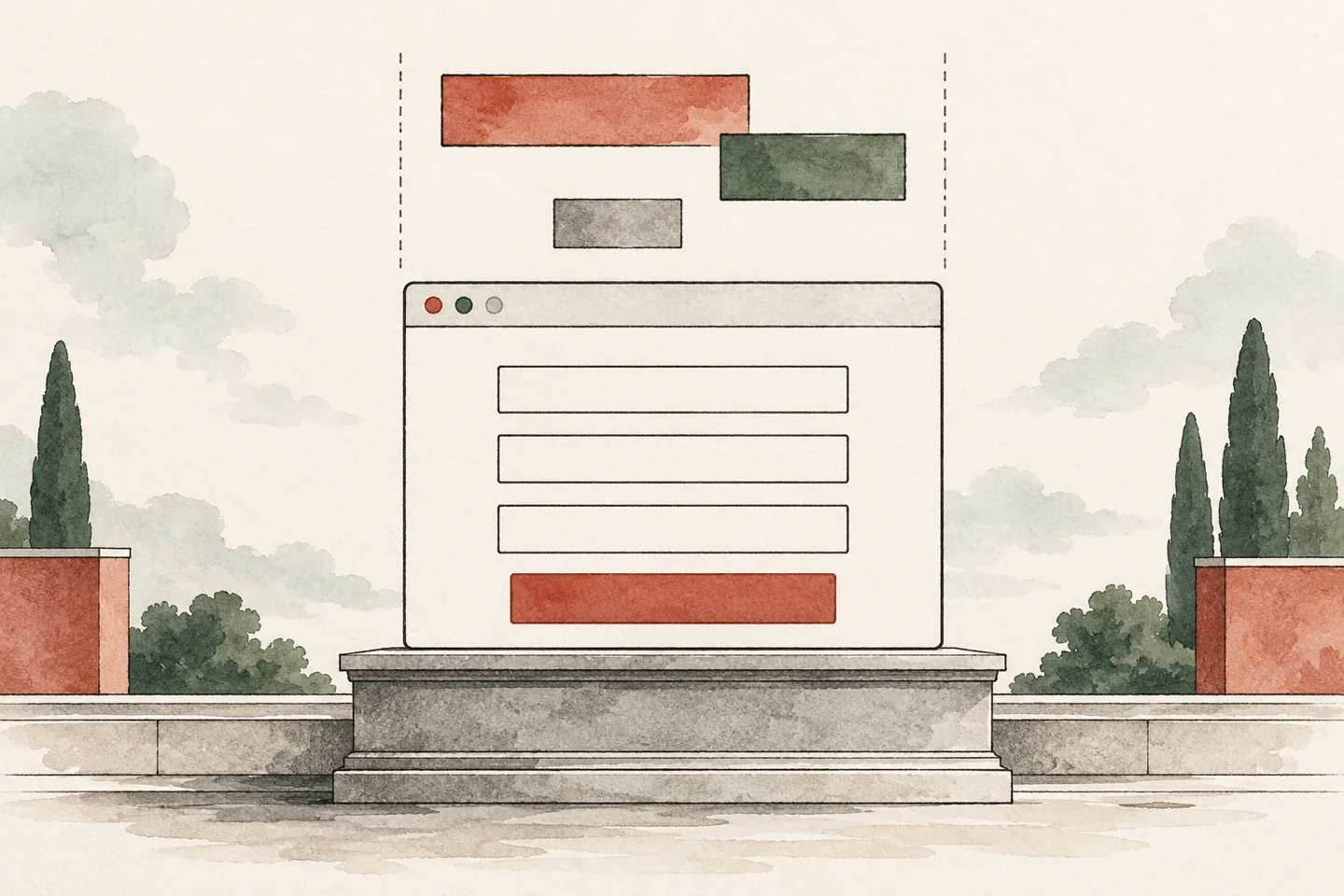
Ink and watercolor browser form resting on a level architectural plinth
Reserve space so late-loading elements do not displace important controls.

Protect the buyer route while changing performance

Record the buyer task, baseline, dependencies and acceptance checks in one local worksheet.

Download the performance planning kit

Give the developer a bounded change request

A useful brief names the URL, template, buyer task, reproduced symptom, report conditions and proposed investigation. Include the current evidence and what remains unknown. Keep the request small enough to verify independently of a wider redesign.

Fictional teaching example: an aluminum turning capability page has a delayed main image in repeated mobile lab tests. The team asks the developer to inspect resource discovery, file delivery and rendering. The release must preserve the image’s useful detail, the mobile menu, the capability links and the RFQ handoff. No before-and-after times or lead gains are assumed.

The example is a work plan, not proof that images cause every slow page. Your result may point to server response, template code or a third-party dependency. If a redesign is necessary, use a separate website migration checklist to preserve URLs and search signals.

Agree on access, scope, timing and any fees before implementation. A public-page review can identify questions and priorities; it does not authorize theme changes, hosting moves or changes to a production form.

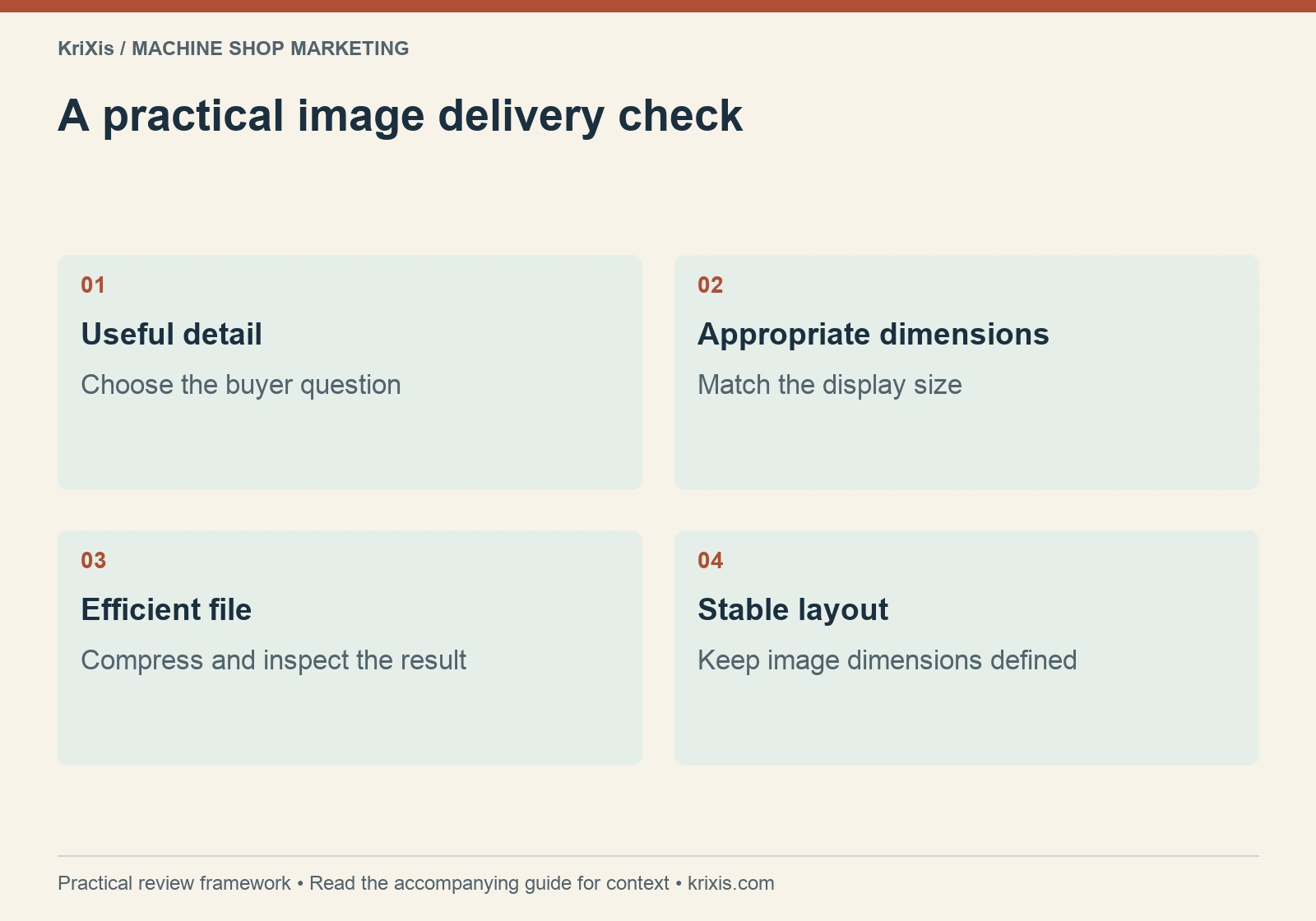
A practical image delivery check — useful detail, appropriate dimensions, efficient file, stable layout
Use this sequence to organize the review described in the guide. View full-size infographic
Read this graphic as text
  • Useful detail: Choose the buyer question
  • Appropriate dimensions: Match the display size
  • Efficient file: Compress and inspect the result
  • Stable layout: Keep image dimensions defined

Set a maintenance budget around the template

A performance budget is an agreed limit or check for future changes, not a universal number copied from another business. Start with the baseline and the purpose of the template. Decide what would trigger review when someone adds an image, a video, a font or another site feature.

For a capability template, the team might require an optimized display image, reserved media space and a repeated mobile test before publishing a gallery. For an RFQ template, the release gate may include validation, visible progress, receipt and routing checks whenever form code changes. Record these rules beside the owner who can approve an exception.

Keep the publishing workflow practical. Ask the content editor to retain the original photo, upload a suitable publishing version and check the rendered page. Ask the developer to explain shared dependencies so an editor does not unknowingly load an expensive component across every page.

Revisit the budget when the design or buyer task changes. A detailed technical diagram may justify a full-size download while the page uses a readable preview. A necessary validation feature may justify additional processing. The useful decision balances delivery, clarity and function rather than treating every additional byte as a failure.

Verify the release before calling it an improvement

Repeat the baseline tasks under comparable conditions. Check the same representative URLs and the templates they share. Inspect the main image, typography, menus, anchor links, downloads and contact options, as well as the diagnostic measurements.

Look for regressions that a home-page screenshot misses: an image source that fails on mobile, an accordion that needs a delayed dependency, a shifted submit button or a download hidden behind a broken overlay. Confirm keyboard access and readable layouts at narrow widths.

Recheck the technical elements that a template edit could affect: title, canonical, robots directives, headings, internal links and structured data. A performance change should not accidentally remove a meaningful page section or replace a self canonical with the wrong address.

Record what changed, when it shipped and who checked it. If the intended symptom persists, keep that result visible. A smaller file or a higher lab score alone does not prove that the original buyer problem was solved. Define the next investigation or rollback from the evidence.

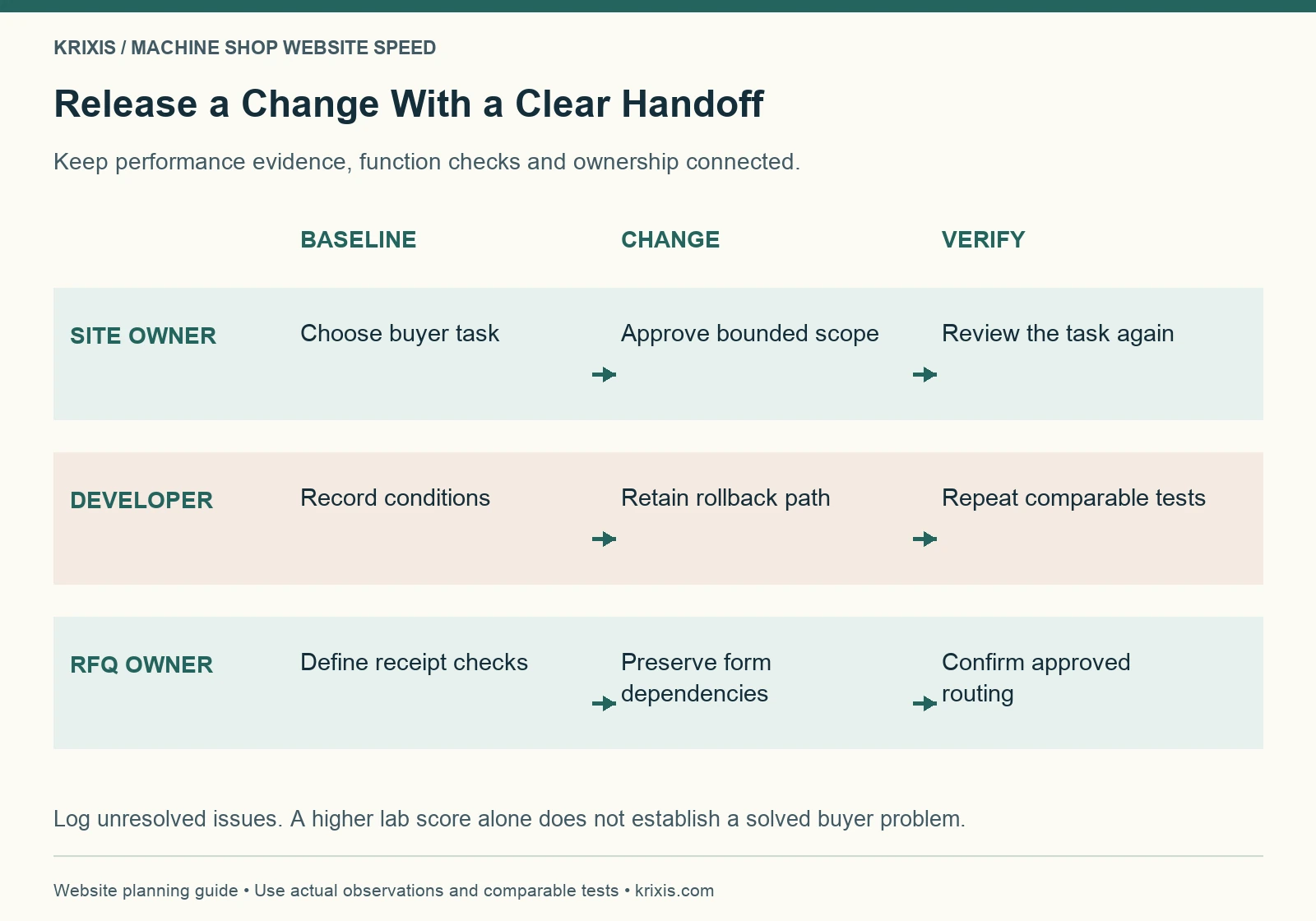
Release swimlane connecting site owner, developer and RFQ owner across baseline, change and verification
The site owner defines the task, the developer retains a recovery path and repeats comparable tests, and the RFQ owner verifies the approved handoff. Log unresolved issues before accepting the release.View full-size infographic

Keep the baseline and release checks together

Record the buyer task, baseline, dependencies and acceptance checks in one local worksheet.

Use the free website performance worksheet

Monitor experience without promising a ranking lift

Core Web Vitals and page experience are relevant to search, but Google explains that good metrics do not guarantee top rankings. A fast page still needs relevant information, credible claims and a usable route to the next action. See Google’s page-experience guidance.

Keep speed evidence alongside the inquiry and qualification records in your machine shop marketing measurement process. Compare periods carefully and note other changes, seasonality and open sales cycles. Do not attribute an isolated new quote to a speed adjustment without supporting evidence.

Review important templates after publishing new galleries, replacing a hero, adding an embed or changing the form. Assign an owner and a review date so performance remains part of routine content maintenance.

Close view of a fingertip depressing an unbranded dark keyboard key
Reproduce a specific interaction before choosing the next investigation.

The next useful step is modest: choose a buyer task, capture a baseline, investigate one plausible constraint and verify the whole route after the change. That produces a clearer decision than chasing a perfect score while the page’s purpose gets lost.

Review a specific page and buyer task

Share a public page and a non-confidential symptom to discuss the next useful investigation.

Email KriXis about a website performance review

November 2, 2026/2 Comments/by Matthew Borza
https://www.krixis.com/wp-content/uploads/2026/11/machine-shop-website-speed-hero.webp 960 1440 Matthew Borza https://krixis.com/wp-content/uploads/2015/12/KriXis-Full-Logo-Trans-300x79.png Matthew Borza2026-11-02 12:18:212026-11-08 07:24:06Machine Shop Website Speed: A Practical Plan for Faster Buyer Pages
Machine Shop Marketing

Machine Shop Lead Generation: A 90-Day Plan for Better RFQs


KriXis editorial guide · About 13 minutes to read

Machine shop lead generation works best when the shop can explain which work it wants, help a buyer evaluate fit, and respond consistently when an inquiry arrives. More traffic cannot compensate for an unclear capability page or an RFQ that sits in an unattended inbox.

Start with a narrow, testable plan. Choose one useful type of work, connect it to a specific audience and page, and follow the inquiry through qualification and quoting. Expand after you understand what the first route produces.

This guide lays out a practical 90-day planning cycle for an owner, sales lead and estimator. Ninety days is an organizing framework, not a promise that SEO, a new campaign or a buyer’s purchasing cycle will produce revenue within that period.

Unbranded manufacturing building at dusk with a clearly lit entrance
Make the route from discovery to a useful conversation clear.
In this guide

  • Define the work you actually want to win
  • Establish a baseline before adding another channel
  • Build one complete route from search to inquiry
  • Use Search Console to choose an achievable content test
  • Select channels according to the constraint
  • Give engineers and sourcing teams useful evidence
  • Capture enough detail for a useful first response
  • Connect the source to the CRM without inventing certainty
  • Run the plan in three 30-day stages
  • Diagnose weak results before changing everything
  • Review a small scorecard every week

Define the work you actually want to win

Write a short target-work brief before selecting a channel. Include the processes, materials, part-size range, quantities and project conditions your team wants to evaluate. Add exclusions where appropriate. Have the responsible technical person review anything that will become a public capability claim.

Separate current capacity from long-term capability. A shop may be able to produce a type of part but have no suitable capacity during the buyer’s required window. Marketing should not turn an outdated capacity note into a delivery commitment.

Make the brief useful to sales: “We want inquiries for this process and general work profile, subject to technical review” is more actionable than “We want more manufacturing customers.” Avoid selecting an industry label that implies an approval or certification you do not hold.

Use the brief to decide what an initial inquiry should contain and what belongs in later review. The RFQ qualification guide provides a fuller scorecard. Here, the purpose is to focus acquisition before additional inquiries consume estimating time.

Establish a baseline before adding another channel

Review recent inquiries with the people who received them. Record the source when known, the work requested, whether the opportunity fit, what happened next and why it stopped. Mark missing information as unknown instead of assigning a convenient source afterward.

Keep distinct stages: inquiry received, qualification pending, qualified for review, quote issued, won, lost or deferred. A contact-form submission is not automatically a qualified RFQ. Agree who can change each stage and what evidence they need.

Look for the immediate constraint. If the website attracts appropriate buyers but the form fails, repair the capture route. If many inquiries concern work you do not perform, examine your claims and targeting. If suitable inquiries stall after quoting, examine follow-up before buying more visits.

Connect this baseline to your marketing ROI process. Keep the sample period, missing records and outstanding sales cycles visible. A small, incomplete dataset can suggest a useful test without supporting a reliable growth forecast.

Turn the target-work brief into a testable plan

Define target work, map the acquisition route and record the evidence for your next review.

Get the free lead generation planning kit

Build one complete route from search to inquiry

Choose a buyer question that closely matches the target work. The destination should explain the relevant capability, limits, evidence and inquiry instructions. Avoid sending every search visitor to a home page that makes them find the subject again.

A useful route might connect a process search to a reviewed capability page, then to quality information and a clear RFQ action. A referral may start with a specific project question and need an approved example before the buyer contacts you. Plan for both paths.

Our capability page blueprint explains the destination’s content. The website navigation guide explains how to connect it with related pages. Neither step requires creating dozens of near-identical pages.

Give the route an owner, a destination URL and a defined next action. Test the live experience on a phone and with a keyboard. Confirm that links, contact details and RFQ instructions work before sending a campaign into the route.

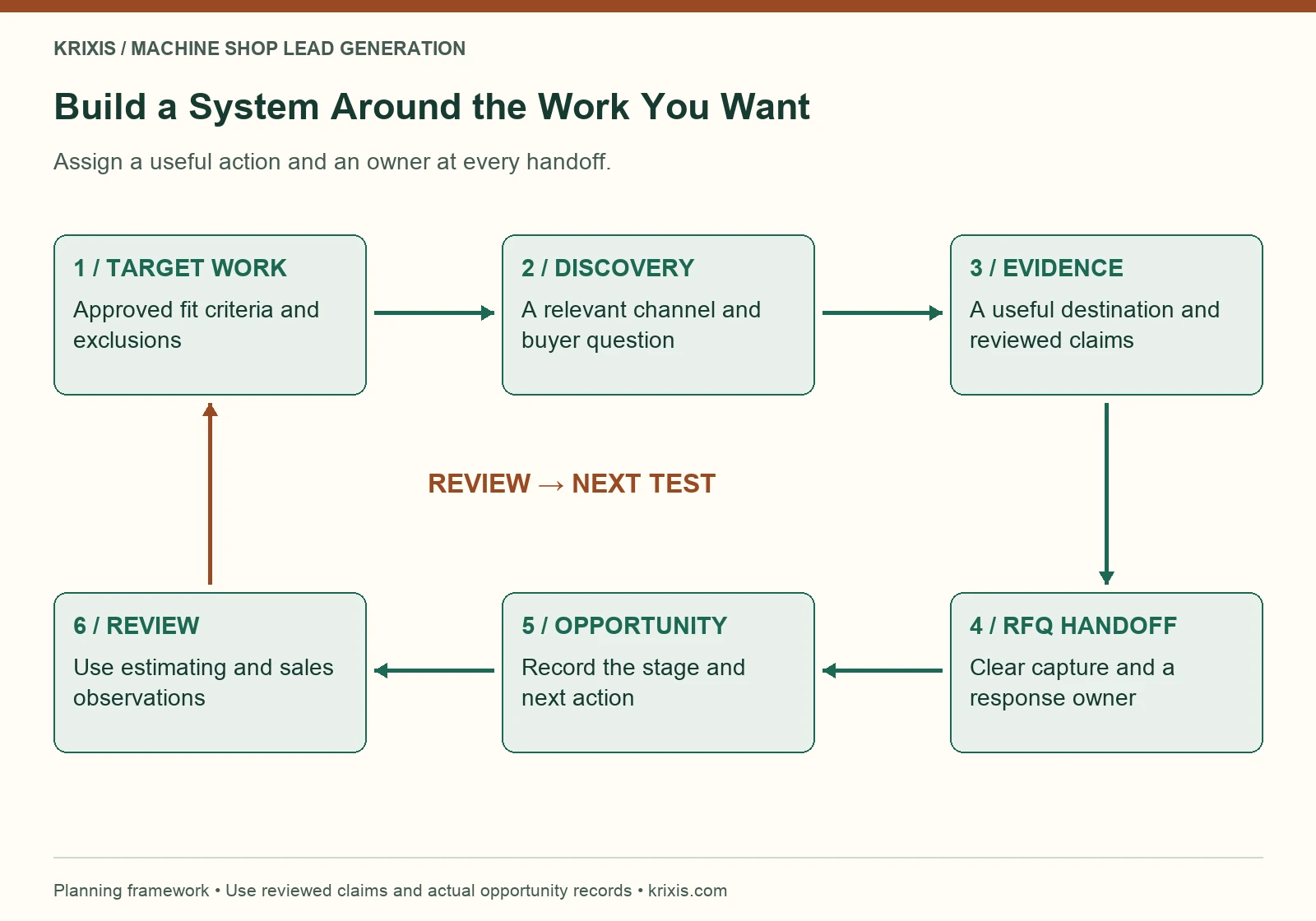
Lead generation system connecting target work, buyer discovery, evidence, RFQ ownership and review
Start with reviewed target-work criteria. Connect a relevant discovery channel to a useful buyer page and supporting evidence. Make the RFQ route clear, assign a response owner and record the opportunity stage. Feed observations from estimating and sales back into the next acquisition test. Each handoff needs a defined action and owner.View full-size infographic

Use Search Console to choose an achievable content test

Organized CNC production bay with a clear aisle and material rack
Start the acquisition plan with work the shop can explain and support.

Review non-branded queries that relate to your actual services. Look for a relevant query with impressions, a plausible destination and a question the page does not yet answer well. Inspect which URL receives the impressions before deciding to write another page.

An existing service page may need a clearer explanation, while a distinct informational question may deserve a supporting article. Give the article its own job: explaining a process, checklist or decision. Link it to the service page when a reader wants implementation help. Repeating the same sales copy at a second address adds little value.

Google’s Search Console performance documentation explains clicks, impressions, CTR and average position. Treat average position as a report metric, not a fixed rank every buyer sees. Record the date range, query, landing page and change you intend to test.

Choose usefulness over a keyword list. An impression shows that the site appeared in a result; it does not tell you total market demand or guarantee that a longer article will win the click. Google’s helpful-content guidance emphasizes content that serves the reader’s task.

Select channels according to the constraint

Organic search can support buyers looking for a process, material or supplier answer. It needs useful reviewed pages, discoverable links and time for evaluation. Use the machine shop SEO playbook for the broader search foundation.

Paid search can test a tightly defined intent when the destination and inquiry process are ready. Start with a scope and spending limit your business approves. Review actual search terms, the resulting inquiries and the work fit, rather than treating ad clicks as success.

Google Ads explains how negative keywords exclude unwanted searches. For example, a shop that does not sell used machinery should examine whether its campaign is attracting equipment shoppers. Review exclusions carefully so they do not accidentally remove useful buyer intent.

Referrals, relevant supplier relationships and existing customer conversations can produce a different route. Make the introduction specific to the work sought and follow the recipient’s preferences. Avoid assuming a purchased contact list is a qualified audience. Select a small number of channels that the team can operate and measure well.

Choose the first route worth testing

Share public page URLs and a non-confidential brief to discuss the first route worth improving.

Discuss a lead generation plan review

Three optical fibers glowing in separate colors from a silver connector
Keep known sources distinguishable while allowing for an incomplete buyer journey.

Give engineers and sourcing teams useful evidence

A buyer should be able to understand what you do without interpreting a collection of slogans. Explain the process, the information needed for technical review and the limits of any published example. Use clear headings and descriptive links to deeper information.

Keep equipment and quality information consistent with the main capability page. A current equipment list can help explain resources. A quality page can explain what information is available and how to request it. Neither should imply universal suitability for a buyer’s part.

Use approved examples where they answer a genuine question. Explain the work context and what can be publicly supported. Do not turn an illustrative image into supposed client proof, invent a performance result or publish customer information without the appropriate approval.

Ask an estimator to review the route as a buyer would. Which question still requires an email? Which wording could create an expectation the team cannot meet? Resolve those issues before expanding the campaign. Better evidence can make the next conversation more useful even when the visitor does not inquire immediately.

Assign the page, evidence and inquiry owners

Define target work, map the acquisition route and record the evidence for your next review.

Download the lead generation worksheet

Capture enough detail for a useful first response

Make the RFQ action visible from relevant pages and explain what happens next. Ask for the information your team needs to route the inquiry, but avoid turning the first contact into an unnecessary administrative exercise.
Distinguish a preliminary question from a formal quote request. A buyer who is still assessing fit may not have a complete package. Give them a sensible way to ask the question while preserving a clear route for a detailed RFQ.

Publish only the drawing-sharing instructions your business has approved. Do not claim that an ordinary email address or generic form provides a security capability you have not verified. Keep technical commitments, restricted information and document decisions with the responsible people.

Test the complete RFQ form and handoff, including validation, receipt, routing and the fallback contact route. A thank-you screen alone does not prove that the correct employee received the submission. Assign a human owner and verify the handoff using your approved testing process.

Connect the source to the CRM without inventing certainty

Record how the inquiry arrived and preserve the buyer’s own explanation when available. Keep known campaign data, the landing page and a self-reported referral source as separate fields. They may describe different moments in the same buying journey.

Use consistent campaign names for links you control. Google’s campaign URL guidance explains source, medium and campaign parameters. Do not place personal information, drawing identifiers or confidential project details in tracking URLs.

Define measurement events around actual actions. If your implementation uses GA4, its recommended events reference distinguishes lead-related events. A website inquiry event and a later qualified opportunity need different evidence and may come from different systems.

The machine shop CRM guide covers ownership and follow-up. Keep unknown sources unknown, deduplicate repeat inquiries and retain the opportunity’s next action. Attribution helps organize observations; it does not prove that one click caused the eventual order.

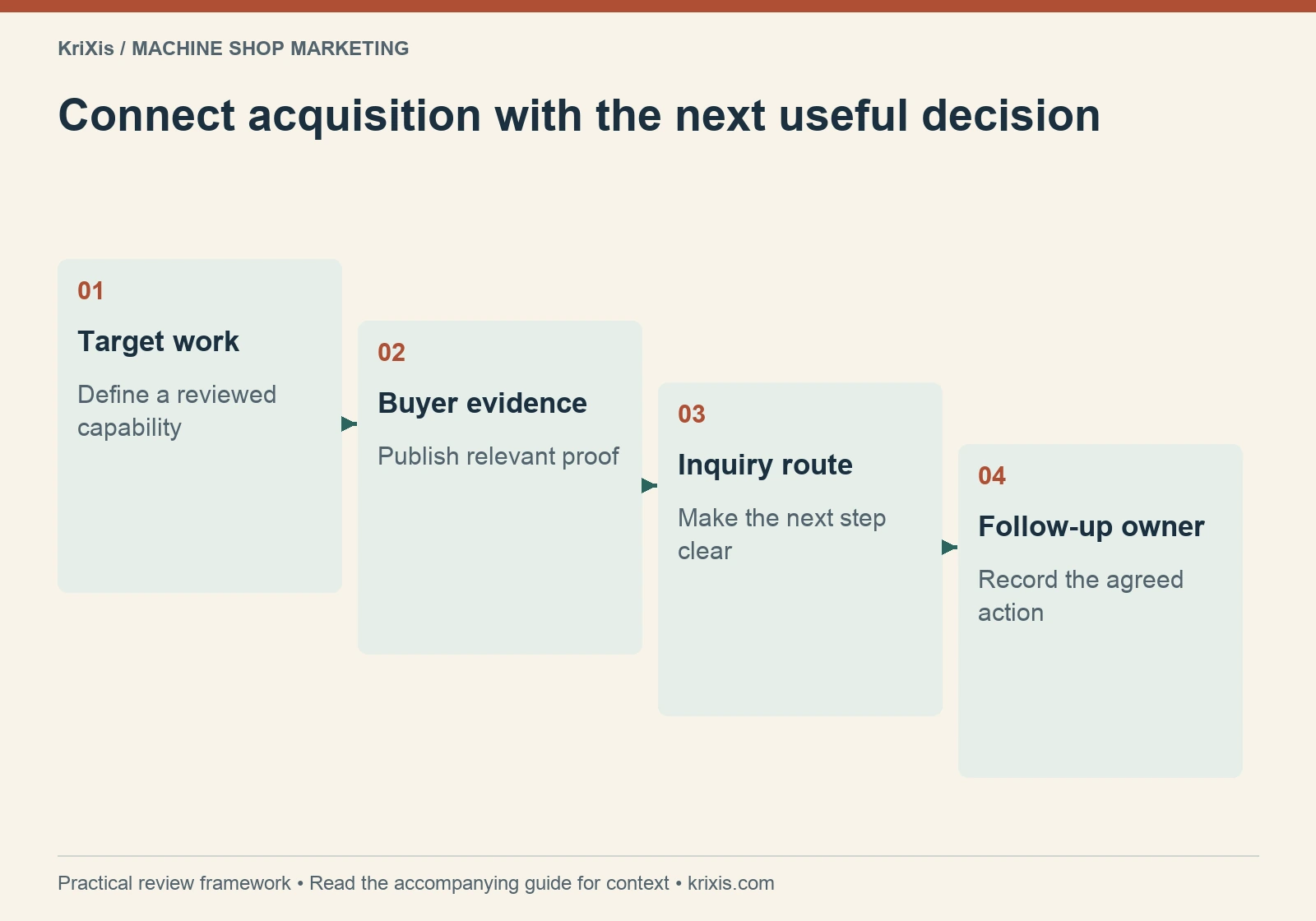
Connect acquisition with the next useful decision — target work, buyer evidence, inquiry route, follow-up owner
Use this sequence to organize the review described in the guide. View full-size infographic
Read this graphic as text
  • Target work: Define a reviewed capability
  • Buyer evidence: Publish relevant proof
  • Inquiry route: Make the next step clear
  • Follow-up owner: Record the agreed action

Run the plan in three 30-day stages

Days 1–30: establish fit and repair the route

Approve the target-work brief, classify the recent inquiry baseline and select one priority buyer task. Review its destination, evidence and RFQ handoff. Fix broken links, unclear claims and missing ownership first. Establish the source and stage fields your team will maintain.

Days 31–60: launch a focused acquisition test

Publish the useful page improvements or supporting article. Add relevant incoming links from existing content. If a paid or relationship-based test fits the plan, launch it within its agreed scope. Record the dates, audience, destination and changes so the review has context.

Days 61–90: evaluate the work, not just the visits

Review inquiries with estimating and sales. Identify fit, quote decisions, open questions and follow-up completion. Compare like-for-like periods where practical and explain differences in timing or sample size. Continue, revise or stop the test based on observed evidence and the business’s capacity to respond.

Three-panel accordion planner illustrated in green and burnt orange
Use three stages to establish the route, run a test and review the evidence.
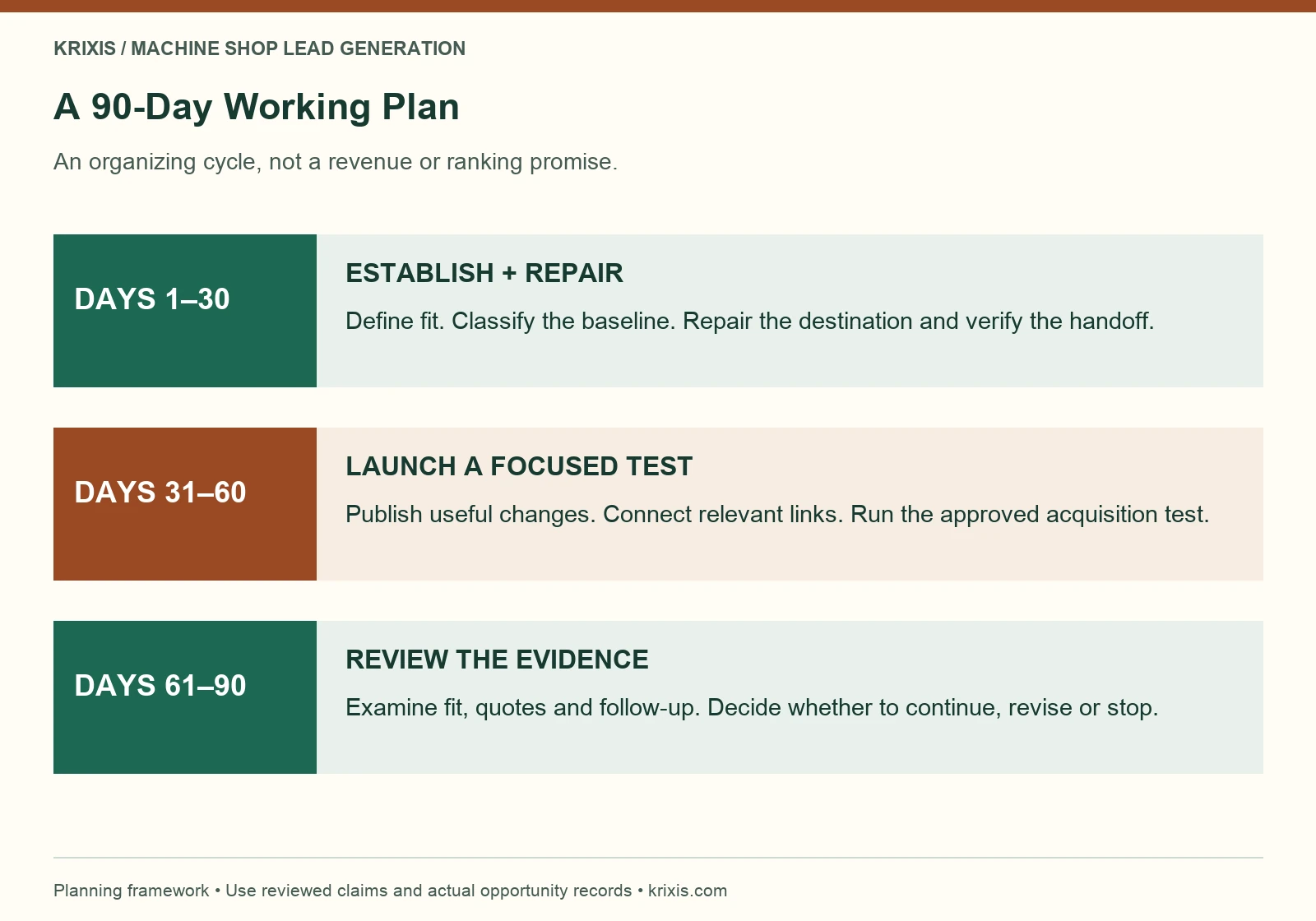
Three-stage 90-day plan showing route repair, acquisition testing and evidence review
Days 1–30: define fit, classify the baseline, repair the destination and verify the handoff. Days 31–60: publish the useful changes and run a focused acquisition test within its approved scope. Days 61–90: review work fit, quoting and follow-up, then continue, revise or stop the test. The calendar organizes work; it is not a revenue or ranking guarantee.View full-size infographic

Put the three stages on one working plan

Define target work, map the acquisition route and record the evidence for your next review.

Use the free 90-day planning worksheet

Diagnose weak results before changing everything

Use the pattern in the records to choose the next investigation. Little relevant visibility may call for reviewing indexing, search intent and the page’s usefulness. Visits without inquiry activity may call for checking destination fit, evidence and the next action. Inquiries without suitable work may point toward targeting or expectation problems.

Qualified inquiries without quotes need a conversation with estimating. Quotes without decisions need an examination of the buying cycle and follow-up, not an automatic accusation that marketing failed. Several factors can produce the same pattern, so test a plausible explanation instead of declaring a cause from one metric.

Fictional teaching example: a shop’s campaign receives visits and inquiries, but the estimator records that most ask for a process the shop does not offer. The next useful action is to inspect the search terms, ad wording and destination claims. Increasing the campaign budget would not resolve that observed mismatch.

Keep a short change log. Make one meaningful adjustment where practical, record what changed and review it after enough relevant activity has occurred. Avoid claiming an improvement from a handful of visits or an unfinished quoting cycle.

Ceramic forms beside matching and mismatched openings
Evaluate work fit before expanding the acquisition effort.
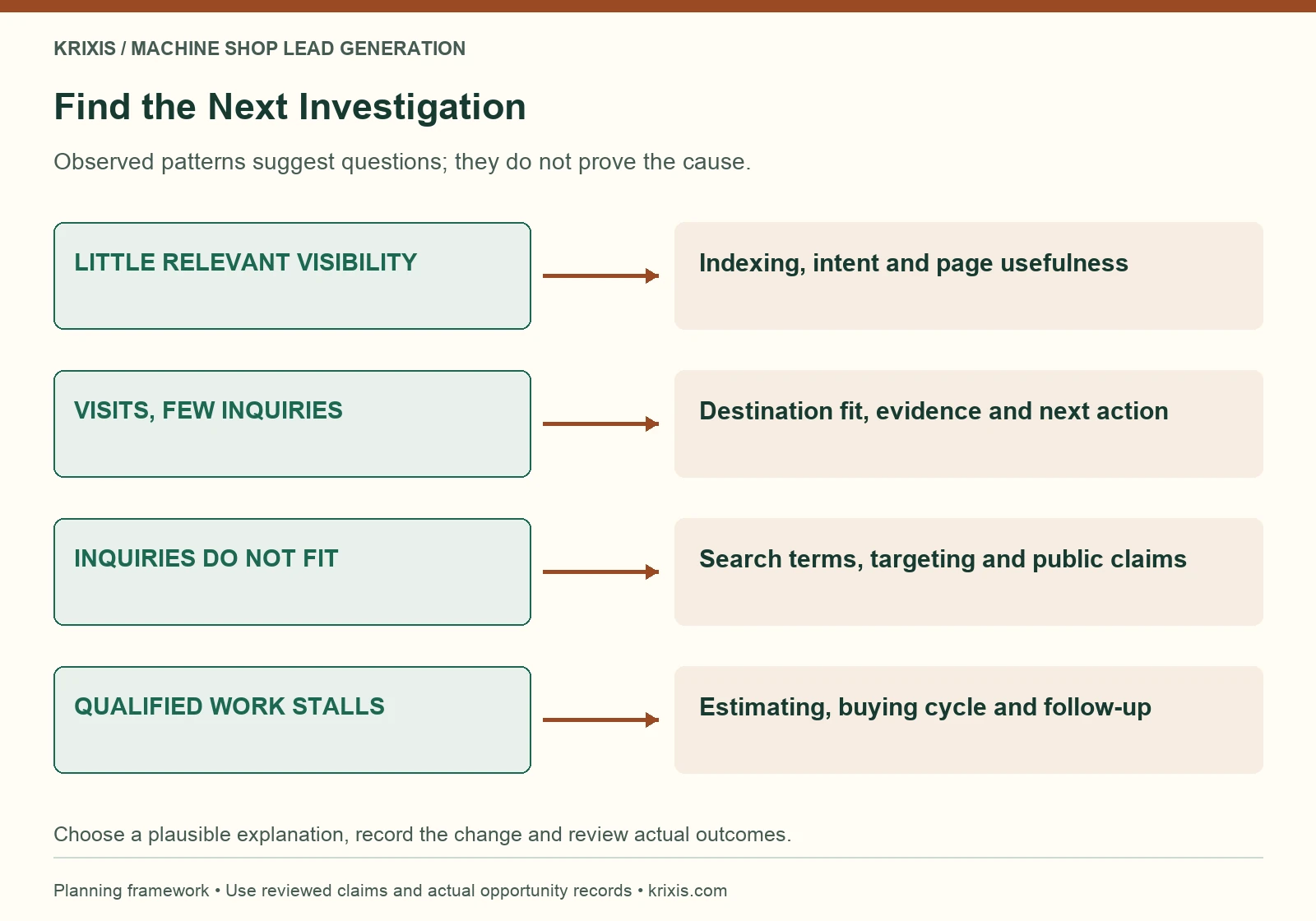
Diagnostic diagram connecting observed lead generation patterns with the next investigation
When relevant visibility is low, review indexing, intent and page usefulness. When visits produce little inquiry activity, investigate destination fit and the next action. When inquiries do not fit, inspect targeting and claims. When qualified work stalls, review estimating, the buying cycle and follow-up. These are investigation prompts, not proven causes.View full-size infographic

Review a small scorecard every week

Track inquiries, qualified opportunities, quotes, decisions and the next follow-up action by source where known. Add response ownership and the reasons work did not fit. Use counts alongside rates so a small denominator is visible.

Agree the qualification definition before comparing channels. A channel that produces many incomplete messages is different from one that produces a few relevant conversations. Neither can be judged solely by the website’s form total. Keep open opportunities separate from losses and avoid assigning revenue before a real outcome is recorded.

At the end of the cycle, keep the useful route, repair the clearest remaining constraint and choose the next test. For implementation help across search, destination pages and follow-up, explore KriXis machine shop lead generation. The aim is a process the shop can operate consistently and improve with real evidence.

Review your first 90-day RFQ generation test

Share public page URLs and a non-confidential brief to discuss the first route worth improving.

Email KriXis about your lead generation plan

November 2, 2026/1 Comment/by Matthew Borza
https://www.krixis.com/wp-content/uploads/2026/11/machine-shop-lead-generation-hero.webp 960 1440 Matthew Borza https://krixis.com/wp-content/uploads/2015/12/KriXis-Full-Logo-Trans-300x79.png Matthew Borza2026-11-02 05:34:162026-11-08 07:24:53Machine Shop Lead Generation: A 90-Day Plan for Better RFQs

Categories

  • Digital Marketing
  • Machine Shop Marketing
  • Machine Shop Of The Week
  • Manufacturing Marketing
  • Personal Branding
  • small business digital marketing
  • small business web design
  • web design

Our Latest Posts

  • Cut-paper RFQ packet with abstract drawing sheets, a specification card and a folded delivery map
    Machine Shop RFQ Checklist: What Buyers Should IncludeNovember 8, 2026 - 4:20 am
  • Three wire document trays holding plain quote folders with a copper clip
    Machine Shop Quote Follow-Up: 5 Email Templates and a Clear WorkflowNovember 5, 2026 - 11:59 am
  • Translucent browser panels moving through blue-green airflow
    Machine Shop Website Speed: A Practical Plan for Faster Buyer PagesNovember 2, 2026 - 12:18 pm
  • Unbranded manufacturing building at dusk with a clearly lit entrance
    Machine Shop Lead Generation: A 90-Day Plan for Better RFQsNovember 2, 2026 - 5:34 am
  • Layered paper paths branching through an abstract industrial campus
    Machine Shop Website Navigation: Help Buyers Find the Right CapabilityOctober 30, 2026 - 12:14 pm

Be The First To Read Our Posts

Matthew Borza – President

KriXis Consulting measures success using tangible data. This is our MBA mindset. Our constant growth is due to the utilization of evidence-based strategies to deliver what matters most, ROI.

Machine Shop Marketing © Copyright - KriXis Consulting
  • Link to X
  • Link to Facebook
  • Link to LinkedIn
  • Link to Pinterest
  • Link to Instagram
  • Services
  • RFQ Growth
  • Blog
  • Contact
  • Portal Sign In
Scroll to top Scroll to top Scroll to top

This site uses cookies. By continuing to browse the site, you are agreeing to our use of cookies.

Accept settingsHide notification onlySettings

Cookie and Privacy Settings


How we use cookies

We may request cookies to be set on your device. We use cookies to let us know when you visit our websites, how you interact with us, to enrich your user experience, and to customize your relationship with our website.

Click on the different category headings to find out more. You can also change some of your preferences. Note that blocking some types of cookies may impact your experience on our websites and the services we are able to offer.

Essential Website Cookies

These cookies are strictly necessary to provide you with services available through our website and to use some of its features.

Because these cookies are strictly necessary to deliver the website, refusing them will have impact how our site functions. You always can block or delete cookies by changing your browser settings and force blocking all cookies on this website. But this will always prompt you to accept/refuse cookies when revisiting our site.

We fully respect if you want to refuse cookies but to avoid asking you again and again kindly allow us to store a cookie for that. You are free to opt out any time or opt in for other cookies to get a better experience. If you refuse cookies we will remove all set cookies in our domain.

We provide you with a list of stored cookies on your computer in our domain so you can check what we stored. Due to security reasons we are not able to show or modify cookies from other domains. You can check these in your browser security settings.

Google Analytics Cookies

These cookies collect information that is used either in aggregate form to help us understand how our website is being used or how effective our marketing campaigns are, or to help us customize our website and application for you in order to enhance your experience.

If you do not want that we track your visit to our site you can disable tracking in your browser here:

Other external services

We also use different external services like Google Webfonts, Google Maps, and external Video providers. Since these providers may collect personal data like your IP address we allow you to block them here. Please be aware that this might heavily reduce the functionality and appearance of our site. Changes will take effect once you reload the page.

Google Webfont Settings:

Google Map Settings:

Google reCaptcha Settings:

Vimeo and Youtube video embeds:

Other cookies

The following cookies are also needed - You can choose if you want to allow them:

Accept settingsHide notification only