
Machine Shop Website Redesign: An SEO Migration Checklist
KriXis editorial guide · Published October 11, 2026 · About 12 minutes to read
A machine shop website redesign should make the business easier to evaluate and contact. Yet a polished launch can create new problems: an established capability URL disappears, a buyer's bookmarked RFQ page stops working, or the replacement contact form never reaches the person responsible for quotes.
The remedy starts before design approval. Treat the rebuild as a controlled transfer of useful pages, buyer paths and operational responsibilities. Give every important existing URL a destination, every inquiry route a test, and every launch decision an owner.
This guide explains how to plan a machine shop website redesign, protect useful search connections and check the finished site. It includes a free planning kit with a URL mapping worksheet and launch checklist. No process can guarantee unchanged rankings, but a documented migration makes avoidable failures easier to find and correct.

Define the redesign before choosing a layout
Write a short project brief that answers three questions: what is failing today, what should a buyer accomplish on the new site, and which evidence will show that the change works?
“Modernize the website” is too broad to guide a launch. A more useful goal might be: help procurement teams find the right machining capability, understand the shop's approved scope, and send an inquiry with enough context for routing. That goal influences navigation, page content, mobile presentation and contact instructions.
Separate visual changes from structural changes in the brief. Replacing fonts and layouts while keeping URLs differs from changing page paths, merging content or moving domains. Google publishes separate guidance for site moves with URL changes and infrastructure changes without URL changes. Ask the developer to identify which situation applies.
Assign a business owner, a technical launch owner and an inquiry owner. In a small shop, one person may hold multiple roles, but the responsibilities still need names. Agree who can approve content, who can restore the previous site, and who confirms that a test request reached its intended destination.
Record what the existing website already does
An inventory helps prevent useful content from vanishing during a rebuild. Start with the sitemap, navigation and a crawl of the current public site. Add landing pages linked from advertisements, directories, email signatures, customer documents and sales presentations. A page can matter even when it receives little organic traffic.
For each URL, record its purpose, current title, relevant capability, buyer action and proposed treatment. Include PDFs, downloadable resources, images referenced by other pages, and the thank-you or confirmation screens used after an inquiry. Save a copy of the current content and screenshots of important templates.
If Search Console and analytics are available, use actual records to prioritize pages. Look for relevant queries, impressions, clicks, entry pages and recorded inquiry activity. Write the date range and metric definition beside the numbers. A website redesign is not a reason to invent a baseline when access or tracking is missing.
Ask sales which links they share most often. Ask the RFQ owner where visitors become confused. An older page with modest traffic may explain a specialty process that matters to a particular buyer. Review its usefulness before deleting it.
Use KriXis's machine shop SEO audit guide to organize broader discovery, then keep this migration inventory focused on what the rebuild changes. A short prioritized list with clear owners is more actionable than an export nobody has reviewed.

Map old URLs to deliberate destinations
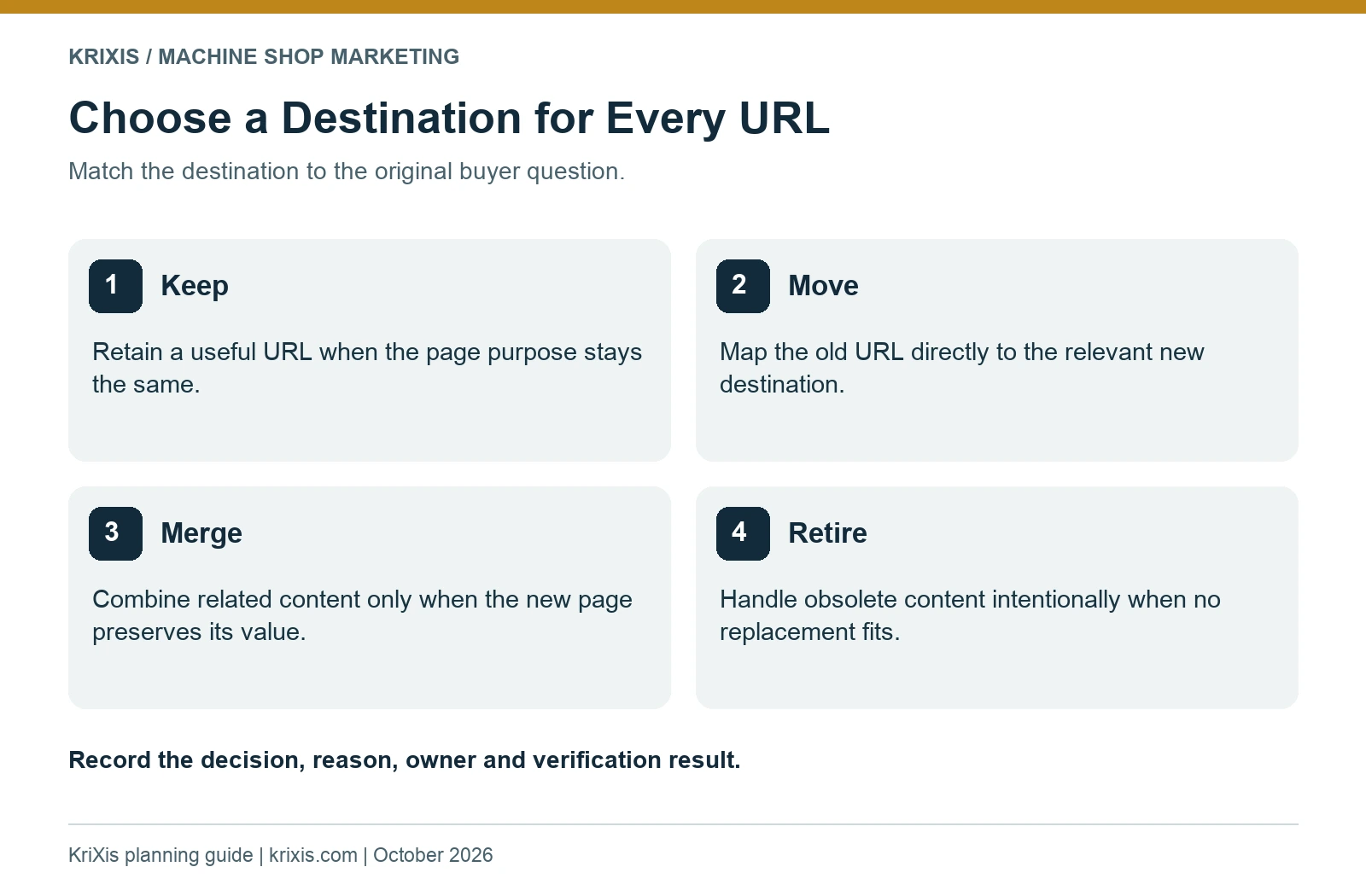
Keeping a clear, established URL is often the simplest choice when the page's purpose remains the same. A redesign does not require every page to receive a new path. Make changes when they improve a real structural problem, and document the reason.
Use four decisions in your worksheet: keep, move, merge or retire. “Keep” means the content stays at the existing URL. “Move” means the equivalent content receives a new URL. “Merge” means several genuinely related pages become one stronger resource. “Retire” means the content has no suitable replacement and should be handled intentionally rather than concealed.
For a permanent move, Google recommends server-side permanent redirects such as 301 or 308. Point old URLs directly to their relevant final destinations and avoid chains. Sending many unrelated pages to the homepage can be treated as a soft 404. See Google's redirect guidance for implementation details.
A fictional mapping example
Suppose a shop has separate pages for aluminum CNC milling and a general equipment list. The milling page answers a distinct buyer question and has an established path. It could keep that URL while receiving clearer content. The equipment list could move into a broader capabilities resource if that new page actually preserves its useful information.
Do not redirect the milling page to the new homepage merely because the homepage mentions CNC machining. The replacement should satisfy the original reader's purpose. If the shop has stopped offering a process, have the responsible team decide whether an explanatory page remains useful or whether removal is appropriate.
Record the old URL, destination, decision, reason, owner and test result. Review mappings with both the developer and someone who understands the services. Automated rules still need spot checks; a technically successful redirect can send a buyer to the wrong information.
Preserve the information manufacturing buyers need
A migration plan cannot compensate for thin replacement pages. Before launch, compare important old pages with their new versions. Confirm that approved capability details, relevant materials, process limits, inspection context and inquiry instructions survived the rewrite.
Use the machine shop capability page blueprint to define a useful page structure. Buyers need enough information to judge fit. Avoid publishing tolerances, certifications, equipment availability or industry approvals that the responsible team has not verified.
Content consolidation deserves particular attention. Combining several pages can simplify navigation, but a long generic page may erase meaningful distinctions between milling, turning, finishing coordination or production support. Keep distinct pages when they answer different supplier evaluation questions with substantive information.
Review approved case studies, technical downloads and photographs separately. Check publication permissions and whether the information remains current. Replace outdated claims with verified wording instead of carrying them forward because they appeared on the old site. Existing case study guidance can help organize that review.
Make the RFQ next step visible on capability pages. Explain what a visitor should send, how to contact the shop and what happens next. Keep initial requests appropriate for your information-handling process; do not encourage buyers to email sensitive drawings through an unsuitable channel.
Check page templates and search signals together
Test at least one example of every important template: homepage, capability page, article, resource page and contact route. A shared template defect can affect many URLs, so fix the pattern before polishing isolated pages.
Each page needs a descriptive title, a useful meta description, one clear main heading and headings that organize its actual content. Write meaningful image alt text when an image conveys information. Decorative images should not add repetitive spoken descriptions. Review social previews so shared capability or resource links show the intended title and image.
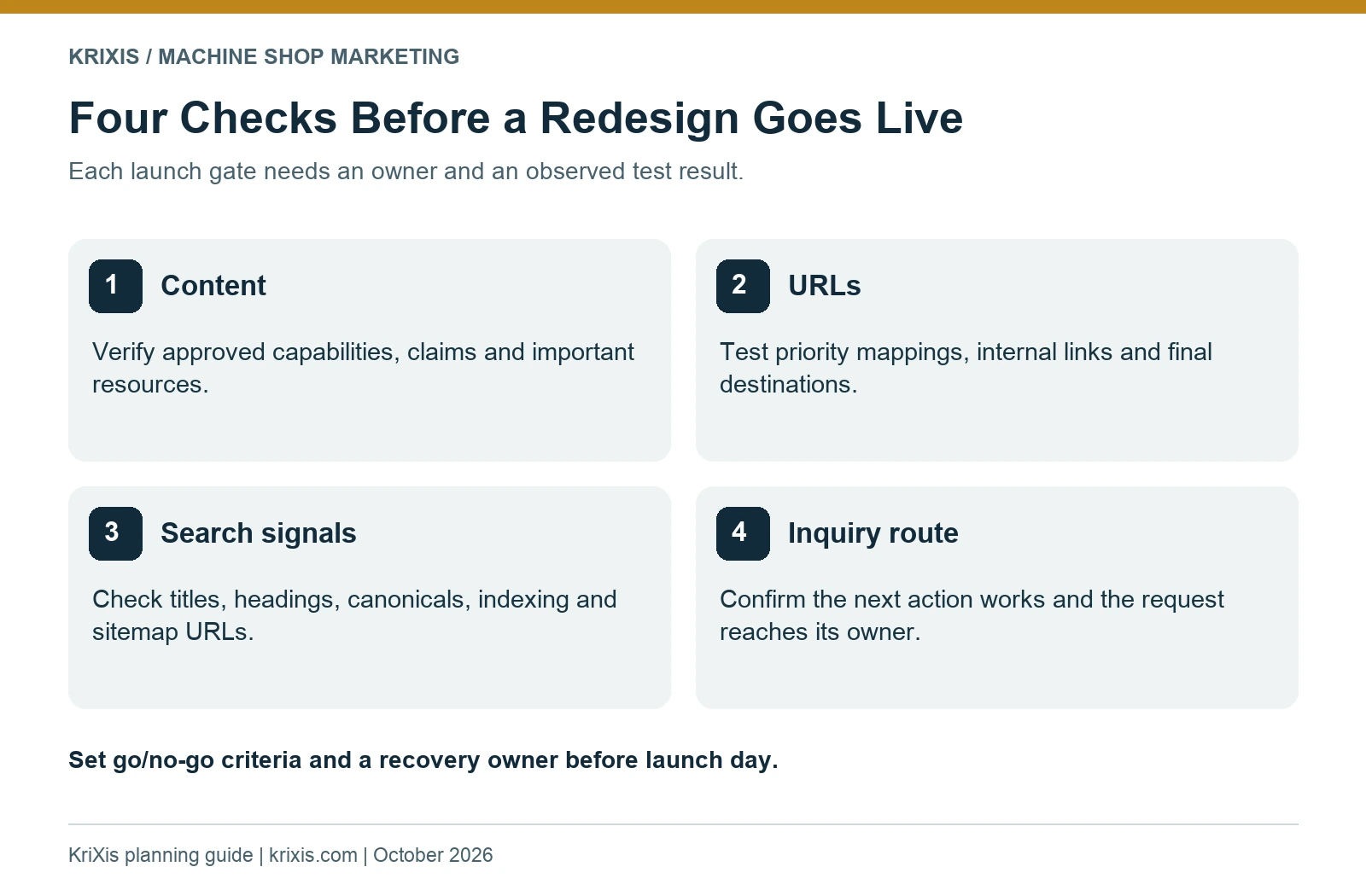
For moved pages, Google's migration checklist includes updating internal links, canonical references and sitemap URLs, and removing development-only crawl or indexing restrictions before launch. The technical owner should verify those details against the final live URLs. A staging environment's settings should never be assumed correct for production.
Keep the relationship between page signals understandable. A public page intended for search should not simultaneously declare itself unindexable or identify a different obsolete URL as canonical. Check rendered output rather than relying only on a plugin's editing screen.
Structured data should describe what is actually on the page. Retain supported organization, article or breadcrumb information where appropriate. Do not add fabricated ratings, product claims or service outcomes to make a schema test look more impressive.
Test the buyer journey on desktop and mobile
Start from the pages visitors actually use. Search for a capability in the site's navigation, open its page, read the relevant details and follow the inquiry route. Repeat on a phone-sized screen. Confirm that menus, tables, diagrams, downloads and buttons remain usable without awkward horizontal scrolling.
Check ordinary interactions that screenshots cannot prove. Does a phone link use the intended number? Does a mail link open with the right recipient? Does a download contain the promised resource? Can a visitor find contact information after landing directly on an article rather than the homepage?
If the site uses an RFQ form, send a clearly identified test request through the live form using an authorized address. Verify receipt with the inquiry owner, including any attachments permitted by the approved process. A success message only proves that the browser displayed a message; it does not establish delivery to the quoting team.
Test validation and error recovery too. Required fields should be understandable, errors should explain what to fix, and the visitor should not lose a detailed message unnecessarily. Maintain spam protections while resolving problems. A working visible email fallback can help when a form needs further investigation.
Compare loading behavior across key templates. Oversized images, unnecessary scripts and unstable layouts can make a beautiful redesign cumbersome. Use appropriately sized media, reserve image space and evaluate real pages on representative devices. Avoid declaring the whole site fast from a single homepage test.

Set a launch gate and a recovery plan
Choose a launch window when the responsible people can respond. Save the previous site, content, configuration and redirect rules through the team's approved backup process. Know what can be restored and who controls hosting, DNS, WordPress and any external inquiry service.
Use a short go/no-go checklist. Important mappings should be approved and tested. Priority content should be verified. Public indexing settings should be checked. Contact routes should be usable. The inquiry owner should know when to monitor requests and report problems.
Classify unresolved items by impact. A missing approved capability detail, broken RFQ destination or widespread redirect failure can justify delaying launch. A minor spacing adjustment may be logged for follow-up. Define the threshold before launch day so urgency does not replace judgment.
If the project changes both platform and content structure, consider whether the team can stage those changes into manageable steps. Record dependencies and the specific checks for each step. The aim is a launch that the available team can diagnose and support.
For a same-domain redesign, do not treat Google's Change of Address tool as a general launch button. Google's URL migration guidance limits its use to qualifying domain or subdomain moves. Have the technical owner follow the instructions for the actual type of change.
Monitor the launch through actual evidence
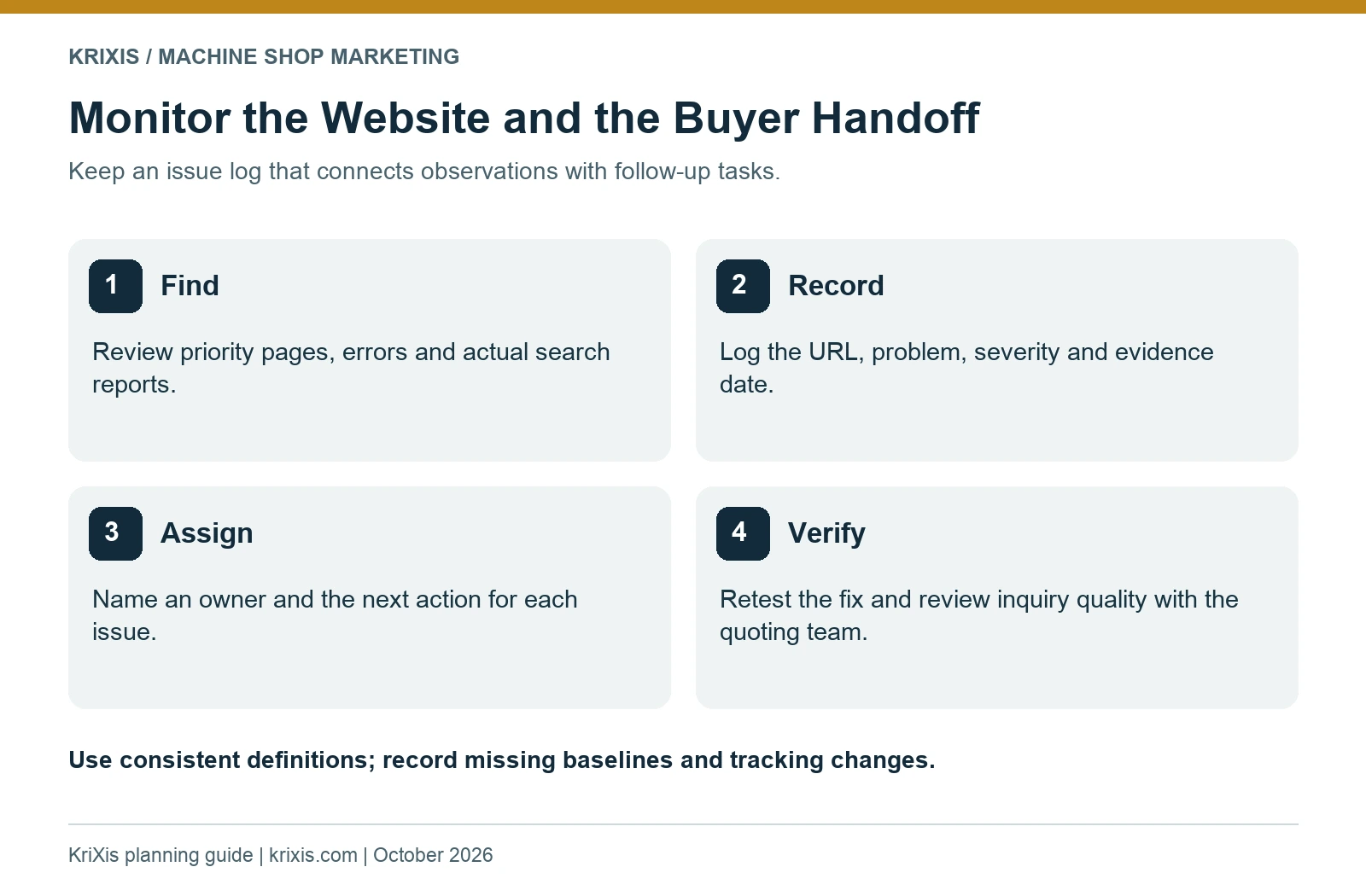
Create a simple issue log with the affected URL, observed problem, severity, owner, next action and verification date. Start with priority pages and contact paths rather than waiting for a visitor to report a failure.
Review crawl errors, sitemap processing and available Search Console reports after launch. Google notes that URL moves can involve temporary search fluctuations while pages are recrawled and reindexed. Do not promise a fixed recovery date. Its guidance also recommends keeping redirects for at least a year, with longer retention useful for visitors following old links.
Keep redirects under change control. A later cleanup should not accidentally remove them because the new site has been live for a few weeks. Include useful old links from brochures, directories and customer records in the retention decision.
Compare inquiry activity using a consistent definition and comparable periods. Separate form delivery failures, tracking changes, seasonal differences and page visibility issues before attributing a change to design. If tracking began only at launch, record that limitation and build an honest baseline going forward.
Schedule a practical review with the website owner and inquiry owner. Which pages are generating relevant questions? Which requests need clarification? Which broken links remain? Use those observations to improve the next task, without turning every early fluctuation into a redesign emergency.

Common questions about machine shop website redesigns
Will a redesign automatically improve SEO?
No. It can improve clarity, usability and technical presentation, but those benefits depend on implementation and useful content. Rankings and inquiry outcomes are not guaranteed. Preserve valuable pages and use actual evidence to assess changes.
Do we need to change every URL?
No. Keep suitable URLs when the purpose remains the same. Map and test necessary changes, including downloads and important campaign destinations. A visual refresh and a URL migration are different project decisions.
How long should the redesign take?
The scope, content readiness, integrations and approval process determine the schedule. Build the estimate from an inventory and assigned responsibilities. A launch date chosen before those details are known can hide unresolved work.
Can we launch while the RFQ form is still being tested?
Treat inquiry delivery as a launch requirement when it is a primary buyer action. If a form cannot be verified, resolve it or provide a clearly explained working contact route. Never present an untested delivery path as confirmed.
Make the redesign easier to operate
The most useful redesign plan connects page decisions with business responsibilities. Preserve approved information, map necessary URL changes, verify the buyer's next step and give the team a manageable launch checklist.
KriXis supports machine shop website design and machine shop SEO. Bring an existing site URL, the problem you want to solve and your proposed timing to a conversation about the next step.

Trackbacks & Pingbacks
[…] changing established pages, use the website redesign and SEO migration checklist to map important URLs, preserve approved capability content and test the buyer inquiry route. The […]
Leave a Reply
Want to join the discussion?Feel free to contribute!