
Machine Shop Quality Pages: Turn Inspection Claims Into Buyer-Useful Evidence
KriXis editorial guide · About 13 minutes to read
A machine shop quality page should help a prospective buyer answer three questions: What does this shop actually do to evaluate work? What documentation can we discuss? Who will review the requirements for our project? A wall of badges and a sentence about commitment to excellence rarely answers those questions.
The page is a bridge between your public capabilities and a technical conversation. It should explain verified practices in plain language, show what you can appropriately share, and make the next step clear. It cannot approve a drawing, replace a supplier evaluation or promise that every requirement fits your shop.
This guide explains how to plan that page, review its claims, organize supporting evidence and keep it current. Start with one facility or defined business scope. Involve the people responsible for quality and estimating before turning internal terminology into public copy.

1. Start with the buyer's evaluation task
Imagine a manufacturing buyer moving from your CNC milling page to your quality page. They may need to know whether you can discuss an inspection plan, provide particular records, or explain how drawing revisions enter the quoting process. Those are different questions from which machining centers you own.
Write down the recurring questions that sales and quality actually receive. Separate early supplier research from project-specific review. The public page can summarize your approach and available discussion topics; detailed acceptance criteria and document deliverables belong in the project review.
Give the page a clear opening: the shop or facility covered, the relevant work, and the purpose of the information. Avoid a broad promise such as “every tolerance, every industry.” Be specific about what a buyer should bring to a discussion and what your team must confirm.
Connect this page to your machine shop capability pages. Buyers should be able to move between the process they need and the information used to evaluate that process without searching the whole website.
2. Build a claim register before the page draft
Create a small working register with a row for each proposed statement. Record the wording, its source, the scope it covers, the person approving it and the event that would make it outdated. A claim without an owner is difficult to maintain even when it begins accurately.
Separate four categories: management-system certification, inspection resources, operating practices and available documentation. They answer different questions. Owning a measuring instrument does not establish certification, and a management-system certificate does not demonstrate that a particular feature can be inspected as required.
Use the register to resolve vague words. What does “full inspection” mean in this context? Is a report standard for the work described or available only when agreed? Does “in-house” refer to the facility shown on the page? Ask those questions before editing for style.
Unresolved claims should stay in the working document with a reviewer assigned. Do not publish a stronger substitute because the supporting record is hard to locate. A modest, verified statement is more useful than an impressive statement your inquiry team must later correct.
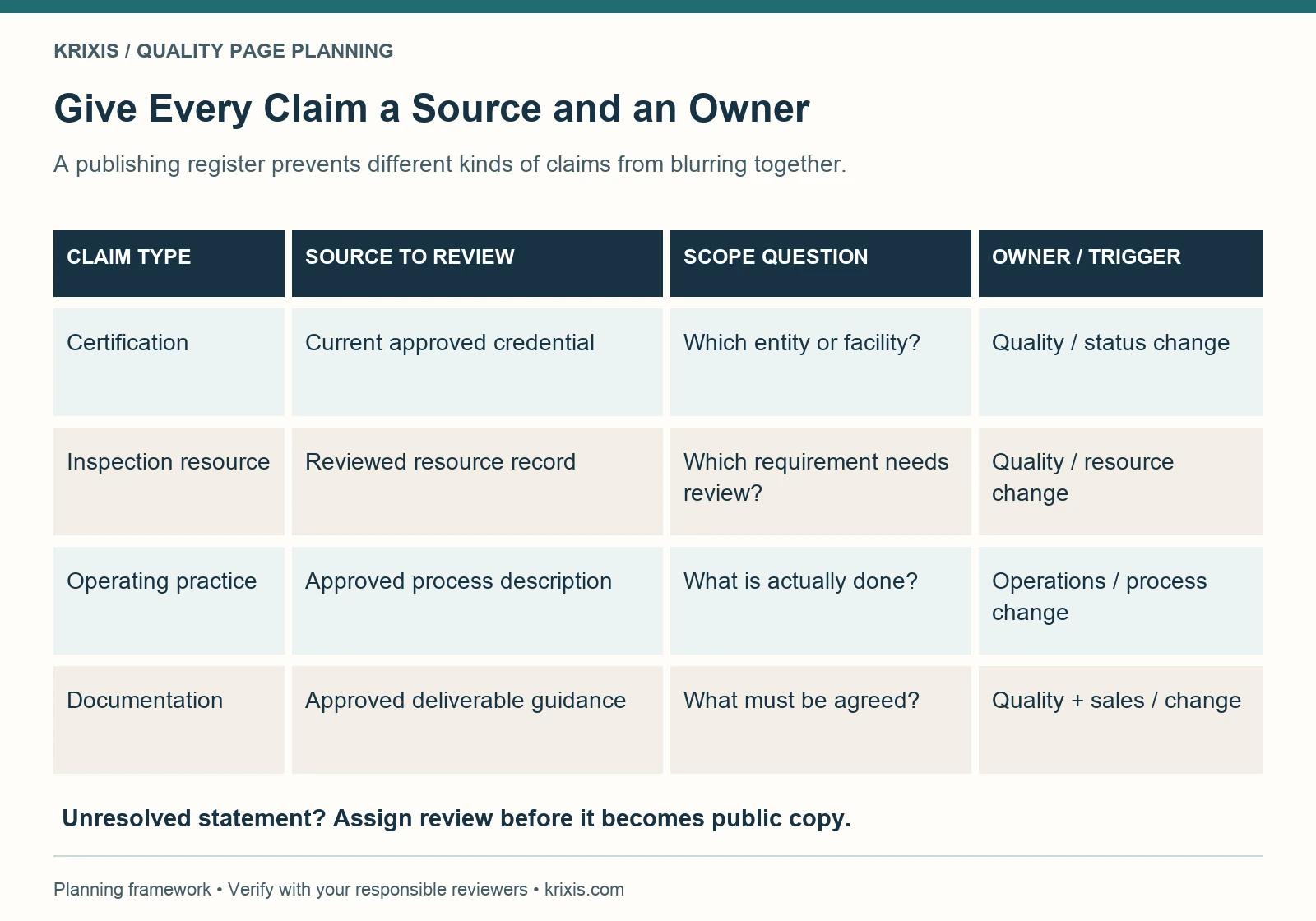
The register separates certification, inspection resources, operating practices and documentation. Review the credential, resource record, process description or deliverable guidance that supports each statement. Confirm its scope and assign a responsible reviewer and change trigger. Hold unresolved wording for review.
3. Describe certification with its actual scope
If a current certification applies, identify the correct organization, applicable facility or scope, standard designation and issuing body from the approved record. Provide an accessible current certificate or a clear route to request it, where sharing is permitted. Let the responsible reviewer approve the wording and document together.
Do not treat a copied badge as verification. ISO explains certification and verification routes, including checking with the relevant certification or accreditation body. ISO develops standards; external certification bodies issue certificates. Follow the issuer's conditions for any mark and avoid using the ISO logo as your own certification badge.
An expired document should trigger review of the web copy, downloadable files and related sales links. If a renewal or scope change is unresolved, use language approved for that exact situation rather than implying uninterrupted status. Do not guess from an old PDF.
A shop without a particular certification can still publish an accurate account of its reviewed practices and inquiry process. Describe what is supported without wording that implies an unheld credential. Keep customer approval, product acceptance and management-system certification distinct throughout the page.
4. Explain inspection resources without blanket promises
An inspection-equipment list is a starting point. Help the buyer understand which types of questions your team can evaluate, who reviews the inspection requirements and what additional information may be needed. Include only resources and methods your technical reviewer has approved for public description.
Avoid converting a tool specification into a universal acceptance promise. Measurement suitability depends on the particular requirement and method. A photograph of a probe, a calibration sticker or a model number does not establish that every feature on a prospective drawing can be measured appropriately.
NIST's metrological traceability guidance distinguishes support for a traceability claim from fitness for a particular measurement purpose. Traceability concerns measurement results and their documented calibration chain; it does not, by itself, guarantee that the result is suitable for the intended need. Have the quality reviewer approve your terminology.
Link to your equipment-list guide when explaining how to organize verified equipment facts. On a shop's own website, link the relevant equipment category to the quality discussion instead of duplicating a long inventory that will drift out of date.

5. Separate public information from request-only records
Not every useful record belongs on a public webpage. Decide what can be summarized openly, what can be shared through an approved request process and what must remain in your internal systems. Assign an owner to each decision rather than leaving the website editor to infer permission.
Public information might include approved descriptions of inspection review, available documentation categories and a current shareable certificate. Request-only information might include an appropriately approved sample report or a response to a buyer questionnaire. Actual customer records need the relevant permissions and handling process.
Before sharing a sample, examine customer names, drawing identifiers, revision details, part geometry, metadata and embedded attachments. Removing a logo does not necessarily make a document suitable for public use. Use an approved teaching sample if a real record cannot be shared, and label any invented example clearly.
Explain the request route beside the information. State what the buyer should identify and who will evaluate the request. Do not tell visitors to send sensitive drawings through a general marketing email address. Direct them to an approved exchange method after the appropriate discussion.
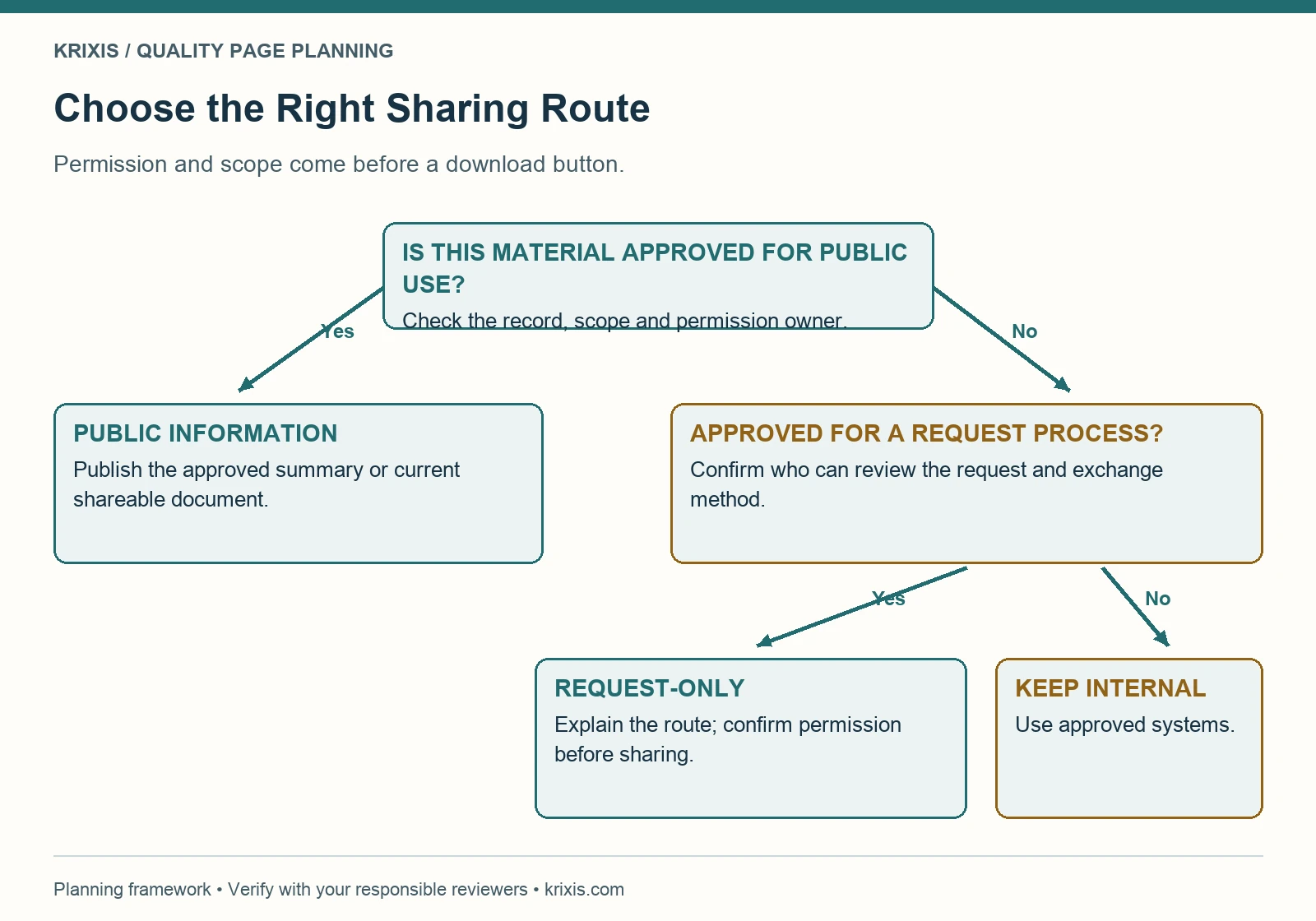
First ask whether the material is approved for public use. If yes, publish only the approved summary or shareable document. If no, ask whether an approved request process exists. Use that process when permitted; otherwise keep the material in approved internal systems.

6. Explain documentation as an agreed deliverable
A buyer may use “inspection report,” “material certification” or “first article” to mean a specific deliverable. Your webpage should help start that conversation without silently promising a package on every order. Use the terminology your quality and commercial teams can consistently explain.
For each document category you choose to mention, clarify whether availability is subject to review and agreement. Describe the information needed to discuss it: applicable requirements, drawing revision, report format, timing and any customer-specific instructions. Confirm commitments in the appropriate project records.
Keep purchasing and outside-process scope clear. If your team coordinates an external service, describe that relationship accurately; do not make it sound like an in-house department. Identify what your inquiry process needs to establish before confirming responsibilities or deliverables.
A useful paragraph might say that requested inspection documentation should be identified during quotation so the team can review format and requirements. Publish that wording only if it matches the shop's actual process. The point is to explain an operational handoff buyers can use, not to add a universal disclaimer beneath an unsupported promise.
7. Give the page a practical information order
Build a sequence around the buyer's next question. Start with scope and the relevant quality contact route. Follow with verified credentials where applicable, an understandable description of inspection resources, documentation discussion topics, and links to relevant capabilities. End with clear inquiry instructions.
Use descriptive headings such as “Inspection requirements and report requests.” Keep the important explanation in HTML, even when an optional PDF is available. A buyer should not need to download a large file simply to learn what the page covers or how to ask a question.
Choose supporting images that help explain the topic. Use photographs you have permission to publish and descriptions that match what they show. An instrument image is an illustration of a resource, not proof of a measured result. Keep captions useful and avoid repeating the heading in every caption.
If you use a detailed diagram, provide its essential information in readable text too. W3C's complex-image guidance describes short descriptions and fuller text alternatives. On a phone, the reader should still understand the explanation without enlarging small words inside a graphic.
8. Replace generic copy with a bounded example
Fictional teaching example: a small shop is rewriting a quality page that currently says “Total quality with state-of-the-art inspection.” Its reviewer cannot find a clear definition of either phrase. The team removes them from the proposed draft and starts with the buyer questions.
For this invented exercise, suppose the team has verified an internal requirement-review process and a permitted sample-report request route. A draft could read: “Identify inspection and documentation requirements with your quote request. Our team reviews the requested approach and report format before confirming the project requirements. Ask about an approved sample report when discussing your documentation needs.”
That paragraph is useful only if those practices exist and the responsible team approves it. It does not establish the fictional shop's certification, instrument capability, acceptance criteria or customer outcomes. Those topics require their own evidence and review.
Apply the same editing method to your draft: underline each operational claim, identify its record and owner, and remove anything you cannot support. Then ask someone unfamiliar with the shop to find the next step. If the reader still has to guess who to contact, improve the handoff before adding more promotional language.
9. Make the inquiry a quality-to-estimating handoff
The call to action should match the reader's task. “Discuss inspection and documentation requirements” is more informative than an isolated “Contact us.” Explain which non-confidential details to provide initially and how the team will arrange the next review or approved file exchange.
Ask the inquiry owner to define the minimum routing information: company and contact, relevant capability or page, a short description of the question, and any timing that helps assign it. Additional technical requirements can be collected through the agreed project process. Avoid turning the public page into an unmonitored document repository.
Connect the handoff to your RFQ form design and lead qualification process. Marketing context should reach the person reviewing the inquiry, so buyers do not need to reconstruct which page prompted the question.
Test the actual route. A button opening an email draft demonstrates link behavior, not delivery. If you use a form, verify submission, receipt and assignment with the people operating it. Record what was observed and fix failed steps before promoting the page.

10. Finish the page's search and usability details
Use a title and description that accurately describe the page's purpose and scope. Keep one clear H1, logical headings, readable link labels and a stable URL. Link from relevant capability and industry pages so buyers can discover the information in context.
Give useful images descriptive alt text, dimensions and optimized file sizes. Check the featured image, sharing preview and downloaded documents separately from body images. Confirm the canonical, indexing settings and supported structured data in the rendered page rather than assuming an editor score proves they are correct.
Do not invent review ratings, credentials or result claims for schema. A quality page should describe the organization and its supported content accurately. Google's helpful-content guidance does not prescribe a preferred word count. Give this page enough detail to answer its buyer questions, then stop.
Review the live page on desktop and a narrow phone viewport. Check that certificate links open, document names make sense, text remains readable and the inquiry route is easy to find. Include keyboard navigation and an actual check of any download in the publication record.
11. Maintain the evidence behind the words
Assign a quality reviewer and a publishing owner. Review triggers should include a credential or scope change, a new or retired inspection resource, an updated documentation process, a broken request route and a change to the facility described. A calendar reminder can supplement these triggers.
Keep a revision log with the source change, approval, affected URLs and observed checks. Update linked PDFs and sales references with the webpage. A new date at the top of an unchanged page is not a substitute for reviewing the claims and their supporting records.
Use real inquiry feedback to decide what to improve next. Track recurring questions and incorrect assumptions through your approved CRM or inquiry process. A buyer repeatedly asking whether a report is included may reveal unclear copy, even when the page receives little traffic.
Connect that feedback to your content strategy. The quality page belongs in a connected system of useful evidence, capability explanations and clear next steps. Keep the facts current and make the review process understandable.
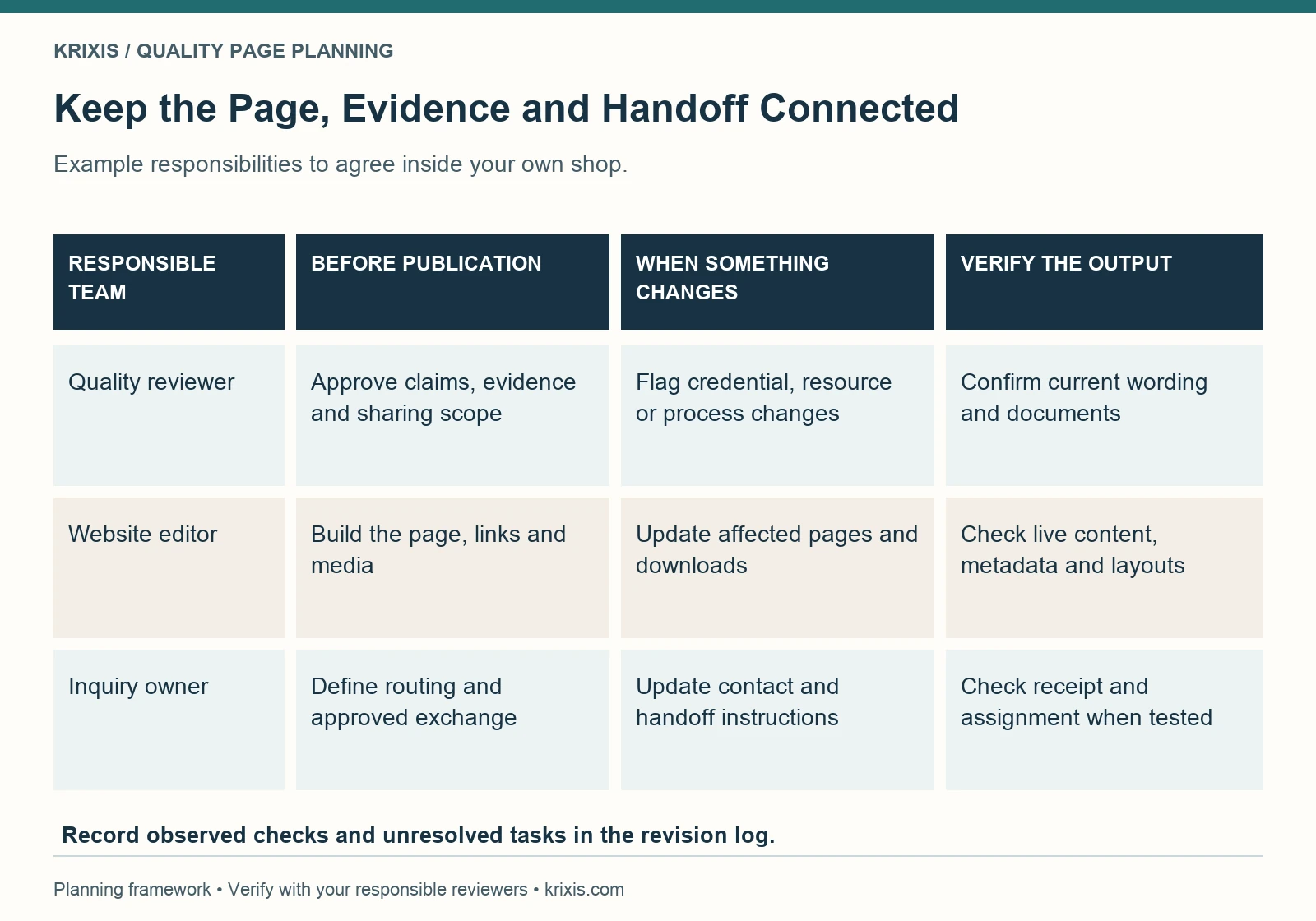
Before publication, the quality reviewer approves claims and sharing scope, the editor builds the page, and the inquiry owner defines routing. When circumstances change, each flags the affected information. Verify current wording and documents, live pages and layouts, and inquiry receipt and assignment to the extent actually tested.

Leave a Reply
Want to join the discussion?Feel free to contribute!