
Google Ads Search Terms for Machine Shops: A Practical Audit


Reviewing Google Ads search terms for machine shops starts with a practical question: would your estimator want to receive a request from someone who typed this? A production buyer looking for turned stainless spacers, a technician looking for a replacement lathe belt and an applicant searching for a CNC operator job can all use machining language. Only some of those searches fit a contract shop’s work.
This audit connects what people searched for with the page they landed on and what happened to the resulting request for quotation (RFQ). You can run it on one campaign, make a handful of documented changes and give the estimating team a way to flag the requests worth pursuing.
Define the work your campaign should bring in
Start with one campaign and ask the person who reviews new work to name the jobs the shop wants to quote right now. Record the process, materials, order profile and places the shop serves. Use the shop’s actual capabilities and available capacity. A campaign for repeat turning work might have a different brief from one for prototype milling, even at the same business.
Write one sentence for each decision. “We quote repeat orders of small turned metal components for equipment builders” is a starting point. Add the specific limits the shop is comfortable sharing publicly, such as its preferred order profile or whether it accepts buyer-supplied material. Put temporary limits, such as a backlog on one process, in the campaign brief with an owner and a review date.
Agree on how estimating will mark an inquiry. A qualified RFQ might fit the supported process, have an identifiable commercial buyer and have enough information for an estimator to quote or ask a specific question. That leaves room for genuine buyers whose first message is brief. A single contact form submission can also be an applicant, an equipment vendor or a duplicate. Our machine shop lead qualification guide provides a starting point for setting those rules.
Pull the searches that triggered your ads
A keyword is a targeting input in your ad group. A search term is what the user entered. The two can differ, so looking only at your keyword list can conceal the main problem. In the Google Ads search terms report, select the Search campaign, pick a date range and add the Keyword column if it is missing. Keep the search term and its matched keyword side by side.
Capture campaign, ad group, keyword, reported match type, impressions, clicks, cost and the conversion actions you use. Note the date range, campaign changes within it and any filters. If the campaign uses search partners, inspect the network breakdown where available. Google’s report omits some low-activity searches. Label totals from visible rows as visible search-term spend so they can be reconciled with campaign totals without assuming a complete list.
Choose a period long enough for recent inquiries to reach an estimating decision, while keeping major settings changes visible. For a busy campaign, one full review cycle may give you enough rows to act. If requests arrive infrequently or sit with estimating for weeks, retain open items and revisit a longer range. Use the same date boundaries and segment definitions when comparing exports.
Sort the export by cost to find expensive patterns, then scan low-cost rows for relevant wording your team might have overlooked. Group near-equivalent terms for review, but retain the exact strings for deciding which exclusions to apply. “CNC turning services” and “CNC turning training” can sit close together in an alphabetical list while representing two different audiences.
Check branded and non-branded searches separately when that distinction matters to your campaign. A repeat buyer typing the shop name to reach a quote page is a different route from an engineer discovering a new supplier. Both can lead to useful work, but a strong branded result can make a broad service campaign look healthier when the two groups are reported together. Record the difference before deciding where to expand.

Classify searches by the buyer’s likely intent
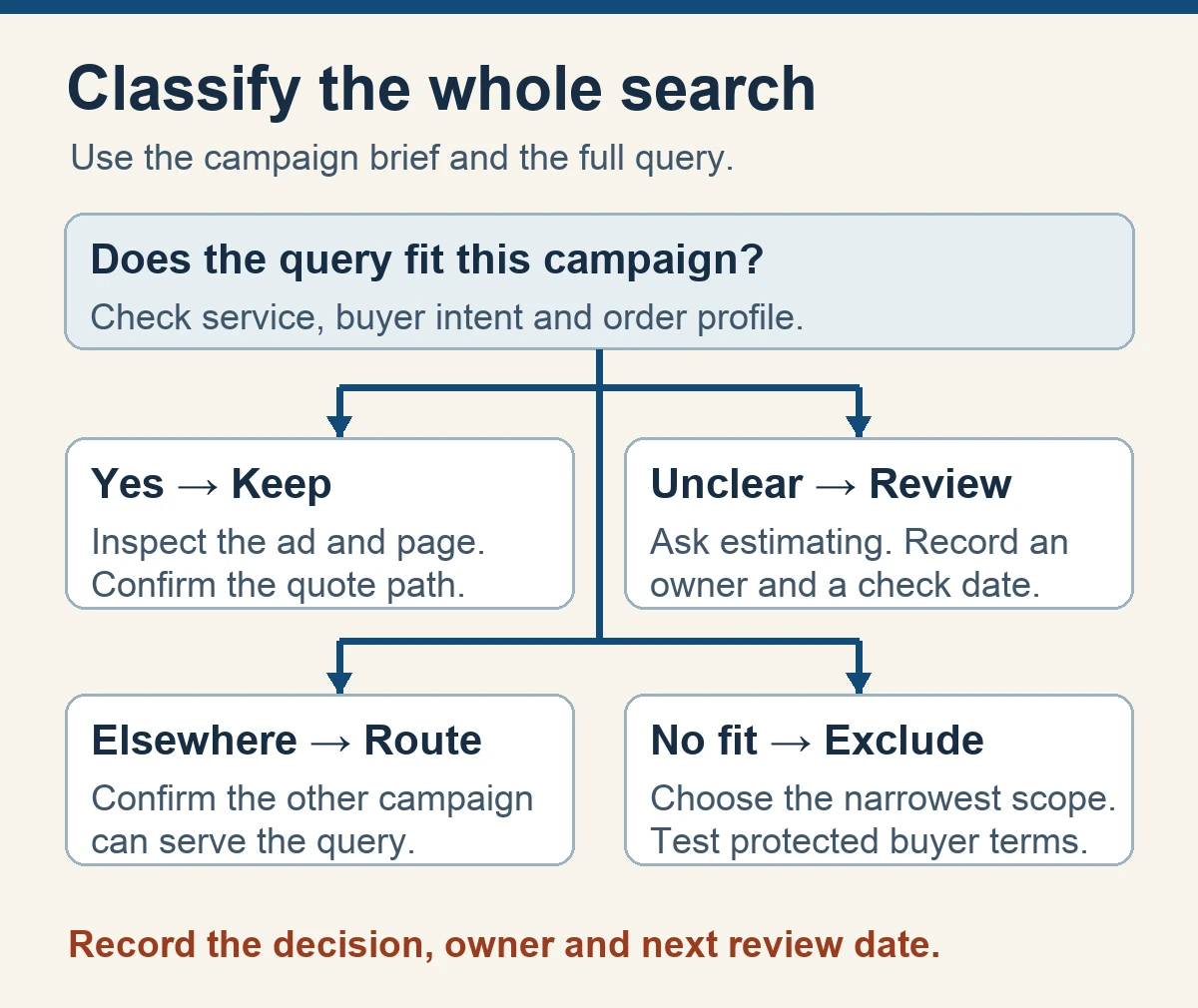
Read the whole query and the campaign brief together. A word like “small” could refer to the part, order quantity or machine. “Repair” could be equipment maintenance or machining a replacement component. Ask estimating what it would need to see before calling an ambiguous request a fit. Where evidence is thin, add the term to a watchlist with a date to revisit.
The following examples are fictional. Assume a shop sells contract turning for repeat commercial orders and does not sell machines, offer operator training or provide field maintenance.
- Keep and inspect the page. “Stainless steel CNC turning supplier” expresses a service need the fictional shop can assess. Check whether the ad goes to its turning page and whether the page explains how to share part and quantity details.
- Investigate before changing. “Small batch turned spacers” sounds promising, but the order size is unclear. Compare the shop’s accepted lot profile with what estimating sees on similar requests. A part type worth quoting can come with several quantity patterns.
- Exclude at the narrowest useful scope. “CNC turning operator jobs near me” expresses employment intent. An exact negative for that full search can address the observed query while you check for a recurring pattern across the account.
- Route to a better ad group. “CNC milling aluminum bracket supplier” could fit a different service. If the shop actually supports and advertises milling, check the intended milling route and its exclusions before adding a turning-campaign negative.
Record the reason in plain language. “Applies to the job search campaign only” gives the next reviewer something to check. “Bad keyword” leaves them guessing. Capture the date and owner, especially when an agency operates the account and an estimator decides whether the resulting work fits.
Add negatives without blocking quote-worthy searches
A negative keyword can apply to an ad group, a campaign or a broader list. Choose the smallest level that solves the observed problem. An ad group exclusion can help route a supported service. A shared list can handle recurring job searches only after someone checks every campaign it affects. A campaign advertising recruiting deserves separate treatment.
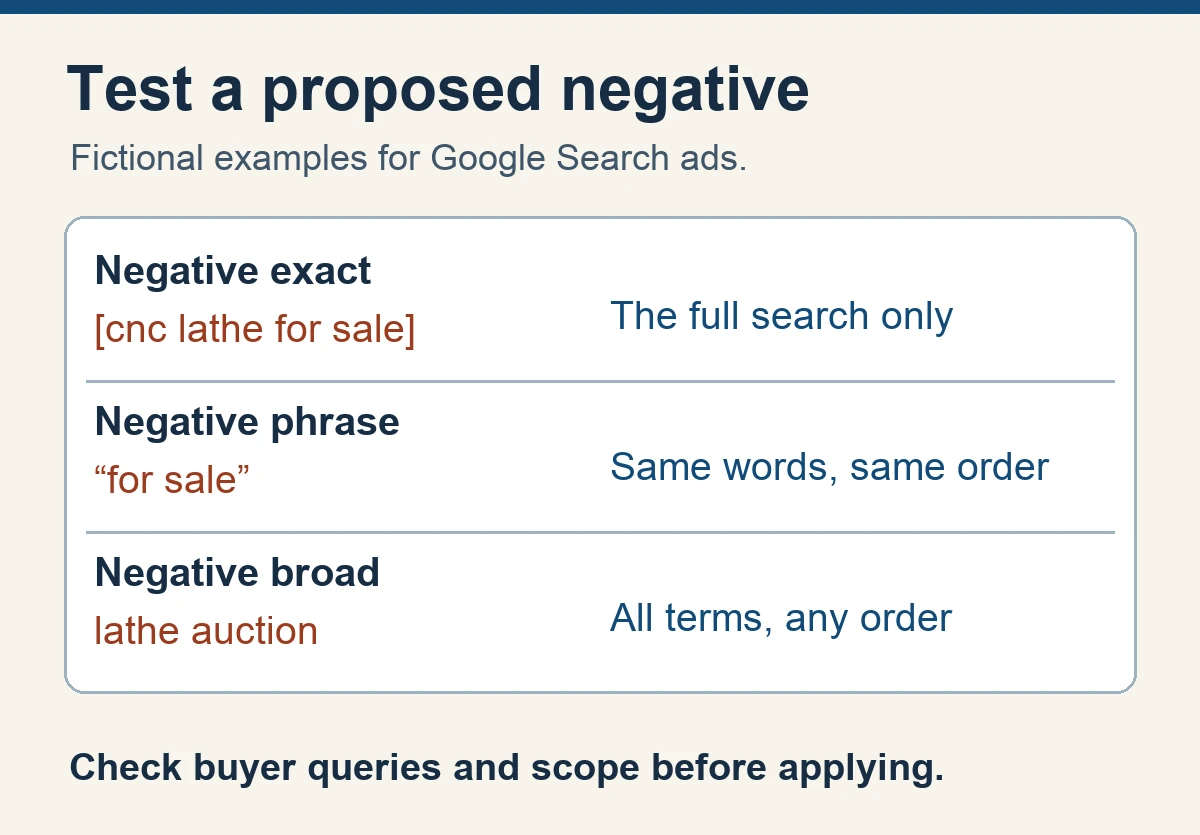
For Search, Google’s negative keyword guidance describes three match types. Negative exact generally targets the full term with no extra words. Negative phrase excludes searches containing the same words in the same order, including with extra words. Negative broad can exclude a search containing all its terms in any order. Positive keywords have different matching behavior. Check singulars, plurals and synonyms separately because negatives do not cover close variants in the same way positive keywords do.
Imagine the fictional turning shop sees “CNC machine for sale” and chooses to add the negative phrase “for sale.” The reviewer should first check whether a buyer might use that wording in a query the shop wants to keep. They could start with the full observed query as a negative exact, then review similar rows such as “used CNC lathe auction” or “lathe marketplace” before settling on a broader rule. Terms like “aluminum,” “lathe” or “small” can appear in relevant searches, so exclusions based on those words deserve extra care.
Before applying a batch, write down several searches you want to preserve. Compare them against each proposed negative’s scope and match type. Save the prior list, proposed changes, approving owner and date. On the next review, check whether desirable searches are still appearing and whether irrelevant variants continue to consume spend. Roll back changes that conflict with the shop’s targeting brief and record why.

Fix the route for searches worth keeping
Follow a plausible buyer query through the ad, the final URL and the first action on the page. If a buyer searched for a stainless turning supplier, look for turning capabilities, the shop’s approved material scope and a visible way to start an inquiry. If the page leads with unrelated services, bring the relevant information forward or route the ad to a dedicated page that already answers those questions.
Give the buyer enough context to decide whether to continue. A machine shop capability page can explain the process, typical work and how the shop reviews a request. Use evidence the shop can approve. Avoid quoting a lead time, tolerance or certification on the strength of an ad theme alone. A page can say who reviews a request and which details help that person respond.
Try the path on a phone. Confirm that the quote button stays legible, the form works as designed, and the receipt appears only after the request is accepted. Use an authorized synthetic test without customer drawings and verify where the notification arrives. If leads mostly arrive by phone or email, decide how to record the campaign where attribution is available and how to mark unknowns. Our RFQ form design guide covers the receipt and estimator handoff in more detail.
If you see a relevant search with no submitted RFQs, investigate the route before excluding the search. Read the promise in the ad, check what the destination asks the buyer to do, and ask estimating whether there is an offer or scope mismatch. Use your own comparison data over a suitable period before giving a sparse row much weight.

Measure qualified RFQs alongside submissions
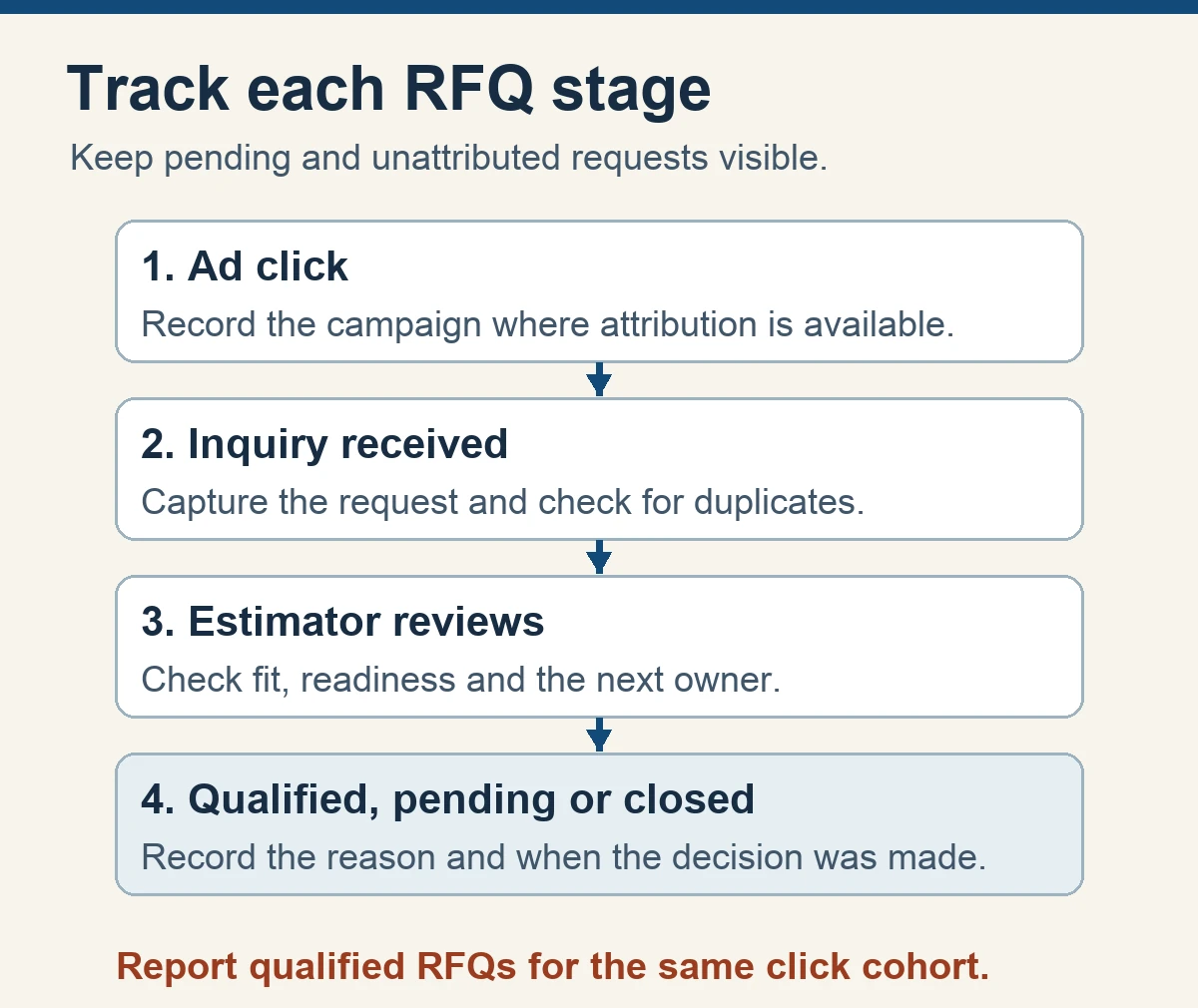
Create a request record with a date, source where known, stage, reason and owner. Use a consistent progression such as received, under review, qualified, quoted and won or closed. Decide when the clock starts and how duplicates are handled. Agree on whether a promising request awaiting a drawing is pending or qualified under your criteria. Keep jobs and vendor outreach separate so a person can reconcile the figures later.
Start by reporting raw inquiries and qualified RFQs together. Cost per qualified RFQ equals ad spend divided by the number of qualified RFQs attributed to the same campaign and click cohort. If that count is zero, report zero qualified RFQs and the spend separately. For longer sales cycles, report the number still pending and label the period provisional. Do not divide a recent month’s ad spend by older qualified leads whose ad clicks occurred outside that period.
As a fictional example, consider one click cohort with $900 in spend, 12 inquiries and three qualified RFQs after the review window. That’s $75 per inquiry and $300 per qualified RFQ. If four inquiries are still pending, publish the pending count beside those figures and update the cohort after the decisions. Use these fictional figures to check the calculation.
In an account with the necessary setup, Google Ads enhanced conversions for leads can help attribute supported offline outcomes. Check the account’s import method and the requirements for permitted first-party data before implementation. Validate the conversion action, timestamps, matching and deduplication with your authorized measurement owner before using the signal for bidding. Keep engineering drawings, part identifiers and buyer notes inside the shop’s approved systems. Some outcomes will remain unattributed, so separate verified campaign-level outcomes from any search-term row-level associations your report actually supports.
Give the estimator a way to explain a rejected request without a long note. A small reason list might include unsupported process, order profile, geography, incomplete information and duplicate. Add an option for unclear fit so the reviewer can ask a useful follow-up question. Review the reasons before using them to drive ad changes. A single vague form can signal a form-design problem, while repeated requests for an unrelated service can indicate an ad or targeting problem.
Turn the audit into a repeatable review
Give each review two owners: the person who can change campaigns and the person who sees what landed in estimating. Set a review interval that matches the campaign’s activity and the time it takes to qualify inquiries. Keep the last export and change log in one place, and use the same reason categories so you can see what recurs.
Start the meeting with three questions. Which clearly irrelevant patterns earned clicks? Which useful searches reached the wrong destination? Which inquiries reached estimating, and what evidence shows they came from this campaign? Give each change a specific next check. For a negative keyword, check whether the unwanted pattern stopped and desirable searches remained eligible. For a page change, confirm the destination and the inquiry path, then compare results once enough time has passed.
Put uncertain searches on the next agenda. If clicks rise but RFQ volume stays sparse, inspect what the buyers saw and what the shop received before calling the campaign a failure. If good inquiries arrive but sit without an owner, the immediate job is assigning responsibility. The KriXis RFQ management service covers how inquiries move from receipt through qualification and follow-up. For the ad account itself, see machine shop PPC management.
If the campaign has too little attributed volume to judge the economics, keep a narrower goal for this pass. Verify that a buyer can find the page, that a request reaches the right person and that each qualification decision is recorded. Once those basics are reliable, the team has a fairer basis for comparing campaign changes. KriXis’s machine shop marketing measurement guide covers how to connect those records to wider marketing decisions.
Begin with one campaign, a few decisions you can explain and a follow-up date. The next reviewer should be able to tell which searches you protected, what you changed and what would make you reverse it.


Trackbacks & Pingbacks
[…] the Google Ads search-term audit for machine shops to review actual queries, test proposed exclusions and compare spend with qualified […]
Leave a Reply
Want to join the discussion?Feel free to contribute!