
RFQ Conversion Tracking for Machine Shops in GA4


RFQ conversion tracking starts with deciding what your shop can confirm. A buyer can click Request a Quote, open a form and attach a file without successfully sending anything. The estimator may see one request while the analytics report shows three. Before you compare marketing channels, decide where a request for quotation (RFQ) becomes a received inquiry and prove that your analytics records that moment once.
This guide is for machine shops that already have a website inquiry route and want to verify it in Google Analytics 4 (GA4). You will map the request path, choose a success signal, test likely failures and compare the analytics totals with an intake record. You can start with one form and one owner.
Define what you want each number to mean
Make a short list of actions a buyer can take. On a capability page, a person might follow a quote link, start a form, add an attachment and submit the form. After that, your intake system might accept the request and notify estimating. Each action answers a different question.
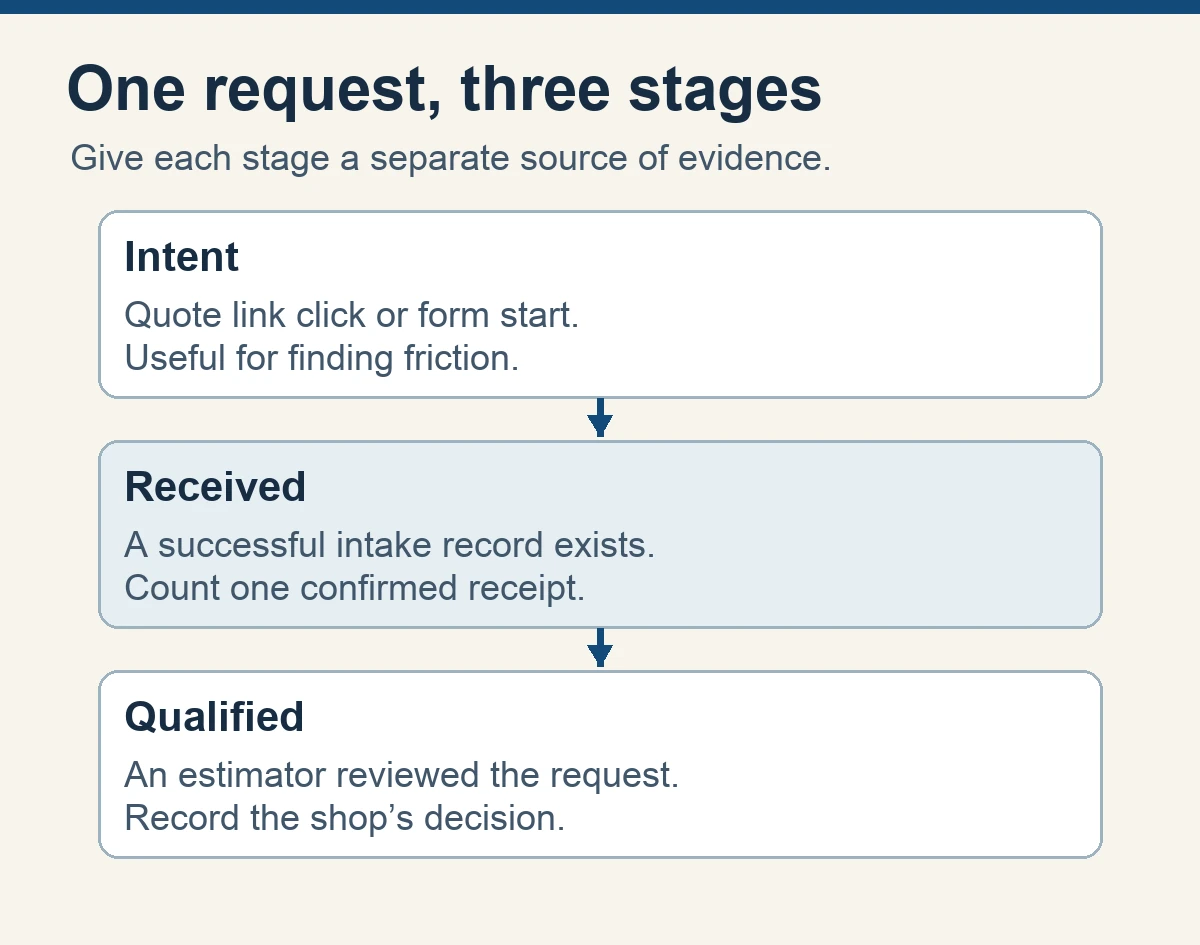
Keep three stages visible. Intent tells you a buyer took a step toward contact. Received means your inquiry system accepted a request. Qualified means someone reviewed it against the shop’s criteria. Add quoted, won or closed as downstream stages in your intake system if they help the team. A shop can use the first stage to diagnose friction, the second to assess lead capture and the third to decide whether marketing is reaching the work it wants.
Choose a source of truth for the received stage. It might be a saved entry in the form system, a request row in the quoting platform or a record created in the CRM. Confirm that a person can retrieve the entry independent of the notification email. If the website sends only an email and has no durable intake record, define what evidence the shop can actually reconcile and who can review it.
A qualification decision usually needs more context. Estimating may need material, quantity, timing or an answer to a drawing question. Use the same stage names whenever someone reports results. The machine shop lead qualification guide provides a framework for deciding which requests fit.
Choose a signal that confirms receipt
Google’s recommended GA4 events include generate_lead for a generated lead. Define the condition that should trigger it on your specific form. A useful rule is one event after the intake system confirms a distinct successful submission, subject to your site’s measurement settings. Use a diagnostic event for actions such as starting a form or clicking a quote link if it helps you investigate a specific problem.
Inspect what the form actually does. A form that stays on the page may show an inline receipt after its own submission request completes. Ask your developer whether the form exposes a documented success hook that follows a confirmed response. A generic click trigger can fire before validation. A form submission detected automatically by analytics should be tested against the actual success and failure paths before it is used as a business metric.
A redirect to a confirmation page can work where that route only follows confirmed receipt and repeat visits are handled. A plain page-view rule for a public thank-you URL can also count someone who refreshes the page, bookmarks it or reaches it through another path. If you cannot tie the signal to a successful request, start with the intake system’s count and ask the form owner for a trustworthy success signal.
Avoid installing a second tag for the same action without checking the existing setup. A plugin, a tag manager and a site script may all listen for the same success. Choose which component owns the event. Disable duplicate tracking through the site’s normal configuration after you understand what each component does. Keep the previous configuration or version so the owner can reverse the change.

Account for repeat clicks and partial failures
Write down how the form behaves when a buyer taps Submit twice or uses Back and tries again. You may want a retry to recover from a failed submission. You also need to distinguish a repeated signal for one accepted record from a second legitimate RFQ. Ask the intake owner whether the application can recognize a retried submission and how it deals with duplicates.
A successful intake may be followed by a failed email alert. Keep those outcomes separate. If the buyer’s submission was accepted and safely stored, the received count can be correct while the routing still needs repair. If the buyer only sees a success message but the intake system has no record, treat that as a receiving problem. Compare the form response, the saved entry and the estimator’s view before you call the path ready.
For attachment problems, test what the buyer sees when a file is rejected, the upload is interrupted or the permitted size is exceeded. A completed upload may only mean the file transfer finished. Check that the request and its permitted files reached the correct intake record before closing a test. Use synthetic information and a harmless dummy file approved for testing. The RFQ form design guide goes further into drawing-sharing routes and the estimator handoff.

Keep analytics data small and predictable
Define a short list of fields the analytics event can carry. A fixed form label such as quote_form and a fixed placement label such as turning_page can answer most initial questions. Write down the approved names and values so the next form revision can reuse them without splitting the report into multiple spellings. Ask the measurement owner which values need registration for reporting in GA4.
Avoid collecting field values through broad form or click variables. Do not include the buyer’s email address, telephone number, message, company-specific job reference, filenames, part descriptions or drawing links. Inspect page paths, titles and query parameters as well as the event payload. A confirmation URL with an email parameter can expose that value through ordinary page tracking. Google’s guidance on personal information in Analytics covers these paths and describes redaction as a safeguard. Keep technical files and identifiable records in the approved intake system.
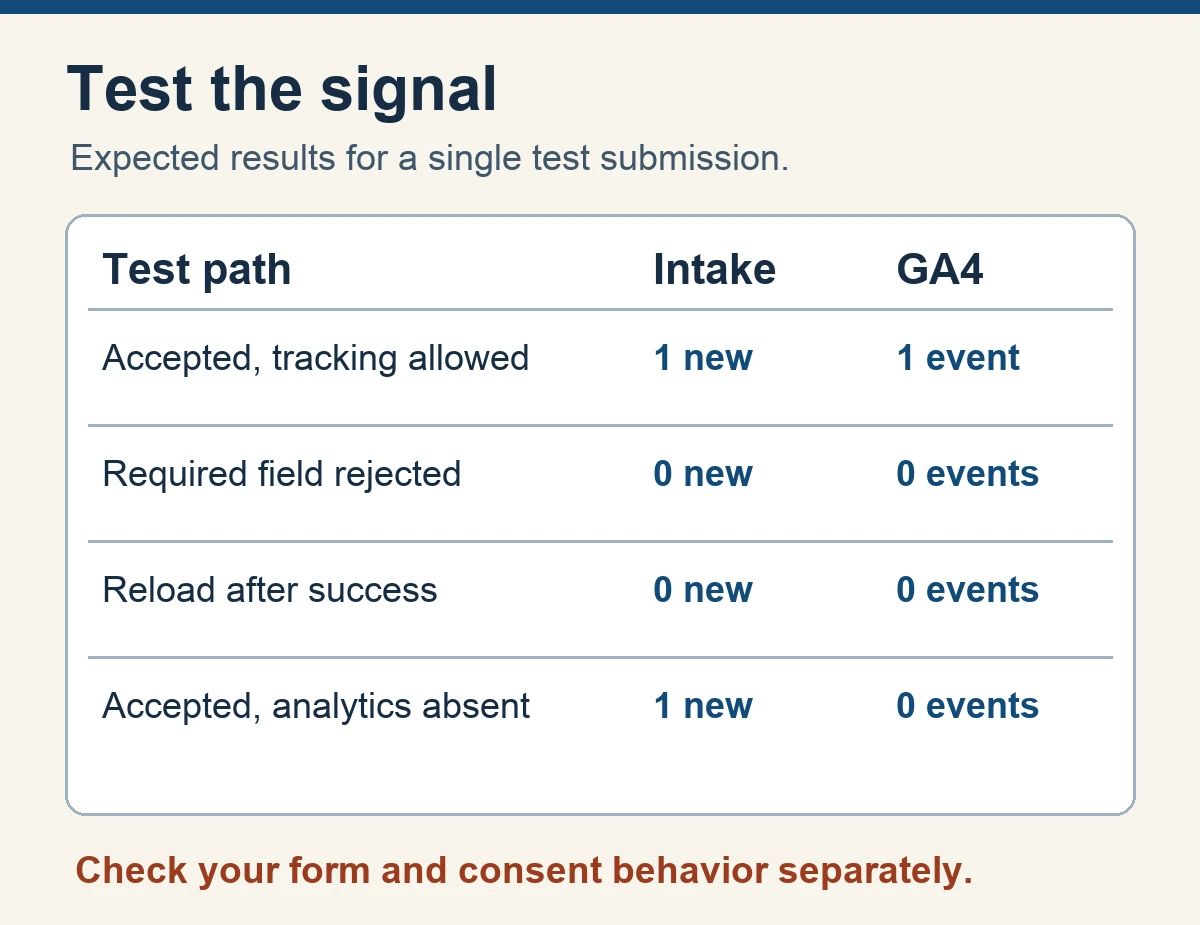
Use a safe testing setup with examples that contain no real customer data. Respect the site’s existing consent behavior when testing. A received RFQ can be recorded in the approved operational system even if the browser sends no analytics event under the applicable settings. Include that possibility in the test plan so a legitimate measurement gap is distinguishable from a broken form.
Test email and phone separately. A click on an email or telephone link shows intent, since the buyer can close the app or hang up without sharing a request. If someone records a received inquiry from either channel, describe what established receipt in the operational record. Use a separate source category when you cannot attribute the request with confidence.
Run the test from both sides of the form
Start with an approved test environment or an authorized synthetic submission. Tell the intake owner what to expect and when. Use a timestamp or a synthetic reference that stays inside the shop’s test record. Open the relevant capability page, follow its quote button and try the flow on a desktop browser and on a phone. Test each distinct form integration that you actually use.
Work through a success test first. Confirm what the buyer sees, check that the operational record exists, then inspect the analytics event. GA4 DebugView can show events and parameters from a device in debug mode, when the property’s collection and privacy settings permit it. Check the property, stream, device and event name if you see nothing. A tag preview helps determine which trigger ran. The intake record establishes whether the request arrived.
Next run the failure and repeat tests. Leave a required field blank, use a harmless invalid test value, and exercise the file rejection path where applicable. Reload the confirmation page or revisit it without a new accepted request. Test a slow connection or retry if your team can do so safely. For each test, record the expected and observed counts on both sides. Keep records of what you tested without retaining unnecessary technical or buyer data.
Check the event’s final reporting role once the behavior is sound. GA4 lets you mark a meaningful event as a key event. Ask the owner whether generate_lead or another approved success event should have that role, and confirm whether it is also used elsewhere for paid bidding before making changes. Keep confirmation of receipt, marketing reporting and advertising optimization as separate decisions. A repaired tracking rule can change the counts the team sees without changing how many buyers submitted a request.

Reconcile GA4 with the requests estimating can see
Pick a date range and reporting time zone. Count confirmed website requests for that period in the intake system and compare the matching GA4 web stream and success event. State which forms and routes are in scope. Use the same request date and definition whenever you discuss which records are part of the comparison. A difference in reporting hours can move a submission across a period boundary.
Split the check into reasons you can verify. Consent choices, blockers or a network failure may reduce observable analytics events. A repeated trigger can inflate them. Direct email, phone calls and offline introductions belong in their own channels unless your evidence connects them to the same website request path. Keep a category for unresolved differences. The two systems can disagree for legitimate reasons, so look for a clear explanation before changing the tag or trying to force the counts to match.
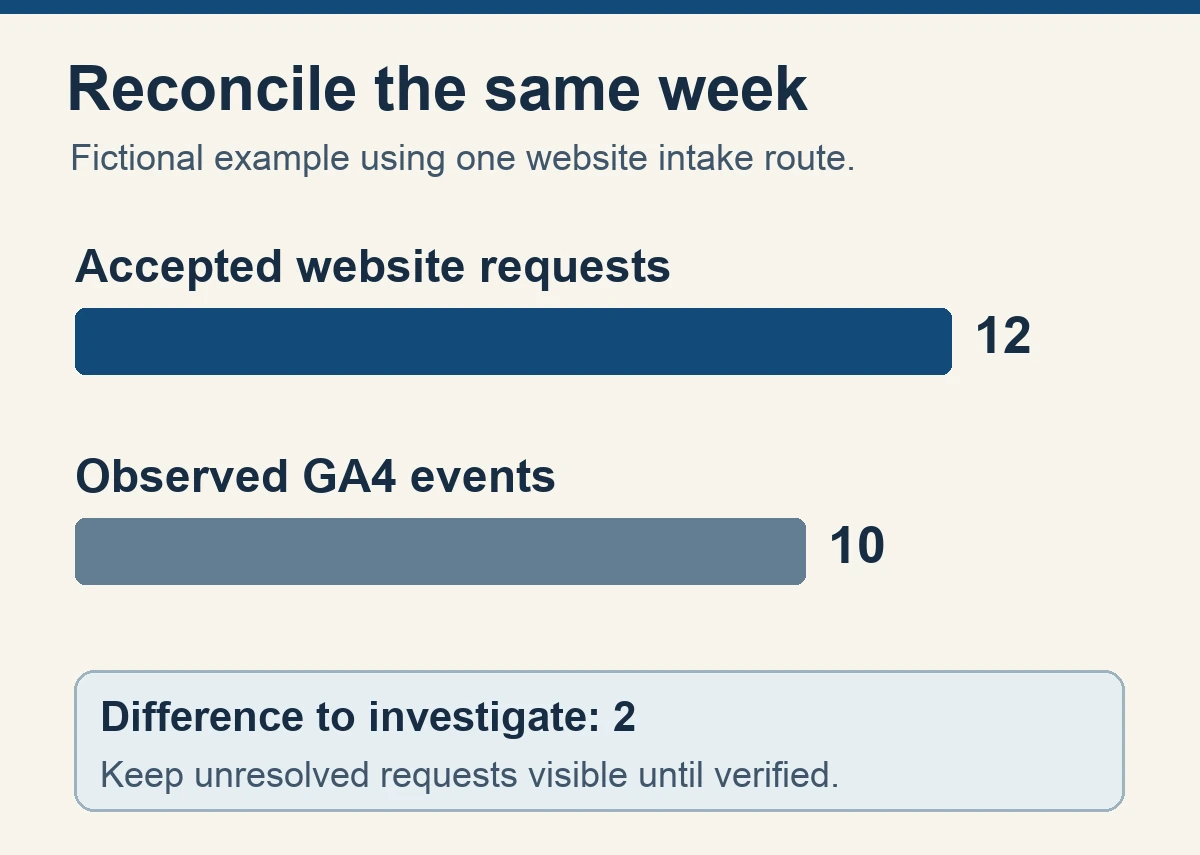
Here is a fictional example. A shop has twelve accepted website RFQs in a reporting week. GA4 shows ten success events. The tester confirms that the form works with analytics consent granted, then runs a test under the declined state and observes that intake still works while the analytics event is absent. That proves a possible reason for some gaps. It does not identify which two production requests were affected. The report can say twelve accepted website RFQs, ten observed analytics success events and a difference of two pending explanation.
For external campaigns, use consistent source, medium and campaign labels where appropriate. Google’s campaign URL guidance explains how tagged referral links supply campaign information. Keep labels free of personal or job information and test that redirects and portal transitions behave as expected. If a request’s source is unavailable, record it as unknown. Search Console search queries, GA4 traffic reports and CRM records answer different questions. Compare them at a level the evidence supports.
If estimating marks five of the fictional twelve requests as qualified, report those five in a separate row with the qualification date or review window. A request may take days to qualify. Compare equivalent cohorts and show requests still under review. Our machine shop marketing ROI guide explains how to carry that record toward quotes and won work.
Keep it reliable after the next site change
Choose an owner for the form, an owner for GA4 and a contact in estimating. They can be the same person in a small shop. Record the site path, event name, date of the last successful test and the next occasion that should trigger a retest. Form plugin changes, a redesign, a new quote portal and edits to consent or tag settings all deserve a fresh success and failure check.
Keep a brief weekly or monthly review that fits your volume. Start with accepted website requests, observed events, qualified requests and unresolved differences. If the gap jumps, check for a real intake problem first. Then examine the latest form, tag and reporting changes. Ask whether estimating received the requests as expected. A small, traceable comparison is easier to maintain than a large dashboard whose numbers nobody can explain.
If you discovered a routing problem, assign someone to verify the receipt and alert path before you use the data to evaluate campaigns. If the form and handoff work but a search campaign is sending the wrong audience, use the Google Ads search-term audit for machine shops to review that traffic. For the steps after receipt, see KriXis RFQ Growth for inquiry qualification, routing and follow-up.
Start with one confirmed request. When the buyer sees a clear receipt, the estimator can find the record and your analytics counts it under the expected conditions, you have a workflow you can document and test again.


Trackbacks & Pingbacks
[…] drawing conclusions about the source of a quote if tracking connects only part of the path. Use the RFQ conversion tracking guide when that gap starts at […]
[…] comparing marketing channels, use the GA4 RFQ conversion tracking guide to verify accepted requests and check for duplicate […]
Leave a Reply
Want to join the discussion?Feel free to contribute!