
Machine Shop Sales Email Templates for a Useful First Conversation
A useful machine shop sales email explains why you contacted a particular company, describes one relevant capability and asks for a manageable next step. The recipient should be able to understand the connection without opening a brochure or guessing which work you want to discuss.
The machine shop sales email templates in this guide help you turn a reviewed prospect into a first supplier conversation. Each example uses fictional context. Replace every detail with approved facts about your shop and the recipient, and check the contact route before sending.
These are introductions to a possible buyer. For an existing quotation, use the separate machine shop quote follow-up guide. An open quote already has requirements, a buyer and a decision process. A first sales message needs to establish whether the conversation is relevant at all.
Start with a reason the recipient can recognize
Find a public observation that explains the potential connection. A company may describe a product family, a local facility or a supplier intake route that is relevant to your work. Record the source and what it actually establishes before using it in a message.
Your note should distinguish the observed fact from the question you want to ask. A company that makes industrial equipment may use turned components, but its website may say nothing about whether it buys them externally. The email can ask about supplier fit without presenting an assumption as a known need.
Have the person who understands the capability review your proposed introduction. Check material descriptions, process scope, available documentation and any limit that changes the meaning of the offer. A sender should know which technical questions can be answered and which belong with estimating.
If the research is still weak, finish that step first. The companion guide to finding manufacturing customers for your machine shop explains how to record the source, fit hypothesis and buying question separately.
Choose one purpose for the first message. You might ask whether outside suppliers are considered, offer a relevant checklist or ask which public vendor route to use. The intended answer should tell you what to do next.
Give the message a simple structure
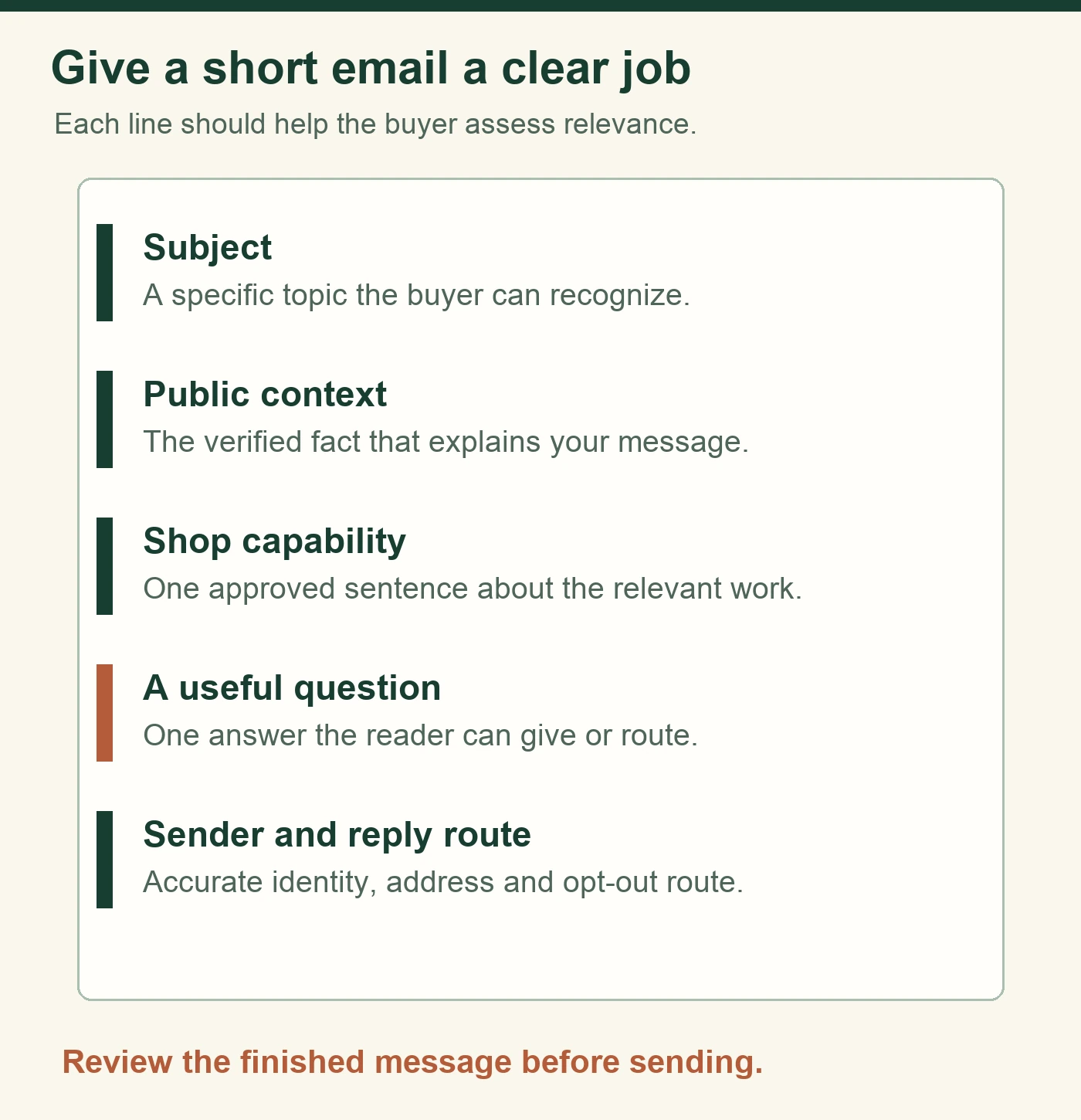
Use a subject that accurately describes the message. Follow with a sentence about the observation, a short explanation of relevant capability and one question. Add a recognizable sender identity and an easy way for the recipient to stop future marketing contact.
Write the capability line in terms the reader can evaluate. Name the process and component family you can discuss, then link to an approved machine shop capability page when it supplies useful detail. Leave pricing and delivery promises for a review of the actual work.
Keep the main request small. A busy reader may be able to confirm the right department or tell you whether a capability summary would be useful. Asking for a meeting and a complete drawing package in the same introduction can create unnecessary decisions before relevance has been established.
Use a normal business signature. The sender, reply route and company identity should agree. Check the message on a phone so the first useful sentence and main question remain easy to find.
The five fictional templates below illustrate different situations. Edit each draft using your shop’s approved facts and the recipient’s verified context. The examples use placeholders and omit a finished signature so your own approved business details can be added consistently.
Five machine shop sales email templates
1. Ask whether the capability is relevant
Use this when a reviewed product page gives a plausible connection but outside purchasing remains unknown.
Subject — Stainless roller supplier question
Hi [name],
Your [public product page] describes [verified product family]. Our shop supports [approved turning capability], and I wanted to ask whether your team considers outside suppliers for that type of component.
If it is relevant, would a short capability summary be useful? If another route is preferred, please point me to it.
[Sender and business details]
The useful question is whether the topic belongs in the recipient’s work. Replace the product description and capability with facts your reviewers can support. A reply saying “we make those internally” is a clear result that helps refine the list.
2. Offer a small practical resource
Use this when you can provide information that helps a buyer prepare a discussion.
Subject — Checklist for reviewing [component family]
Hi [name],
I saw [specific public observation]. We work with [approved process or part family] and have a short checklist covering [relevant information needed for review].
Would that be useful for the person who reviews this work? I can send the checklist or use your preferred supplier contact route.
[Sender and business details]
The resource should exist and answer a useful question. A short list of drawing revision, quantity and service conditions may be more helpful than a broad sales presentation. Keep the language specific to the work the shop understands.

3. Ask for the correct supplier route
Use this when the public business contact is appropriate but the supplier process is unclear.
Subject — Supplier introduction route for [process]
Hello [team or name],
I am with [shop]. We provide [approved capability] and would like to understand the right way to introduce that work to [company].
Is there a public supplier form or department we should use? I found [source], but it does not explain where a new supplier introduction belongs.
[Sender and business details]
Keep a routing request focused on routing. If a form or department is supplied, record it for the whole team. Avoid sending a separate introduction to several employees while waiting for the first person to answer.
4. Follow a genuine public introduction opportunity
Use this only when the stated event, directory instruction or introduction opportunity actually exists.
Subject — [Event or supplier opportunity] follow-up
Hi [name],
[Accurate description of the public opportunity or real interaction]. Our shop’s [approved capability] may be relevant to [verified application or discussion topic].
Would you like the short capability summary, or is there a supplier review process we should follow first?
[Sender and business details]
Describe the actual connection in the context line. Identify the real interaction or the relevant public invitation, then explain why the capability belongs in that conversation. The recipient can use those details to evaluate the introduction.
5. Answer an initial request for more information
Use this after the recipient asks a specific capability question.
Subject — Re: [actual conversation subject]
Hi [name],
Thanks for asking about [their question]. Our approved public information covers [verified answer]. [Named role] can review the details that depend on the part and requirements.
Would you prefer [one relevant next step]? We can confirm the right information-sharing route before you send a technical package.
[Sender and business details]
Answer the question that was asked. Where a detail is unknown, identify who will check it and what information is needed. Use the actual email thread so the context stays visible to the recipient.
Review each draft before it leaves the shop
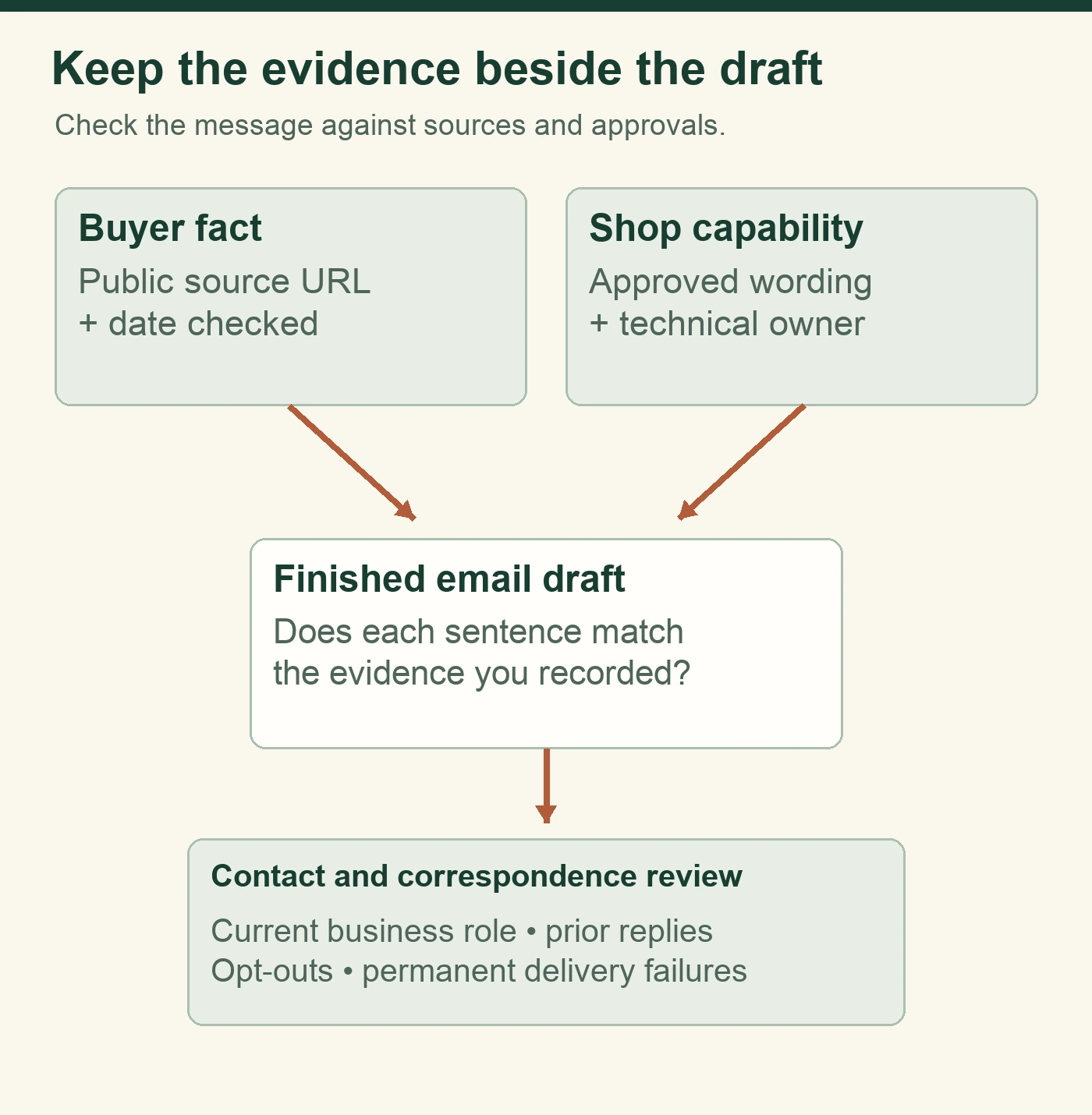
Create a short review pass for facts, purpose and next action. Compare the research note with the first sentence. Check that every capability statement matches approved shop information. Read the question as the recipient would and decide whether an answer would move the conversation forward.
Review links and resources as well. A promised checklist should be available in the format you describe. A capability link should open the relevant page. Test the reply address and check which person will handle responses while the sender is away.
For a fictional teaching example, imagine a shop that mills replacement fixtures. Its draft says a nearby assembly facility “needs faster fixture delivery.” The public source only establishes that the facility operates assembly lines. Revise the sentence to describe that fact and ask whether outside fixture support is relevant. The edited version gives the recipient room to correct the assumption.
AI can help organize the draft, shorten repeated text or suggest questions from approved facts. The reviewer still needs to compare the output with its sources. An invented plant expansion, unsupported tolerance or assumed buying schedule should be removed before the message is approved.
Keep the approved version with its company record. Record the reviewer and sending decision so another team member can see which wording was used. Changes to capability facts should reach the people preparing future messages.

Check the sender setup and stop requests
Before starting a campaign, have the email owner verify the sending setup and provider requirements. Google’s Gmail sender guidance describes authentication and delivery practices, with additional requirements for larger sending volumes. Use the requirements that apply to your sender and audience. Gmail sender guidelines.
Keep subjects accurate and avoid presentation that implies a prior conversation when none occurred. Include clear sender information, the required postal address and an easy opt-out route. The FTC’s U.S. commercial email guidance covers business-to-business messages as well as consumer email. FTC commercial email guidance.
Make stop requests part of the ordinary workflow. Record them where the next sender will see them, and exclude those recipients from subsequent marketing batches. Carry the recorded preference into each new spreadsheet and campaign handoff.
Check delivery failures before sending again. A failed address may need correction or removal. Classify a bounce as a delivery event and record human responses in their own categories.
The broader small business email marketing guide explains how audience expectations, system choice and reporting fit together. Use a consistent process for the records and decisions that support each message.
Plan what happens after a reply
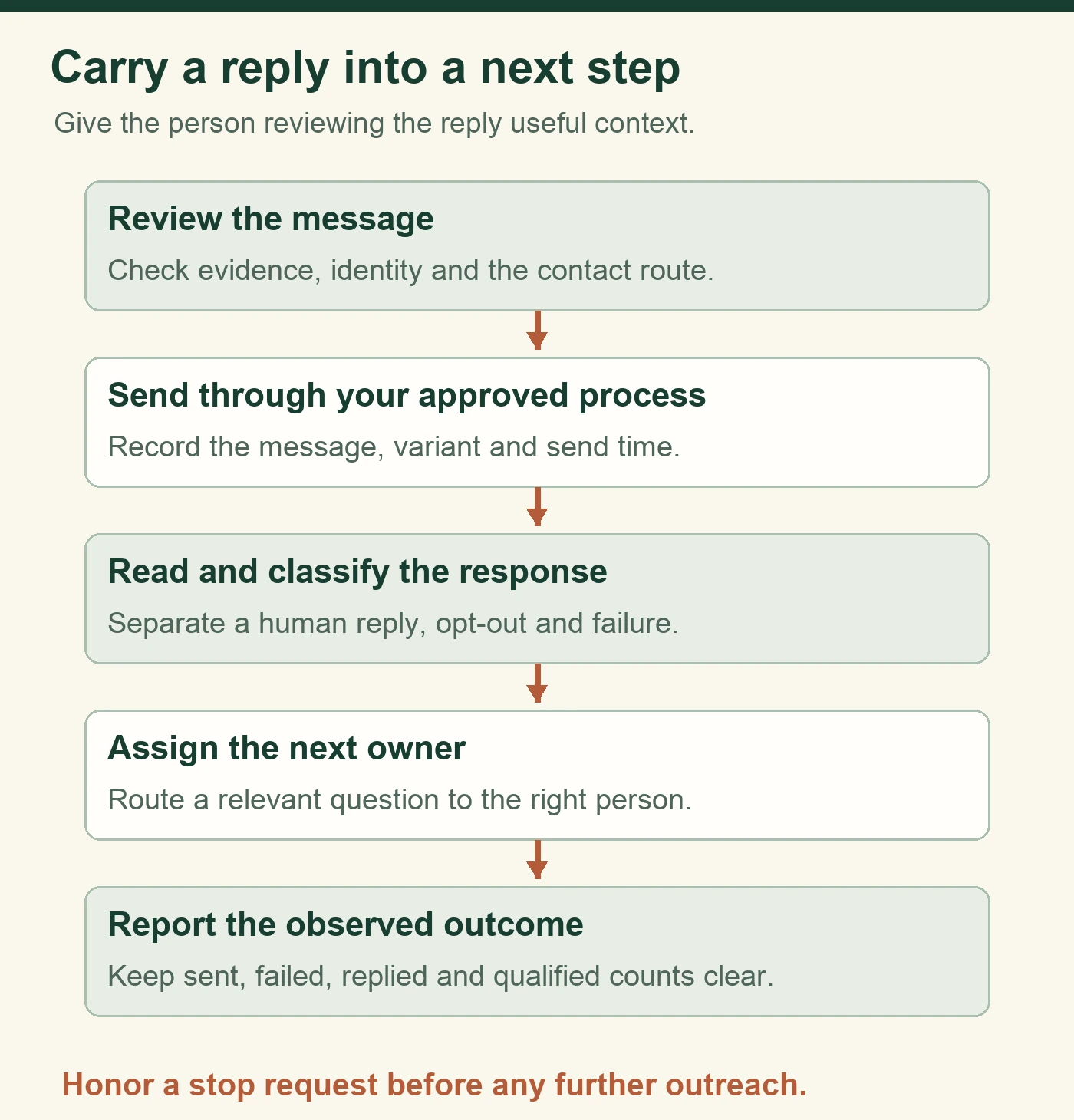
Assign one owner to review incoming responses. A request for a supplier form needs a different next action from an engineering question or a request to stop contact. Read the message and record the response category with a reference to the original.
If the recipient provides a better contact route, update the company record. If they ask a capability question, give the technical reviewer the context. If they request a quote, use the shop’s normal estimating process and confirm the missing requirements.
The machine shop RFQ checklist helps define information needed for an initial review. Keep technical feasibility, pricing and scheduling with the people responsible for those decisions.
Record the next step in observable terms. “Send the approved material summary after technical review” gives the owner a concrete task. A vague “follow up” entry leaves the next person to reconstruct the conversation.

Measure conversations with clear definitions
Start with the number of eligible recipients actually contacted. Count replies, useful routing responses, positive interest and RFQs separately. Define each result before comparing messages so reviewers classify a polite acknowledgment, a request for information and buying interest consistently.
For a small content test, assign each eligible company or contact to one variant before sending. Keep the sender, general structure and sending period as similar as practical. Record the article and email version each recipient received, then preserve that assignment when reviewing responses.
A one-week review describes the activity in that window. A manufacturing buyer’s eventual decision may come later. Report later responses separately if you continue observing the campaign, and avoid selecting a winner from a small difference that could easily change with one reply.
Track the events your systems actually record. A sent message establishes a sending action. A reply provides text to review. Website analytics may show campaign visits when the setup records the tags correctly. Use verified analytics records when reporting visits and separate those events from email opens or recipient-level clicks.
Use the review to choose the next improvement. Weak fit calls for better research. Repeated confusion about a process calls for clearer wording or a capability page update. Useful responses with no owner call for a better handoff.
Common first-contact email questions
Should the first email include an attachment?
Use an attachment when the context calls for it and the material has been approved. A first routing question can often stand on its own. If a reader asks for a capability summary, send the current version and confirm that its links and contact details work. Give the file a recognizable name so it remains understandable when forwarded to engineering or purchasing.
What if the recipient says the timing is wrong?
Record the actual response and any preference they express. Ask a clarifying question only when it is appropriate to the conversation. If the recipient gives a future review date, keep that date with the original context and an owner. Avoid converting a vague timing comment into a promised buying event or treating it as permission for an indefinite sequence.
How much personalization belongs in the message?
Include enough verified context to explain why the work may be relevant. The company’s product, facility or published supplier process can supply that context. Personal details unrelated to the buying question usually add little. Read the sentence aloud and ask whether it helps the recipient understand the proposed conversation. Keep the research source available so the reviewer can check the wording.
Discuss the KriXis Outreach private pilot
KriXis Outreach starts with one shop capability and up to 25 prospects. The private pilot focuses on buyer research, reviewed personalized drafts and recording replies. Your shop reviews the capability connection and remains responsible for technical and commercial commitments.
Connected mailbox sending and automatic follow-ups are pending. Discuss the available process and responsibilities before building a campaign around either feature. A buyer’s RFQ continues through your normal quoting workflow.
Bring your public capability page, intended buyer audience and one example of the message you want to improve to a KriXis Outreach pilot conversation. Those details give the review a specific starting point.


Trackbacks & Pingbacks
[…] a first supplier introduction, use our machine shop sales email templates to connect verified buyer context with an approved capability and one useful […]
Leave a Reply
Want to join the discussion?Feel free to contribute!