
How Machine Shops Can Use AI to Respond to RFQs Faster—Without Risking Customer Data

An RFQ is not just a form submission. It may include drawings, material requirements, quantities, timing, quality requirements, and the first signal that a buyer is looking for a long-term supplier. When it sits unanswered, gets routed to the wrong person, or loses its context between inboxes, a real opportunity can quietly disappear. An AI RFQ response for machine shops starts by making that first handoff clear.
AI RFQ response for machine shops can improve that handoff—but it should not replace engineering judgment, promise a price, or make technical decisions without review. The practical opportunity is simpler: use AI to organize incoming requests, prepare a complete internal summary, draft a human-reviewed response, and ensure the follow-up happens.
For a shop trying to turn more website visits into qualified conversations, that is a meaningful improvement. It connects the front end of marketing with the back end of the sales process, which is the same principle behind a well-configured machine shop CRM.
AI RFQ response for machine shops: where RFQ response breaks down
Most quoting delays are not caused by a lack of effort. They come from incomplete information and scattered processes. A buyer may submit a drawing through a website form, add a short note, and expect the shop to know what matters next. The request then lands in a general inbox, is forwarded manually, and waits while someone determines whether the job fits the shop’s capabilities.
The common points of failure are predictable:
- An inquiry arrives outside normal hours and receives no acknowledgement.
- The form misses a drawing, quantity, material, or target date.
- A capable lead is mixed in with low-fit or incomplete requests.
- A salesperson or estimator has to reread an email thread to recover context.
- A quote is sent, but no one has a dependable reminder to follow up.
None of these require an autonomous sales robot. They require a clearer workflow.
The best AI role: prepare the work, not approve it
For most shops, AI is most useful as a controlled assistant. It can perform repeatable, low-risk tasks around the RFQ while a qualified person retains responsibility for feasibility, pricing, lead time, quality requirements, and the final customer communication.
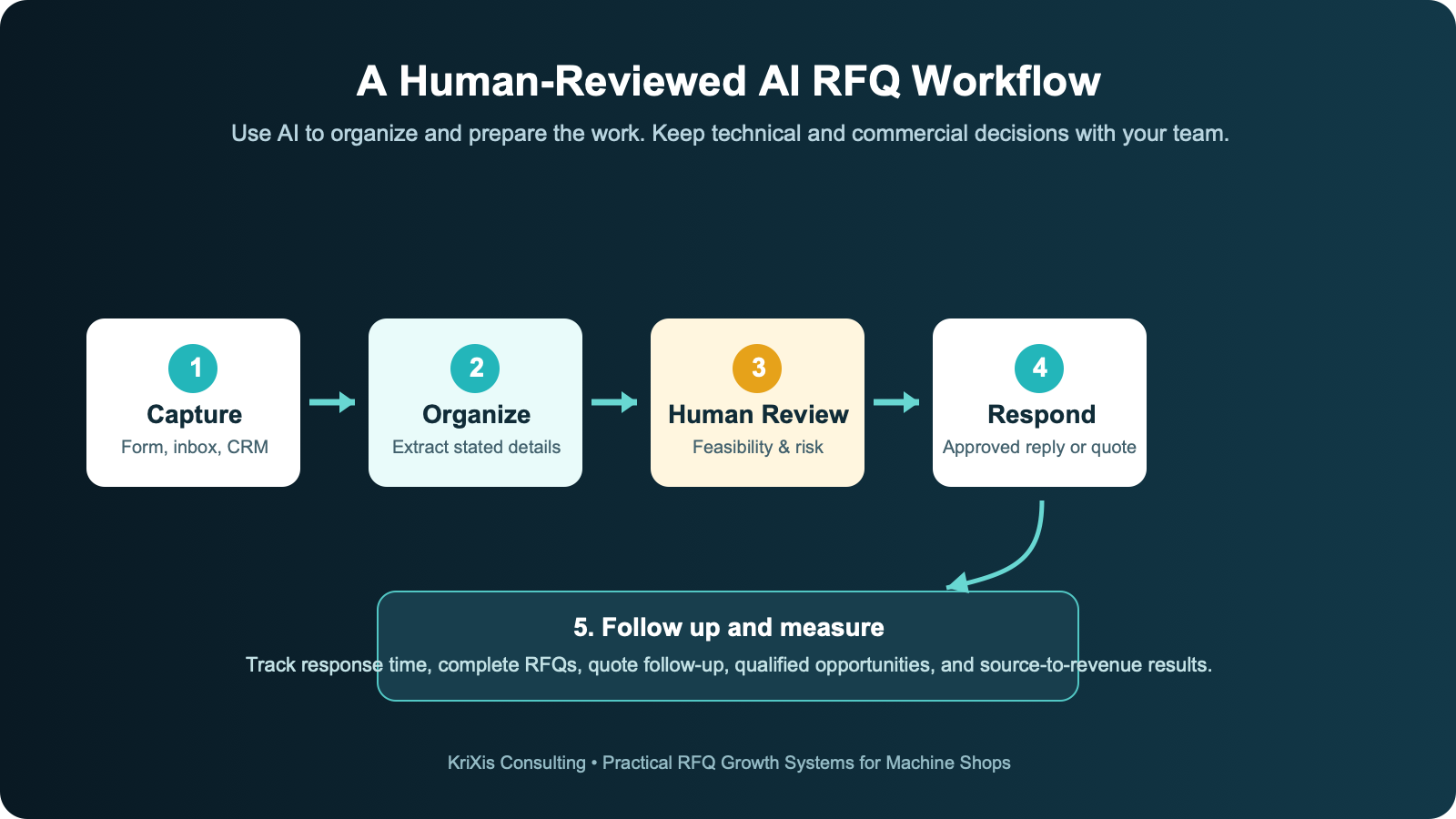
A disciplined AI-supported workflow can look like this. An AI RFQ response for machine shops should make the next human decision easier, not obscure it:
- Capture the RFQ in one place. Route website forms, designated email inboxes, and relevant messages into the shop’s CRM or lead system. Preserve the original source and attachments.
- Create a structured internal summary. AI can extract stated details—such as process, material, quantity, target delivery date, industry, and attached files—into a reviewable summary. It should clearly mark information it could not find rather than inventing an answer.
- Check for missing information. A draft response can ask for the specific items needed to begin a review: drawing revision, material, quantity, tolerance, certification, finish, delivery requirement, or other shop-defined fields.
- Route by rules the shop controls. For example, send repeat customers, a particular process, or a defined size range to the right estimator. Route out-of-scope work to a review queue rather than automatically rejecting it.
- Draft the acknowledgement and follow-up. AI can prepare a concise, professional response using approved language. A team member reviews it before it is sent.
- Keep the opportunity visible. Create follow-up tasks after the quote is delivered, document buyer responses, and report on the source and outcome of each lead.
That process reduces administrative friction without turning a sensitive technical decision into a black box.
A practical RFQ intake checklist
Before implementing any automation, decide what a qualified request means for your shop. The website form and internal workflow should make it easier for buyers to provide useful information, not create an obstacle course.
For many machining RFQs, a practical intake checklist includes:
- Contact name, company, email, and phone number
- Part drawing, model, or clear description of the work
- Process or capability needed, if known
- Material and any required finish
- Quantity, including prototype versus production context
- Critical dimensions, tolerances, or inspection requirements
- Required certifications or industry requirements
- Target delivery date or project timeline
- Any confidentiality requirement or NDA process
Not every request will contain every item. The goal is to capture what is present, identify what is missing, and make the next human conversation more productive.
What should never be left to an AI tool alone
An AI assistant can be helpful around a quoting workflow, but it cannot know a shop’s actual capacity, tooling condition, supplier availability, machine constraints, or risk tolerance unless those facts are deliberately supplied and maintained. Even then, a responsible shop should keep human approval in the loop for decisions that affect the customer.
Do not let an AI tool independently:
- Commit to a price, delivery date, capacity, or certification status
- Interpret an ambiguous drawing as a final engineering requirement
- Claim that a job is manufacturable or meets a tolerance
- Send customer drawings, controlled technical data, or confidential information to an unapproved system
- Reject a lead solely on an automated score without a review path
The right standard is simple: automate the preparation and reminders; keep technical and commercial commitments with accountable people.
Protect customer information in an AI RFQ response for machine shops
Customer drawings and RFQ data may be commercially sensitive. Before connecting an AI tool to a website, inbox, or CRM, document what data is allowed to enter the system, who can access it, how long it is retained, and whether the provider’s terms fit the shop’s obligations to customers.
Start with a limited pilot. Use a small set of non-sensitive or permissioned inquiries, require a human review before any outbound message, and track errors. Keep the original RFQ available so an estimator can compare the AI summary against the source material. The NIST Generative AI Profile is a useful framework for thinking through these controls, including risk management across the AI lifecycle.
For many shops, the first phase should work only with the contact details and text supplied in a form—not the drawing itself. Once the workflow is proven and the security review is complete, the team can decide whether it is appropriate to extend the system.
AI does not replace the RFQ path on your website
AI follow-up cannot compensate for a website that makes it hard for a buyer to understand the shop’s capabilities or submit a request. The site still needs accurate process pages, real capability proof, clear contact options, and a useful RFQ form.
KriXis’s Machine Shop SEO in 2026 guide explains how a buyer-focused site connects search visibility, technical credibility, and conversion. This is especially important as buyers use more detailed search queries and AI-assisted research. Google’s guidance remains clear: the foundation is helpful, reliable, people-first content and sound technical SEO—not a special AI markup trick. Google’s AI features guidance confirms that the same technical and content fundamentals apply.
In other words, build the website and the RFQ process for people first. Use AI to make the internal response process more consistent.
How to launch an AI RFQ response for machine shops in 30 days
The best first version is intentionally narrow. Do not try to automate every sales process at once.
Week 1: Map the current path
Follow three to five recent RFQs from source to outcome. Record where each request came from, who touched it, when it received a response, what information was missing, and whether it received a follow-up after a quote was sent. This baseline reveals the actual bottleneck.
Week 2: Define the rules and approved language
Create a shop-specific intake checklist and routing rules. Write approved acknowledgement and information-request templates. Decide which decisions always require a human review. This is the work that makes automation trustworthy.
Week 3: Pilot with one channel
Start with website RFQ forms or a dedicated inquiries inbox. Have AI create an internal summary and a draft response, but require staff approval before the draft is sent. Correct problems immediately and update the rules rather than working around them.
Week 4: Measure the result
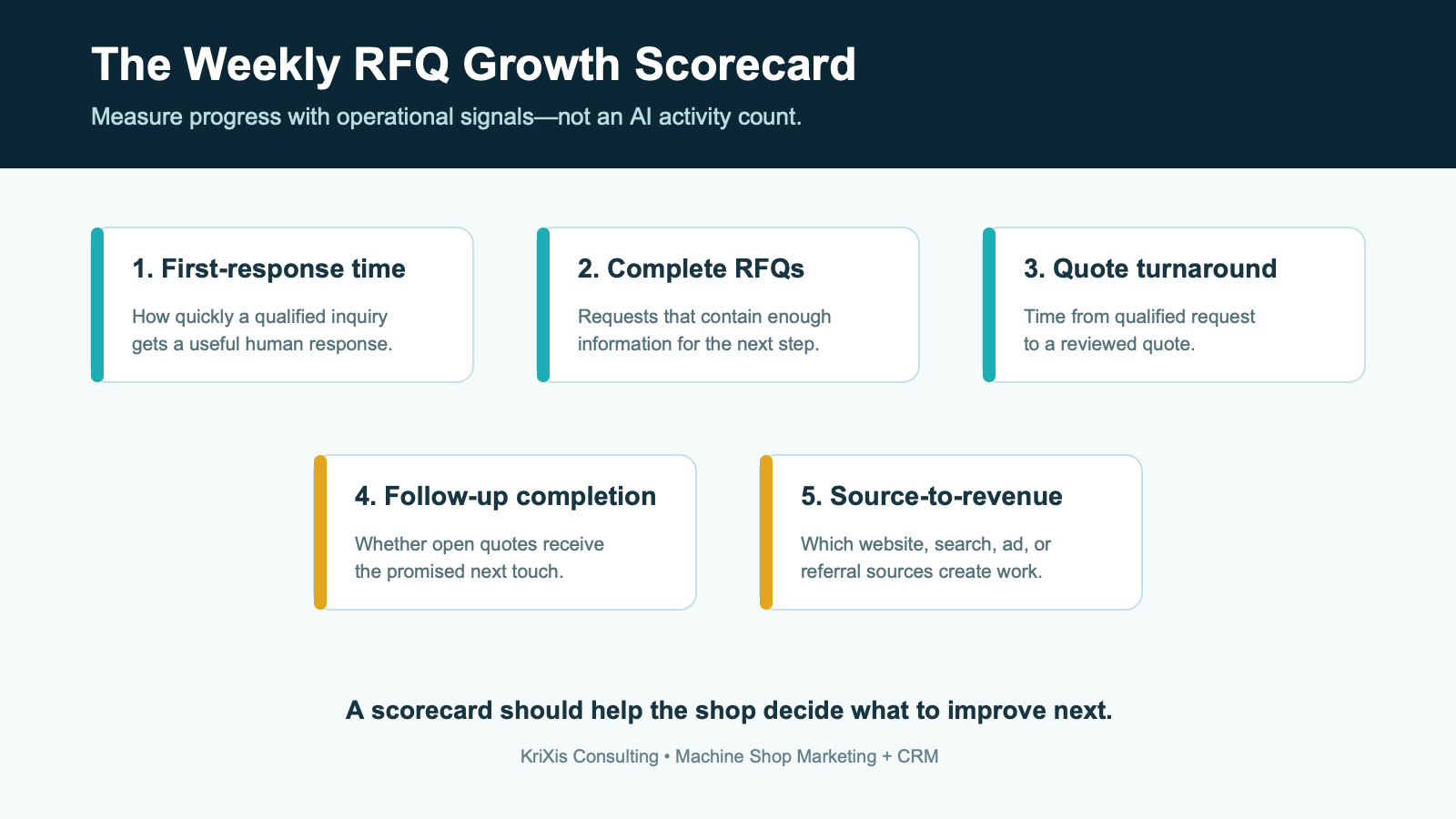
Review first-response time, completeness of intake, qualified RFQs, quote turnaround, follow-up completion, and the source of closed opportunities. Those metrics are more useful than counting how many messages AI drafted.
The outcome to aim for
The purpose is not to sound more automated. It is to make a serious buyer feel that the shop is organized, responsive, and able to understand the work. A better RFQ process gives estimators more time for the judgment that matters and gives marketing a clearer connection to revenue.
If your shop is investing in SEO, paid ads, or capability content, make sure the inquiry path and follow-up system can hold onto the opportunities that work creates. KriXis helps manufacturers connect website visibility, RFQ conversion, and CRM follow-up into one measurable growth system. Start a conversation with KriXis.
Sources
- Google Search Central: AI features and your website
- Google Search Central: guidance on generative AI content
- NIST: Generative AI Profile
Why faster response matters before the quote is written
Speed is not a promise that every quote will arrive instantly. Good manufacturing work deserves careful review. Speed means that a buyer quickly knows the request reached the right team, understands what information is needed next, and is not left guessing whether the shop is interested. That early clarity is especially valuable for procurement teams managing several suppliers at once.
A short, accurate acknowledgement can do more for trust than a generic “we received your message” email. It should identify the next step, distinguish a request for missing information from a commitment to quote, and make it easy for the buyer to reply with the needed document or detail. The person reviewing the job can then focus on the work that genuinely needs expertise: machine fit, process route, tooling, inspection, subcontract work, scheduling, and commercial risk.
AI can make that first handoff more consistent because it is good at organizing repeatable information. It is not a substitute for the estimator. Think of it as the person who prepares a clean job folder, labels the attachments, highlights unanswered intake fields, and drafts the first note—then places it in front of an accountable employee for review.

Build the workflow around the buyer’s questions
Every RFQ workflow should begin with the questions a serious buyer needs answered. Can this shop make the part? Does it understand the requirements? Is there a practical next step? Who owns the conversation? A good process supports those questions even when the buyer’s original message is brief.
Create a small, approved knowledge base for the team. This is not a public marketing brochure copied into an AI prompt. It is a controlled reference set: standard acknowledgement language, lists of the information needed for different job types, routing rules, definitions of out-of-scope work, trusted CRM fields, and escalation contacts. Keep it factual and easy to update. If the shop changes a capability, certification, service area, or response policy, update the source before using it in automation.
Use categories that match real shop decisions. A five-axis prototype request, production CNC turning inquiry, repair job, and aerospace part with documentation requirements may all need different reviewers and different questions. The more the workflow reflects the shop’s actual operating model, the less likely it is to produce an impressive-looking but unusable summary.
Use a clear “missing information” branch
One of the highest-value uses of AI is drafting a respectful request for information. Rather than assume a material, tolerance, finish, or quantity, the system can flag the omission and present a concise list for the buyer. The message should explain why the information matters: for example, that it helps the team determine the right process or provide a useful quote. Avoid long generic questionnaires. Ask only for the next detail the team truly needs.
Keep the original language from the buyer visible alongside the summary. This makes it easy for an estimator to catch a nuance that a system may have missed, such as a revised drawing, a request for partial delivery, a special inspection note, or an unusual material callout.
Choose the first automation carefully
Do not start by connecting every inbox, shared drive, and ERP record. Begin with one low-risk, high-volume step where the outcome is easy to inspect. For many shops, that is website form intake. The form already has a defined structure, the source is clear, and the information is intended for the sales conversation.
A useful first automation might create a CRM record, preserve the original form submission, assign the lead owner, list the supplied fields, flag missing items, and prepare an internal task. The only external message is a human-approved acknowledgement. Once that path works reliably, the team can test a dedicated RFQ email inbox, quote follow-up reminders, or reactivation of prior buyers.
Set success criteria before the pilot starts. For example: every web inquiry appears in the CRM, an owner is assigned, missing fields are correctly flagged, and no unreviewed technical claim is sent to a customer. If the system does not meet those conditions, improve the workflow before broadening it.
Make the data structure useful to people
The quality of an AI-assisted workflow depends on the quality of the information it receives. A CRM should not become a pile of summaries that no one trusts. Use a small set of fields that the sales and estimating teams will actually review: source, buyer company, primary contact, capability or process requested, material, quantity, industry, stated timeline, status, lead owner, next action, and outcome.
Separate facts from interpretation. “Buyer stated 500 pieces in 6061 aluminum” is a fact. “High-value production opportunity” is an interpretation and should be labeled as such. When a summary is uncertain, it should say “not stated” or “needs review.” This preserves confidence in the system and prevents an AI-generated guess from turning into a sales assumption.
It also creates better marketing intelligence. When source, capability, and outcome are consistently recorded, a shop can see whether a service page, paid campaign, referral partner, or industry topic is producing inquiries that the team can actually quote and win. That is much more useful than traffic alone. KriXis’s digital marketing services are built around connecting visibility to measurable business activity.
Set guardrails before the system touches customer data
Guardrails are not a technical afterthought; they are part of the customer experience. A buyer who trusts a shop with a drawing or project detail expects it to be handled carefully. Before introducing an AI tool, identify the data categories the shop receives and decide what is permitted in each system.
At a minimum, document who can access RFQ information, which vendor accounts are approved, how long the information is kept, what happens when an employee leaves, and how the team handles an NDA or customer-specific requirement. Review the tool’s data-use and retention terms with the person responsible for customer commitments. If there is uncertainty about controlled information, export-controlled work, or a client restriction, keep that data out of the pilot until qualified advice and a clear policy are in place.
Use least privilege. A marketing assistant may need to see lead source and a follow-up status but not every attached drawing. An estimator may need the complete job package. Role-based access is often more valuable than adding another feature because it limits unnecessary exposure while keeping the process usable.
Create an exception queue
Not every RFQ belongs in the normal flow. The workflow should flag requests that are incomplete, have unusual requirements, appear to contain sensitive data, or fall outside defined rules. A visible exception queue is better than silently routing a request to the wrong person or allowing the system to make a confident-looking assumption.
Give the team an easy way to correct the system. If an AI summary mislabels a process, fails to recognize an attachment, or suggests the wrong follow-up question, staff should be able to mark the correction. Review those corrections weekly. They show where the form, routing rules, or reference material needs improvement.
Design human review so it does not become a bottleneck
“Human in the loop” should not mean copying and pasting every message from one screen to another. It means building a review interface that makes the correct decision easier. Place the original inquiry, attached files, extracted facts, unanswered fields, suggested owner, and draft reply in one view. Make the reviewer choose an action: approve, edit, request information, reassign, or close as not a fit. Record the reason when appropriate.
Approved response templates help. For example, a standard acknowledgement can confirm receipt without promising pricing or delivery. A separate template can request missing information. A third can explain that a job is not within the shop’s current capability. Each message should be plain, professional, and tailored by a reviewer to the buyer’s actual request.
Technical decisions should have clear ownership. If an estimator needs a programmer, quality lead, or production manager to assess a requirement, the workflow should create the right internal task rather than encouraging a sales person to guess. AI can summarize the question for the specialist; it cannot replace the specialist’s sign-off.
Connect follow-up to real buyer value
Follow-up should not be a stream of automated “just checking in” notes. The best follow-up offers a useful next step: clarification on a requirement, an updated delivery question, a request to confirm a revision, a scheduling conversation, or a concise reminder that the quote is available. Use the shop’s actual sales cycle and buyer type to determine the timing.
AI can help create the task and prepare a draft, but a salesperson should decide whether the message is timely and relevant. When a buyer replies, preserve that context in the CRM so the next person does not restart the conversation from zero. This is where a connected CRM changes the experience from a marketing lead to a managed opportunity.
Measure your AI RFQ response for machine shops weekly
A useful scorecard tells the team where the system is weak. If response time is slow, investigate ownership and routing. If too many inquiries are incomplete, improve the RFQ form and the information-request template. If quote follow-up is inconsistent, make the next action visible. If a traffic source creates many low-fit requests, refine the associated marketing message or landing page.
Do not use the scorecard to claim that AI “caused” revenue before there is enough evidence. Use it to identify operational improvements and connect them to outcomes over time. Compare performance against the shop’s own baseline, not a generic industry promise. The goal is a more reliable process, not a vanity dashboard.
Questions to ask before choosing an AI or automation partner
Tools can be useful, but the vendor conversation should begin with the workflow, not a feature list. Ask how the tool handles data, whether outputs can be reviewed before they are sent, how it integrates with the CRM, what is logged, how access is controlled, and how the team can correct an error. Ask which parts of the process remain under the shop’s control.
- Can we preserve the original RFQ and attachments alongside the generated summary?
- Can we require human approval for every outbound buyer message?
- Can the system state what it does not know rather than fabricating a field?
- Can we limit access by role and remove access promptly when needed?
- Can we audit routing, edits, and approvals later?
- Can the workflow keep source attribution through to qualified opportunity and revenue?
If the answer to those questions is unclear, the solution may be too immature for a customer-facing quoting workflow. Start with a smaller use case or choose a partner that can explain the controls in plain language.
A practical next step: AI RFQ response for machine shops
Choose one RFQ source and map it from first contact to final outcome. Identify where the request loses context, where a buyer waits unnecessarily, and where staff spends time moving information rather than assessing the work. Then design the smallest change that improves that point. For many shops, that is a structured web form, a connected CRM record, a human-reviewed acknowledgement, and a clear follow-up task.
Once the fundamentals are reliable, AI can make the system faster and more consistent. It should reinforce the shop’s professionalism—not create new uncertainty. The shops that benefit most will be the ones that pair capable technology with accurate capability information, accountable people, and a clear process for turning interest into a useful RFQ conversation.

Leave a Reply
Want to join the discussion?Feel free to contribute!