
Machine Shop Industry Pages: Build Pages Buyers Can Use
KriXis editorial guide · Published October 12, 2026 · About 13 minutes to read
A machine shop website can list ten industries and still leave a buyer unsure whether the shop understands their application. A logo grid and a paragraph about precision do little to explain which parts, processes, documentation and project conditions fit the business.
Useful industry pages make those questions easier to answer. They connect a particular buyer’s needs with approved capability information, relevant examples and a sensible inquiry route. They also help the shop decide where a dedicated page is justified and where a shorter section is enough.
This guide shows how to plan machine shop industry pages, choose their content and review them before publication. The free planning kit includes an evidence record, a six-section outline and a publishing checklist. Start with one industry your team can describe accurately, then use buyer feedback to improve the page.

Start with a supplier evaluation question
Choose a concrete question the page should answer. For an industrial automation buyer, it might be whether the shop can discuss fixture components, changing revisions and repeat orders. For a pump equipment buyer, it could concern the relevant machining process, material experience and documentation needed for a housing.
These are starting questions for a conversation with your own team. They are not claims that every buyer in either sector has the same requirements. Ask sales, estimating, operations and quality what comes up in actual inquiries. Record which questions appear repeatedly and which assumptions still need verification.
NIST’s supplier selection guidance encourages manufacturers to examine supplier capabilities, quality documentation, capacity and communication. Those topics offer a useful reminder: a prospective customer is evaluating more than an industry name or a machine list.
Write a one-sentence page purpose: “Help an industrial equipment buyer understand our approved machining scope and the information needed for a project review.” Then identify the evidence that can support it. If the team cannot name a distinct buyer question, useful information or relevant example, pause the dedicated page and improve the broader capabilities content first.
Decide whether an industry needs its own page
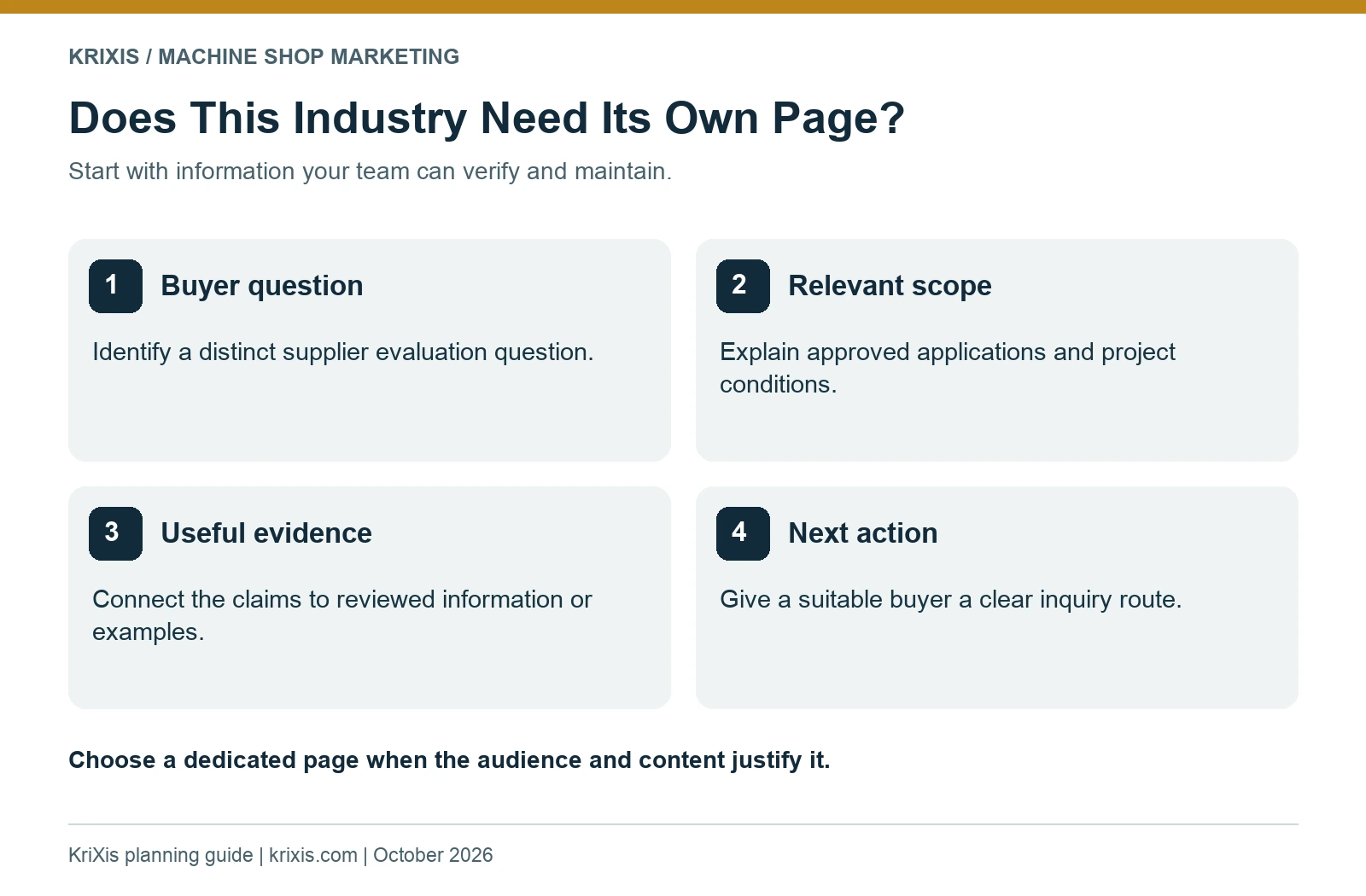
A separate page creates another resource to write, verify and maintain. Use it when the industry changes what the buyer needs to know and your business has enough approved information to answer those needs.
Consider three practical tests. First, does this audience ask questions that your general capability page leaves unanswered? Second, can your team explain relevant applications or project conditions without vague claims? Third, is there a clear next step that helps an appropriate buyer discuss a project? A page should have a purpose beyond occupying another search result.
If several industries receive essentially the same explanation, a well-organized industries overview may be more useful. It can name the segments you actually serve, describe the shared scope and link to process pages. Add dedicated pages later when substantive differences and evidence become available.
Distinguish an industry page from a capability page. The industry page organizes information around the buyer’s application context. The capability page explains the process itself: materials, geometry, working limits, inspection context and inquiry details. Link them together so readers can choose the depth they need. Our machine shop capability page blueprint covers that process-focused resource.
Google’s spam policies describe doorway abuse, including substantially similar pages created to funnel visitors elsewhere. Do not build a large set of pages by changing the industry name in otherwise identical copy. Review each proposed page for a distinct purpose and useful content.
Collect publishable evidence from the responsible team
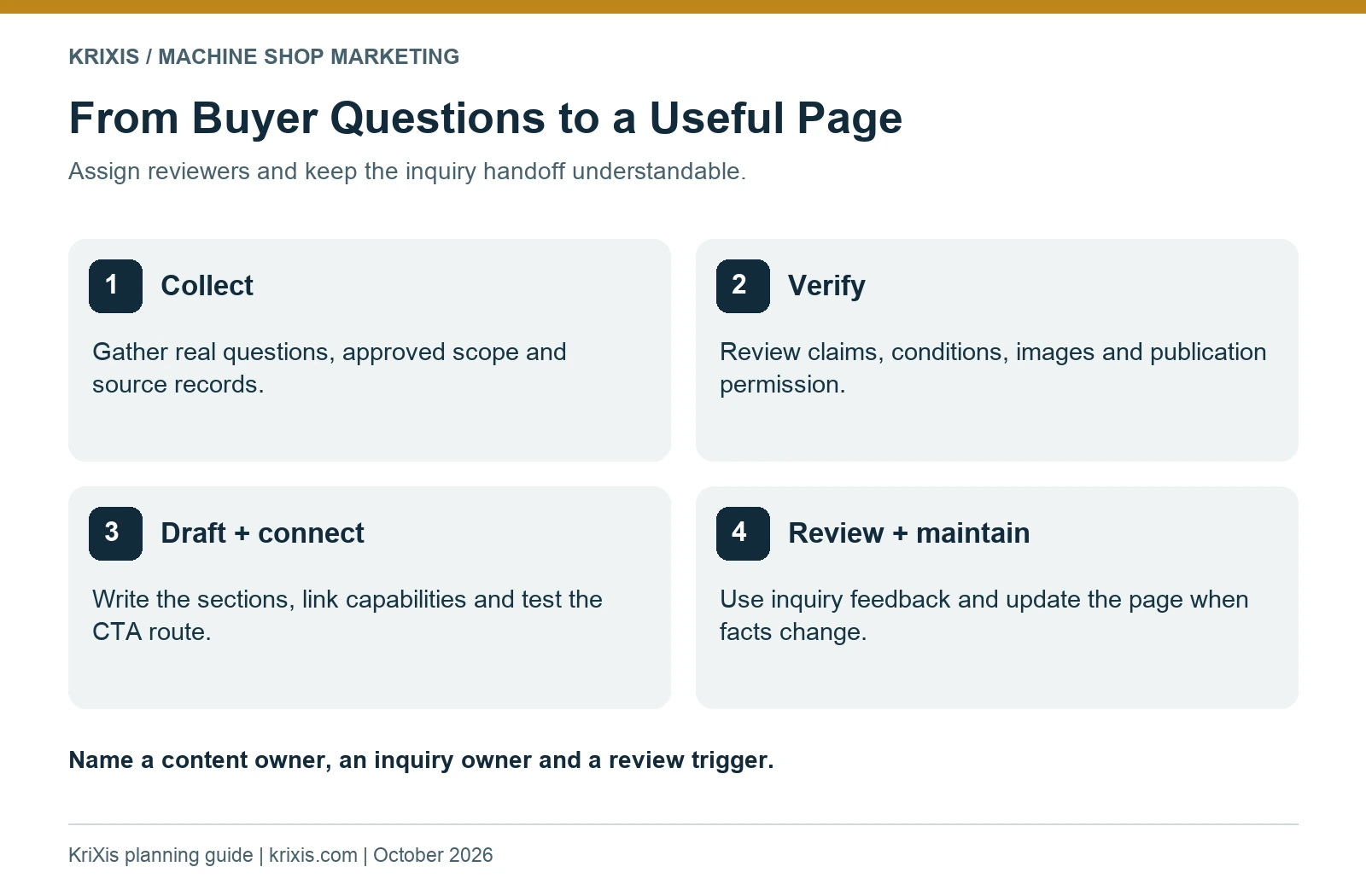
Create a brief evidence file before writing. List the applications the shop can discuss, the relevant processes, approved material experience, documentation practices and examples available for publication. Beside each proposed claim, record the source, responsible reviewer and any conditions that change its meaning.
Interview the people who handle the work. Ask estimating which information determines whether a project can be reviewed. Ask operations where the process needs qualification. Ask quality which documentation descriptions are accurate. Ask the account owner what customer context or imagery can be published.
Keep wording within the evidence. Having produced one component does not establish experience with every product in a sector. Supporting a particular customer’s project does not establish blanket approval by that customer’s entire industry. Explain the actual scope your team has verified and let project-specific review handle requirements that depend on the drawing or purchase conditions.
If you mention a certification or approval, have the responsible person verify the exact organization, scope and current status before publication. Do not imply that a general quality statement proves every customer requirement has been satisfied. This is a content review step; your technical team determines what the business can claim.
Publish only approved information. A useful example can describe the application problem and decision without exposing drawings, customer identities or commercial terms. Review combined details that could identify a project. If the team has no approved example, explain the relevant evaluation process honestly and leave a future evidence task in the plan.

Use a six-section industry page outline
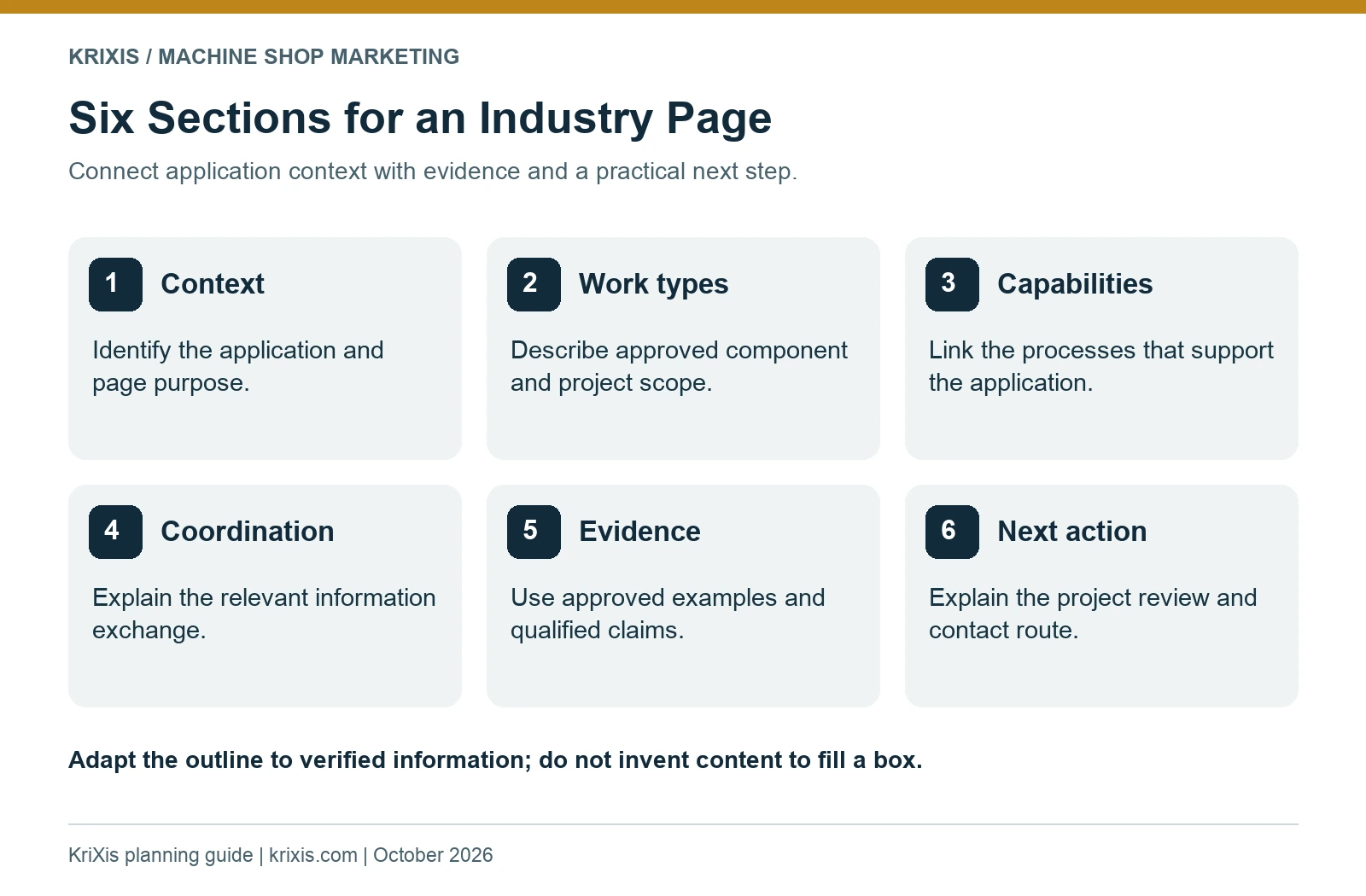
The following outline keeps the page connected to a buyer decision. Adapt it to the information your team can verify; avoid filling a section with unsupported statements simply because a template includes it.
1. Application context and page purpose
Identify the type of work the page addresses and the buyer question it helps resolve. Use recognizable application language from real conversations. A headline such as “Machining Support for Industrial Equipment Components” gives more context than a broad declaration of excellence.
2. Relevant component and project types
Describe approved examples of components or work categories. Explain whether the page concerns new development, repeat production, fixtures, replacement parts or another verified scope. Make it clear when a pictured component is an illustration rather than a documented customer result.
3. Capabilities that support the application
Connect each relevant process with a buyer need and link to the detailed capability page. A turning or milling reference should help readers understand which conversation to start. Avoid reproducing a full equipment table if the linked capability resource already contains the maintained details.
4. Documentation and coordination
Explain the approved information exchange and review process: how requirements are clarified, which documentation topics can be discussed, and who reviews project-specific needs. Include meaningful conditions. A process description should not become a promise about capacity, turnaround or inspection deliverables that vary by order.
5. Relevant evidence
Use an approved project story, a useful component example or a description of the verification process. Connect the evidence with the page’s buyer question. Our machine shop case study writing guide explains how to document requirements, decisions and outcomes without inventing results.
6. A practical next action
Explain how to request a project review and what initial information helps route the inquiry. A button becomes more useful when the surrounding text tells the buyer what happens next. Include a visible contact route and maintain the information-handling instructions your business has approved.
Work through a fictional industrial automation example
Imagine a fictional shop planning a page for industrial automation buyers. Its team has approved descriptions of machining fixture plates and simple adapters, but has not approved broad claims about complete automation systems. The page’s purpose is to help equipment builders determine whether to discuss a component project.
The opening explains the component scope. The next section identifies the work types the team can review, then links to maintained milling and turning capability pages. A coordination section describes how the buyer identifies the current revision, quantity and project timing for an initial conversation.
For evidence, the writer uses a fictional teaching example of a fixture plate that requires a clarification about mating geometry. The example explains the question that must be resolved before quoting. It does not claim a real delivery result, a customer endorsement or a measured cost saving.
The CTA asks the buyer to start with a short project description and use the shop’s approved route for any drawings. The inquiry owner receives the context that the visitor was reading about industrial automation components. This helps follow-up begin with the correct topic rather than requiring the buyer to repeat the whole story.
Compare that page with a copy that merely substitutes “industrial automation” into general precision-machining language. The useful version adds an application boundary, relevant component types, a clarification example and a defined next step. Those differences give the reader something concrete to evaluate.
Your published page should use your verified scope and approved real evidence where available. The fictional scenario here demonstrates the planning method; it supplies no evidence about KriXis clients or any shop’s manufacturing performance.

Make each page’s SEO describe its real content
Choose a clear phrase that matches the page’s purpose and the language prospective buyers use. Use it naturally in the title, main heading and introduction. Add related application and process terms where they help explain the work. A list of disconnected sector keywords will not repair an unclear page.
Write a unique SEO title and meta description. The title should identify the application and machining scope without claiming capabilities the business has not approved. The description should summarize the useful information and next action. Give the page a readable, stable URL rather than a long string of repeated keywords.
Use one main heading, then organize the six sections with descriptive subheadings. Add useful image alt text, appropriate image sizes and space reserved for media. Review the phone layout: long tables, dense diagrams and oversized headings can make information difficult to use even when the desktop page looks polished.
Google’s helpful content guidance encourages content that serves an intended audience and adds useful value. It also states that Google has no preferred word count. Let the page’s verified information determine its length; do not pad it to match another industry’s page.
Connect the page with the rest of the website. Link from an industries overview and relevant capability pages, and add a relevant project story when one exists. Give each destination a clear role. If the project changes established URLs, use the website redesign and migration checklist to plan the transition.
Check the live canonical, indexing directives, sitemap inclusion and sharing image after publishing. Structured data should describe the actual page and organization; it should not introduce fabricated reviews or certifications. These checks confirm implementation details, not a promise that Google will index or rank the page.

Connect the page to a useful inquiry handoff
An industry page should make an appropriate project conversation easier to start. Tell visitors what initial details to provide: the general component or application, required process if known, quantity, proposed timing and preferred contact information. Clarify the approved route for drawings or other sensitive project material.
Preserve context when the inquiry reaches the responsible person. A page-specific subject or a verified form field can identify the industry page involved. Do not collect unnecessary customer data to make the tracking record look comprehensive. Confirm that the inquiry owner can see the information needed to route and respond.
Test the live route. For a form, verify receipt with the intended recipient rather than relying only on a success message. For an email route, check the visible address, recipient and prefilled brief. If you have not tested delivery, record that limitation and avoid presenting it as a confirmed result.
Use the RFQ qualification guide to decide how to classify inquiries, then connect the next action with your CRM follow-up process. Page context should help the team understand the request; it does not replace technical review.
Review the page when evidence or buyer needs change
Assign a content owner and a review trigger. Useful triggers include a capability change, a revised documentation process, an outdated certification reference, new approved evidence or recurring questions that the page fails to answer. A calendar review can support that process, but it should not substitute for reacting to a known change.
Use actual search and inquiry records when they are available. Review relevant queries, page entrances and the quality of requests. Record the date range and definitions so comparisons remain understandable. If access or tracking is missing, document the gap instead of creating an assumed baseline.
Ask the inquiry owner which requests required clarification or were outside the shop’s scope. Those patterns may point to missing instructions, an overly broad headline or unclear capability boundaries. Improve the page around the observed problem and keep an issue log with an owner and a verification date.
Common questions about machine shop industry pages
How many industry pages should a shop have?
Create only the pages your team can support with distinct buyer questions and substantive approved information. A smaller set of useful pages is easier to maintain. An industries overview can cover segments that do not yet justify a dedicated resource.
Can the same capability appear on several pages?
Yes. The same process may support several applications. Explain why it matters in each context and link to the maintained capability resource. Repeating a process name does not require copying the whole page.
What if we cannot identify the customer in an example?
Use only details approved for publication and review whether the combined context reveals the customer. An unnamed approved example can still explain a requirement and decision. Do not create a testimonial or result to fill the space.
Will industry pages guarantee more RFQs?
No. They can help relevant buyers evaluate the shop when the information is useful and discoverable. Search visibility and inquiry outcomes depend on the content, market, implementation and follow-up. Use actual evidence to judge performance.
Build one page your team can stand behind
Choose a real buyer question, gather approved evidence and draft the six sections. Review the scope and inquiry route with the people responsible for the work before publishing. Then maintain the page as the business and buyer questions change.
KriXis supports machine shop website design and manufacturing marketing. Start with one industry and a useful draft, then discuss the next step with a clear goal.
For a broader publishing plan, use the machine shop content strategy playbook to connect industry pages with buyer questions, approved evidence, supporting guides and maintained inquiry routes.


Trackbacks & Pingbacks
[…] an approved project story as relevant evidence on an industry page. The industry page guide explains how to connect it with application context, maintained capability pages and the next buyer […]
[…] your page needs to explain a specific application context, use the machine shop industry page planning guide to connect the buyer question with approved capability details and […]
Leave a Reply
Want to join the discussion?Feel free to contribute!